
Lieferung heute & morgen

Qualitätsgarantie

Willkommens-Angebote freischalten: KOSTENLOSE Lieferung | Bis zu 80 % RABATT | Kostenlose 30-Tage-JoyPlus-Testphase
App herunterladen
A modern infotainment system with navigation and app integration is standard in new cars today. Owners of older, yet otherwise reliable, vehicles often face a choice: an expensive and permanent car stereo conversion or continuing to use outdated technology. An aftermarket CarPlay screen offers a flexible and cost-effective alternative. However, the market is crowded, and not every device delivers on its promises. This guide will help you avoid common purchasing pitfalls and make an informed decision.
Many offers advertise a long list of features, but the devil is in the details. Pay attention to these three critical points to avoid a bad investment:
To separate the wheat from the chaff, you should focus on a few, but crucial, technical features. These determine the real-world usability and longevity of your device.
The ability to retrofit Wireless Android Auto is a key selling point for many. For this to work seamlessly, a stable wireless connection is essential.
A portable CarPlay display is more than just a portable car GPS. The quality of the screen and useful enhancements increase safety and comfort.
Based on the criteria mentioned, we have compiled products for different user groups.

Why this product is a good fit: Ideal for drivers seeking a comprehensive, non-permanent upgrade. It combines navigation, media, hands-free calling, and a full-featured dashcam in one device, without any need to interfere with the vehicle's electronics. Perfect for leased vehicles or older models.
This model uses dual-band Wi-Fi for a stable wireless connection. The 10.26-inch HD screen with 1600x600 resolution remains clearly legible. Power is supplied simply via the 12V-24V port, enabling a true plug-and-play installation.
Combines Wireless CarPlay & Android Auto with a 4K front dashcam and a 1080P rear-view camera. A 64GB TF card is already included in the package.
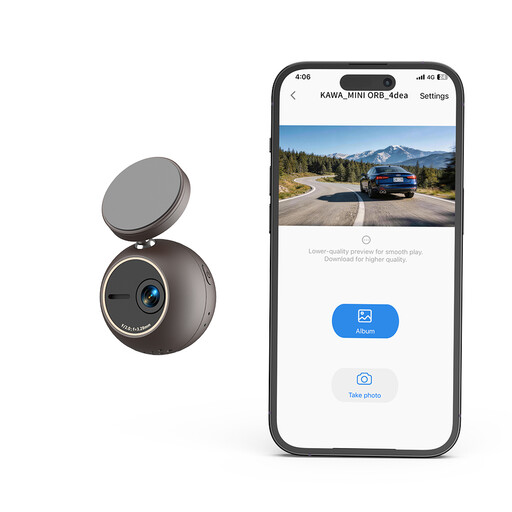
Why this product is a good fit: For drivers whose main concern is the uninterrupted documentation of their drive. Anyone who already has a good navigation solution and is looking for a dedicated, discreet dashcam will find a specialised solution here.
This device focuses on one core function: high-quality video recording. It avoids the complexity and potential weak points of multi-function devices, thus bypassing problems like unstable app connections or poor displays, as it does not have an infotainment screen.
Offers a high 2K resolution for sharp recordings. The compact, spherical design and 360° mount allow for discreet placement without obstructing the field of view. Control via app and voice commands.
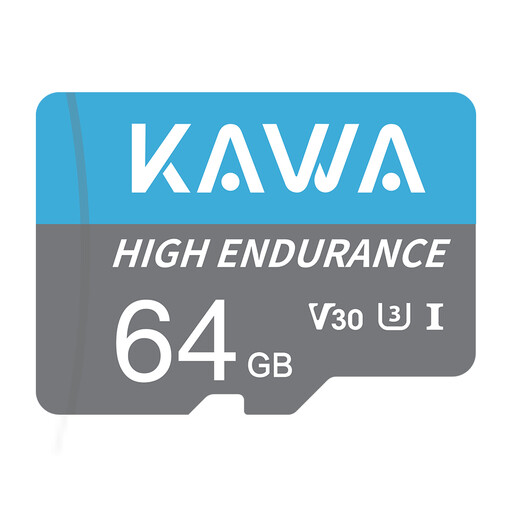
Why this product is a good fit: An essential accessory for anyone using a dashcam or a CarPlay display with a recording function. The reliability of the recording depends directly on the quality of the memory card.
Conventional SD cards are not designed for the constant overwriting of loop recording and can fail at a critical moment. This high-endurance card is specifically designed for video surveillance, thus preventing the loss of important footage.
Rated U3, Class10, and V30 for high write speeds, which are necessary for 4K and Full HD recordings. The card is also resistant to extreme temperatures, water, and X-rays.
We have compiled a complete, up-to-date list of products that fully meet these strict selection criteria and local safety regulations.
Most portable CarPlay screens are powered via the vehicle's 12V cigarette lighter socket. This allows for a simple installation without interfering with the on-board electronics. Make sure the supplied cable is long enough to be routed discreetly within the vehicle.
Yes, since these devices operate independently of the vehicle's own system, they are compatible with virtually any car that has a cigarette lighter socket. This makes them an ideal solution for older vehicles, company cars, or leased vehicles where permanent modifications are not permitted.
Placement is crucial. Most devices come with a mount for the dashboard or windshield. Position the screen so that it does not block your field of view of the road. A non-installed screen should always be mounted below your primary line of sight to avoid compromising safety.