
Lieferung heute & morgen

Qualitätsgarantie

Willkommens-Angebote freischalten: KOSTENLOSE Lieferung | Bis zu 80 % RABATT | Kostenlose 30-Tage-JoyPlus-Testphase
App herunterladen
The term "AI Laptop" is on everyone's lips, but behind the marketing hype, there are often significant differences. Many devices are advertised as AI-capable without having the necessary hardware for demanding tasks. As your Joybuy Product Recommendation Officer, I'll help you understand the crucial features so you can make an informed decision and not pay for features you don't need.
The market for notebooks with AI features is growing rapidly. However, this also brings new marketing tactics that can lead to poor purchasing decisions. Pay special attention to these three points:
To avoid the pitfalls mentioned above, you should check three core technical parameters before buying. These determine whether a notebook with AI can deliver on its promises.
The NPU is the heart of a modern AI Laptop. It offloads tasks from the CPU and GPU by handling calculations specifically optimised for machine learning. This leads to higher efficiency and longer battery life for AI applications.
Local AI models and complex applications need fast access to large amounts of data.
The choice of GPU depends heavily on the intended use case.
Based on the criteria above, we have identified some models that are particularly well-suited for specific user groups.
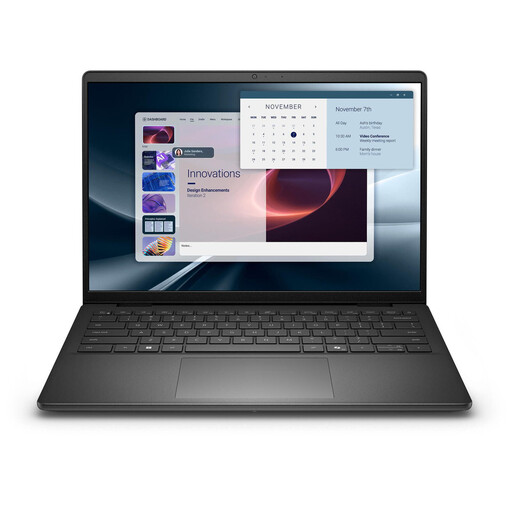
Why This Fits Their Persona: This model is tailored to the needs of mobile professionals. It's compact, offers enhanced security features with Windows 11 Pro, and delivers reliable AI performance for productivity tools like Microsoft Copilot without draining the battery, thanks to its powerful NPU.
As a certified Copilot+ PC, it features an NPU with 50 TOPS, significantly exceeding the minimum requirement and ensuring smooth AI performance. The configuration with 16 GB RAM and a 1 TB SSD is well-balanced.
Compact 14-inch form factor; Windows 11 Pro for enterprise environments; Strong NPU performance for AI-powered productivity.

Why This Fits Their Persona: For users who refuse to compromise on performance. Ideal for AAA gaming, 3D rendering, and professional video editing. This device is designed to handle even the most demanding tasks of the coming years with ease.
This model avoids the unbalanced configuration trap with a no-compromise spec sheet: the Intel Core Ultra 9 processor is paired with a GeForce RTX 5090, 64 GB of RAM, and a 4 TB SSD. There are no bottlenecks here.
Extreme computing and graphics performance; Large 18-inch display with 120 Hz; Massive storage and RAM for the most demanding multitasking.
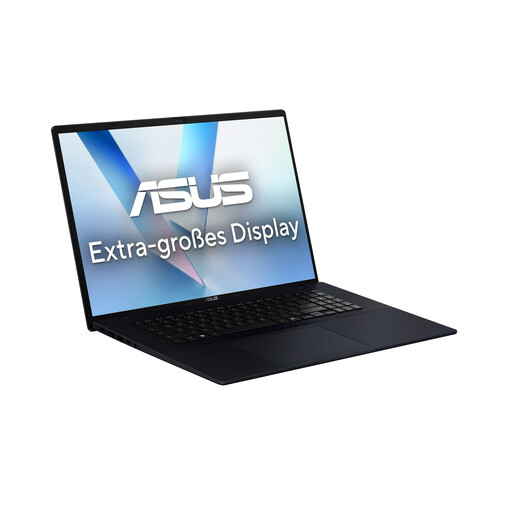
Why This Fits Their Persona: An excellent choice for users looking for a future-proof device for everyday tasks, multimedia, and light creative work. The large 18-inch display and solid AI performance offer excellent value for money.
This model avoids the "AI-Ready" trap by integrating an NPU with 50 TOPS as a Copilot+ PC. It offers clear, measurable AI performance instead of vague marketing promises and combines it with a balanced set of components.
Large 18-inch display with 144 Hz; Strong NPU performance for everyday use; Well-rounded package with 16 GB RAM and a 1 TB SSD.
We have compiled a complete, up-to-date list of products that fully meet these strict selection criteria and German safety regulations.
For solid baseline performance and compatibility with advanced Windows features found in Copilot+ PCs, you should look for an NPU with at least 40 TOPS. For developers or users who want to run complex local AI models, higher values of 50 TOPS or more will provide better performance and greater future-proofing.
That depends on the use case. For everyday AI-assisted tasks like optimising video conferences, using Copilot, or intelligently organising notes, a modern integrated graphics unit combined with a powerful NPU is perfectly sufficient. However, if you plan to use AI for professional image and video editing, 3D modelling, or gaming, a dedicated graphics card (dGPU) is essential.
"Copilot+ PC" is a standard defined by Microsoft. A device must meet certain minimum requirements to earn this label: an NPU with at least 40 TOPS, 16 GB of RAM, and a 256 GB SSD. This guarantees a consistent and powerful experience for the most advanced AI features in Windows. A "regular" AI laptop may also have an NPU but might not meet all these criteria, which can lead to more variable performance on AI tasks.