
Lieferung heute & morgen

Qualitätsgarantie

Willkommens-Angebote freischalten: KOSTENLOSE Lieferung | Bis zu 80 % RABATT | Kostenlose 30-Tage-JoyPlus-Testphase
App herunterladen
The integration of artificial intelligence into software is fundamentally changing the demands on our hardware. For demanding professional and creative tasks, an AI laptop is no longer just an option, but a necessity. However, choosing the right device can be complex given new terms like NPU and TOPS. This article provides objective guidance and presents a selection of models relevant for AI applications, multitasking, and content creation in 2026.
Before you buy a premium notebook, you should understand a few technical fundamentals. These will help you make an informed decision tailored to your specific needs.
The core feature of an AI laptop is the NPU, a specialised processor chip designed for the efficient execution of AI algorithms. Its performance is measured in TOPS (Tera Operations Per Second). A higher TOPS number means the notebook can handle AI tasks like real-time translation, image editing, or code generation faster and more power-efficiently directly on the device, without relying on the cloud. To use features like Microsoft's Copilot+, an NPU performance of at least 40 TOPS is required.
For creative professionals, display quality is crucial. A 14-inch OLED laptop typically offers excellent colour accuracy, high contrast, and deep blacks, which is ideal for photo and video editing. At the same time, it's important not to neglect battery life. A notebook with long battery life is essential if you need a lightweight notebook for on-the-go use. Pay attention to the manufacturer's specified capacity (in watt-hours, Wh) and the estimated usage time to find a compromise that fits your workday.
Future-proof ports and wireless standards are important for a smooth workflow. Wi-Fi 7 ensures faster and more stable network connections, while Thunderbolt 4 or USB4 ports enable rapid data transfer and the connection of multiple external monitors. The choice of operating system, whether a laptop with Windows 11 or macOS, often depends on your personal work environment and preferred applications. Both systems now offer deeply integrated AI functions.
Here is an overview of three models that stand out for their specific features and focus on AI applications.
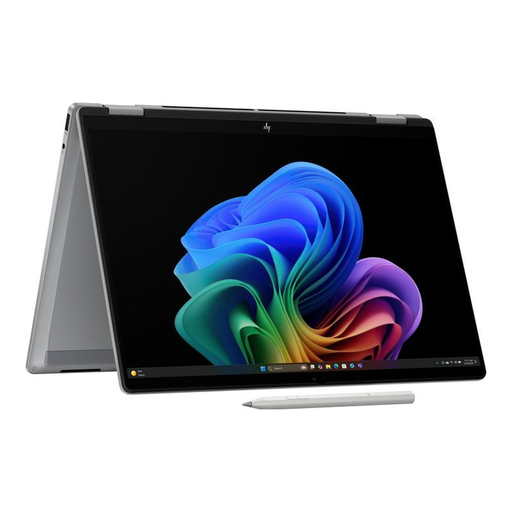
What makes it stand out The HP OmniBook X Flip is a versatile convertible that combines the power of an AI notebook with the flexibility of a tablet. Powered by the AMD Ryzen AI 7 350 processor, it delivers an NPU performance of 50 TOPS, qualifying it for demanding local AI applications. The brilliant 3K OLED touchscreen display with a 120 Hz refresh rate ensures a smooth and colour-accurate picture, while the lightweight aluminium chassis and long battery life provide maximum portability.
Advantages
Who is it for? This model is a great choice for professionals and creatives looking for an extremely portable and flexible device. Those who frequently switch between laptop and tablet modes and value a high-quality touch display and strong AI performance will find a suitable solution here.
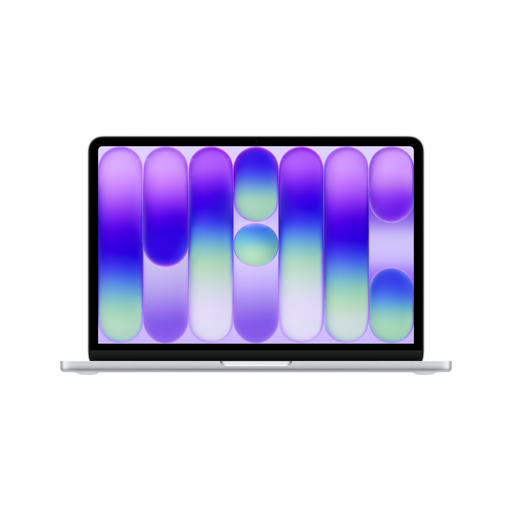
What makes it stand out The Apple MacBook Neo is deeply integrated into the Apple ecosystem and uses the A18 Pro chip, which was specifically developed to run Apple Intelligence. It is characterised by its seamless collaboration with other Apple devices and the high efficiency of macOS. The lightweight and robust aluminium design, combined with long battery life, makes it a reliable companion for the entire day.
Advantages
Who is it for? The MacBook Neo is ideal for users already working within the Apple ecosystem who appreciate an optimised, user-friendly experience. It is suitable for students, writers, and professionals who need a reliable, secure, and durable notebook for everyday productivity and AI-powered features.
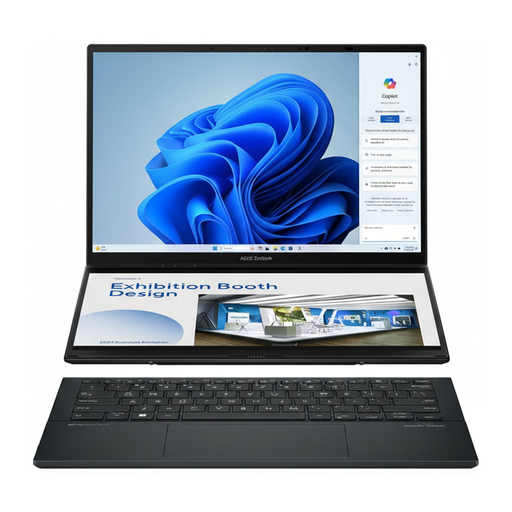
What makes it stand out The ASUS Zenbook Duo redefines multitasking by combining two full-sized 14-inch OLED touchscreens in a single laptop chassis. Powered by an Intel Core Ultra 9 processor, it offers tremendous processing power for the most demanding applications. With 32 GB RAM and a 2 TB SSD, this device is built for extreme workloads, from video production to complex data analysis.
Advantages
Who is it for? This notebook is aimed at the ultimate power user: developers, video editors, financial analysts, and anyone who benefits from maximum screen real estate and computing power. If your workflow involves constantly switching between windows, the Zenbook Duo could significantly boost your productivity. It is the best laptop for creatives who refuse to compromise on performance.
The models presented here cover specific use cases. If you haven't found the right device for your needs or if you want to compare other configurations, you can find a wider selection in our powerful computer category.
1. What is the difference between a normal laptop and an AI laptop? The main difference lies in the hardware. An AI laptop has a dedicated Neural Processing Unit (NPU) that is specifically optimised to accelerate AI and machine learning tasks. This allows for faster and more power-efficient processing of such tasks directly on the device, rather than offloading them to the cloud.
2. How many TOPS does a good AI laptop need? An NPU's performance is measured in TOPS (Tera Operations Per Second). To use current AI platforms like Microsoft's Copilot+, a minimum performance of 40 TOPS is recommended. Models with 40 to 50 TOPS are well-equipped for current and upcoming AI applications.
3. Is an AI laptop also suitable for normal tasks like browsing and Office? Yes, absolutely. AI laptops are essentially very powerful notebooks. They handle everyday tasks like web browsing, email, and Office applications with ease. The added benefit is that they are perfectly prepared for the growing number of AI-powered features in software.