
Lieferung heute & morgen

Qualitätsgarantie

Willkommens-Angebote freischalten: KOSTENLOSE Lieferung | Bis zu 80 % RABATT | Kostenlose 30-Tage-JoyPlus-Testphase
App herunterladen
The introduction of laptops with dedicated AI processors marks a turning point in computing technology. But with new terms like NPU, Copilot+ PC, and TOPS ratings, confusion is also growing. Many devices are advertised as "AI-capable," but not all live up to their promises. This guide will help you understand the key technical features and avoid the common pitfalls when buying an AI Laptop.
Before you make a purchasing decision, you should be aware of the common marketing traps that can lead to an unsuitable and expensive purchase.
To buy a future-proof AI Laptop, you should check three core technical parameters. These define the device's performance and practical utility.
The Neural Processing Unit (NPU): This is the heart of any modern AI laptop. The NPU is a specialised processor designed exclusively for the efficient execution of machine learning algorithms. It offloads tasks like real-time translation, noise cancellation in video conferences, or intelligent image editing from the CPU and GPU. Current models primarily rely on processors like those in an Intel Core Ultra Laptop (with Intel AI Boost) or an AMD Ryzen AI Laptop. The presence of an NPU is the key feature that distinguishes a notebook with AI from a conventional device.
Overall System Performance: An NPU never works in isolation. For demanding applications like video editing, 3D design, or gaming, a harmonious balance of all components is essential. Look for a powerful multi-core processor, at least 16 GB of DDR5 RAM (or 32 GB for creative tasks), and a fast PCIe 4.0 NVMe SSD. These components ensure that the system remains responsive even outside of AI-specific tasks and that no bottlenecks occur.
Copilot+ PC Certification: This certification, introduced by Microsoft, serves as a reliable quality standard. A Copilot+ PC must meet defined hardware requirements, including an NPU with at least 40 TOPS of performance and a dedicated Copilot key on the keyboard. This certification ensures that the device is optimised for current and future AI features in Windows and provides a seamless user experience.
The choice of the right model depends heavily on your individual use case. Here are some recommendations tailored to specific user profiles.
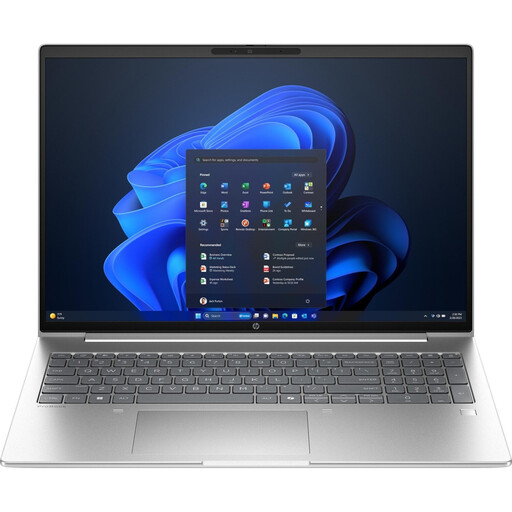
Why This Fits Their Persona: Ideal for daily business use. The 16-inch, 16:10 aspect ratio display offers ample space for documents and spreadsheets, while Windows 11 Pro and comprehensive connectivity options (including Wi-Fi 7) meet professional demands. The integrated Copilot functions accelerate routine tasks like summarising notes or drafting text.
This model features an Intel Core Ultra 7 processor with an integrated Intel AI Boost NPU. It's not just "AI-Ready" but is equipped with dedicated hardware for AI workflows.
A balanced system with 32 GB of DDR5 RAM and a 1 TB SSD. Windows 11 Professional also offers advanced security and management features for enterprise use.
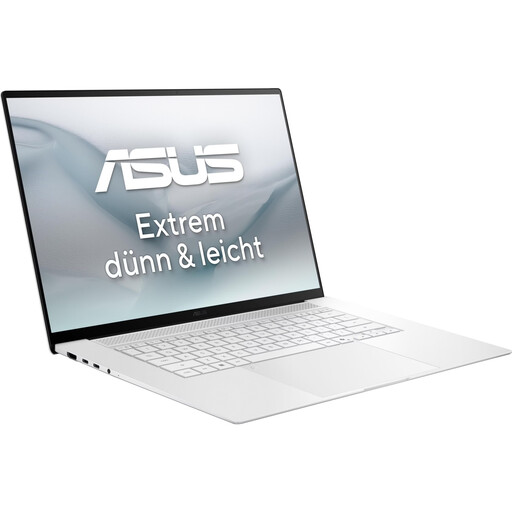
Why This Fits Their Persona: Perfect for designers, photographers, and video producers. The 16-inch 3K OLED display with a 120 Hz refresh rate and HDR support delivers outstanding image quality with accurate colours and deep blacks. Despite its high performance, it is highly portable at 1.5 kg.
The AMD Ryzen AI 9 465 processor not only offers 10 CPU cores but also an NPU with 50 TOPS. This ensures excellent overall performance that isn't just reduced to a single metric.
The combination of a high-resolution OLED display, a powerful processor, and 32 GB of RAM makes it an ideal tool for visually demanding tasks. Wi-Fi 7 connectivity ensures fast data transfers.

Why This Fits Their Persona: For users who make no compromises on performance. This device is designed for extreme gaming and professional applications. The large 18-inch display with a 120 Hz refresh rate offers an immersive experience, while the hardware handles even the most demanding titles and programs.
This notebook offers an uncompromising total package. The Intel Core Ultra 9 with 24 cores and the dedicated GeForce RTX 5090 graphics card ensure that performance doesn't just exist on paper but is delivered in real-world applications.
Maximum performance through the combination of a top-tier CPU, high-end GPU, 64 GB of RAM, and a massive 4 TB SSD. This is an investment in a machine that will remain at the forefront of performance for years to come.
We have compiled a complete, real-time list of products that fully satisfy these strict selection criteria and UK safety regulations.
The key difference is the integrated NPU (Neural Processing Unit). This specialised chip accelerates AI applications by offloading tasks from the CPU and GPU. The result is higher efficiency, better performance on specific AI functions (e.g., live captions, enhanced video calls), and often longer battery life, as the NPU operates more power-efficiently than the main processors.
For basic tasks like web browsing or word processing, an NPU is not strictly necessary right now. However, if you frequently use video conferencing software, AI-powered creative programs (e.g., from Adobe), or want to take full advantage of the latest Windows features offered in a Copilot+ PC, a notebook with AI provides tangible benefits in speed and efficiency. It is also a more future-proof investment, as more and more software is being optimised for NPUs.
TOPS (Trillions of Operations Per Second) is a measure of the NPU's raw performance. A higher number is generally better but should not be the sole purchasing criterion. For a certified Copilot+ PC experience, for example, Microsoft requires an NPU performance of at least 40 TOPS. However, the interplay of all components is more important. A balanced system with a fast processor, sufficient RAM, and a speedy SSD is crucial for a consistently smooth user experience.