
Lieferung heute & morgen

Qualitätsgarantie

Willkommens-Angebote freischalten: KOSTENLOSE Lieferung | Bis zu 80 % RABATT | Kostenlose 30-Tage-JoyPlus-Testphase
App herunterladen
As a content creator, vlogger, or educator creating online courses, you know the challenge: you want to record dynamic, professional videos, but you don't have a camera operator. An AI tracking tripod promises to be the solution—an intelligent partner that follows you automatically. But the market is flooded with devices making exaggerated claims. Many buyers soon find their new gadget brings more frustration than utility.
This guide will help you navigate the common pitfalls. We focus on the crucial technical features so you can make an informed decision and find a tripod that will reliably elevate your video production.
Before we look at the key features, let's highlight the three most common issues that lead to a bad purchase.
To avoid the problems mentioned above, you should focus on three core technical areas when making your choice. These define the performance and reliability of a good AI tripod.
The type of object detection is fundamental. The most advanced models feature an integrated AI chip and a dedicated small camera directly in the tripod head.
A tripod with face tracking based on such an integrated solution is usually superior to app-based systems in practice.
A 360-degree tripod offers maximum freedom of movement. But this freedom is useless if the base isn't stable.
For longer recording sessions, such as online workshops or detailed vlogs, the tripod's endurance is crucial.
Based on the criteria above, we have put together a few configurations tailored to the different needs of content creators.
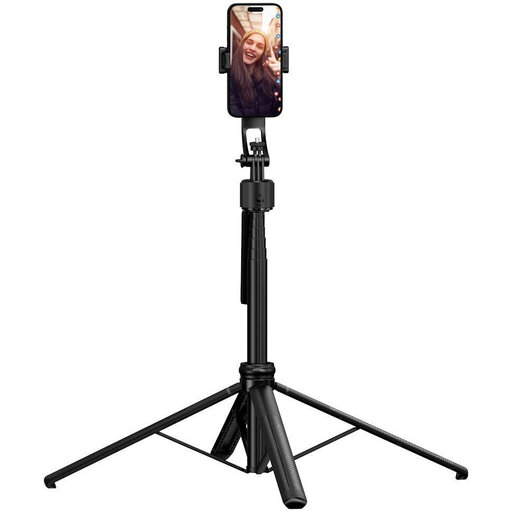
Why This Fits Their Persona: Ideal for anyone looking for a straightforward all-in-one solution. This device combines a stable tripod, a selfie stick, and an intelligent tracking unit, with no additional accessories required. Perfect for TikTok videos, Instagram Reels, or your first vlogging attempts.
The integrated AI unit eliminates the need for a separate app and ensures smooth tracking. The quadpod base with four feet provides high stability and minimises the risk of tipping over.
Gesture control for hands-free operation and flexible use as a desktop tripod, a tall stand (up to 163 cm), or an AI selfie stick.
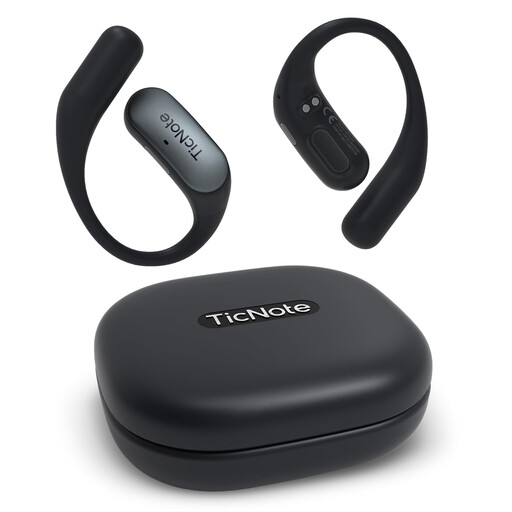
Why This Fits Their Persona: For podcasters, educators, and YouTubers whose workflow involves not just video, but also audio processing. While the Rollei tripod automates dynamic video recording, the TicNote Pods capture and transcribe the audio in real-time. This saves hours of manual work.
This combination solves two problems at once: the tripod ensures professional, shake-free footage, while the earbuds fully automate the often tedious process of audio transcription for subtitles or scripts.
Maximum efficiency by automating both video and audio workflows. The large internal storage of the TicNote Pods (32 GB) also allows for hours of recording without a smartphone.
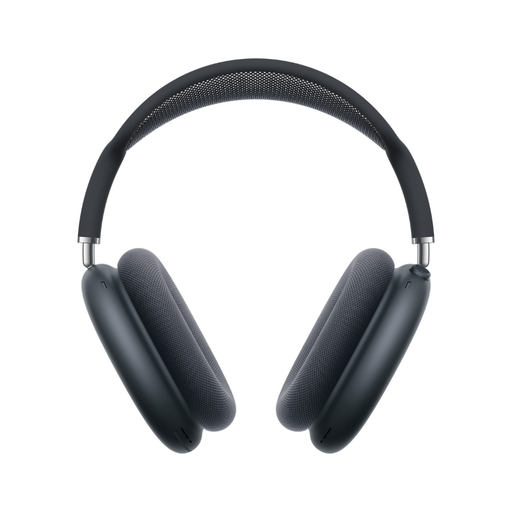
Why This Fits Their Persona: For content creators who place the highest value on production quality. The Rollei tripod provides dynamic camera movements, while the AirPods Max 2 enable studio-level audio monitoring. Ideal for music tutorials, detailed product reviews, or professional online courses.
This setup avoids compromises on video and audio. The tripod reliably automates camera work, while the headphones with active noise cancellation allow for precise assessment of audio quality during post-production.
A combination of automated, professional camera work and high-fidelity audio monitoring. The seamless integration of the AirPods into the Apple ecosystem further simplifies the workflow.
We have compiled a complete, real-time list of products that fully satisfy these strict selection criteria and UK safety regulations.
1. Do I need a special app for an AI tracking tripod? That depends on the model. We recommend devices with integrated AI and a dedicated camera in the tripod head, like the Rollei Easy Creator. These work with any camera app on your smartphone, making them more future-proof and flexible than models that require a proprietary app.
2. How stable is a tripod like this with a modern, heavy smartphone? Stability is determined by the base design and the maximum load capacity. A quadpod design with four legs offers significantly more stability than a conventional tripod. Pay attention to the specified maximum load capacity (e.g., 2.5 kg) to ensure that even heavy smartphones are held securely.
3. Does the face tracking work with multiple people in the frame? Most consumer-grade AI tripods are optimised to track a single person. Once the system has locked onto an individual, it will maintain focus on them even if other people move through the frame. Tracking groups requires more professional and significantly more expensive systems.