
Lieferung heute & morgen

Qualitätsgarantie

Willkommens-Angebote freischalten: KOSTENLOSE Lieferung | Bis zu 80 % RABATT | Kostenlose 30-Tage-JoyPlus-Testphase
App herunterladen
Choosing the right AIO water cooler is crucial for the stability and longevity of a high-performance PC. However, the market is filled with marketing promises that often create more confusion than clarity. Many users invest in a system that either doesn't fit their case, becomes unexpectedly loud under load, or has expensive extra features that prove impractical. This guide will help you navigate these pitfalls and make an informed decision.
Before we dive into the technical details, it's important to understand the most common issues that can lead to a poor purchasing decision.
To select the right PC water cooler, you should focus on three objective criteria that have a direct impact on functionality.
The radiator size is the most important factor for cooling performance. Its surface area determines how much heat can be dissipated into the ambient air.
Before buying, be sure to check your PC case specifications to verify the maximum radiator size (length and thickness) for top, front, or side mounting. The radiator itself is usually made of aluminium, while the cold plate, which makes direct contact with the CPU, should be made of copper for optimal heat transfer.
A high-quality cooler is distinguished by its adaptability. Look for the following features:
Secure and correct contact pressure is essential for effective heat transfer. Make sure the AIO is explicitly compatible with your CPU socket (e.g., CPU cooler for AM5). Some manufacturers offer special mounting solutions, such as contact frames for Intel sockets, which replace the motherboard's standard retention mechanism. According to manufacturers, these ensure more even pressure distribution and can protect the CPU's lifespan.
Here are some models that are well-suited for different user profiles based on objective criteria.
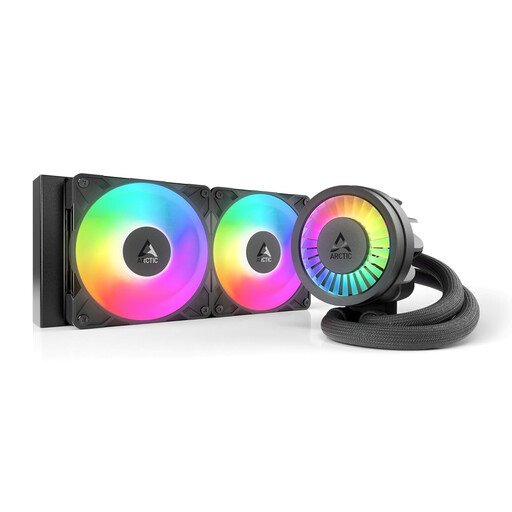
Why This Fits Their Persona: This model focuses on high cooling performance at a competitive price. It's ideal for users who need reliable cooling for mid-range CPUs and can do without expensive extra features like a display.
It sidesteps the trap of overpriced features by offering functional benefits like the VRM fan and integrated cable management, which improve system stability and ease of installation, rather than focusing solely on aesthetics.
Strong price-to-performance ratio; integrated VRM fan for cooling voltage regulators; simplified installation with only one visible cable.
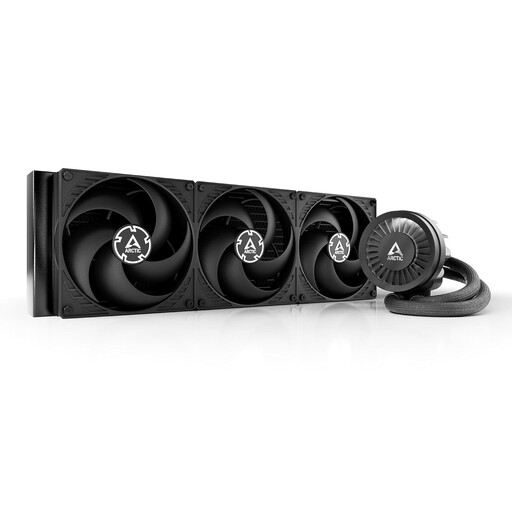
Why This Fits Their Persona: For users who want to get the absolute maximum out of their high-end CPU. The 420mm radiator provides an enormous cooling surface area designed for even the most demanding overclocking of high-TDP (Thermal Design Power) CPUs.
This model solves the "noise vs. performance" problem by relying on a large radiator surface area. The three 140mm fans can operate at lower speeds, remaining quieter while still delivering high cooling performance.
Maximum cooling performance from a 420mm radiator; suitable for extreme overclocking; offset mounting for optimised heat absorption on AMD CPUs.
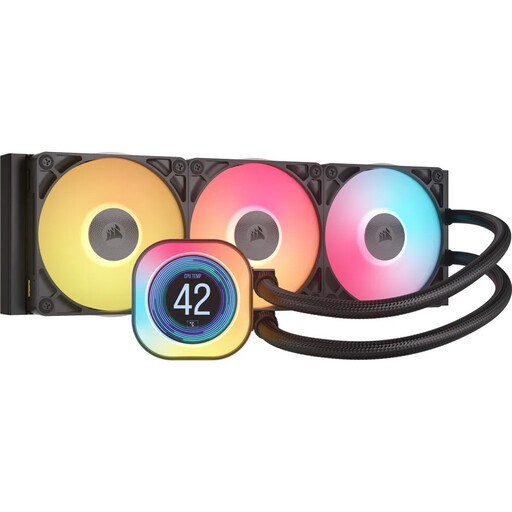
Why This Fits Their Persona: For users who prioritise aesthetics and a clean system setup. The customisable IPS LCD screen and the iCUE LINK ecosystem allow for tidy cable management and centralised control of lighting and cooling.
It addresses the complexity of RGB systems. The iCUE LINK system drastically reduces cable clutter by connecting multiple components via a single cable, significantly simplifying the build and maintenance process.
Customisable 2.1-inch IPS LCD display; greatly simplified cable management via the iCUE LINK ecosystem; centralised control through iCUE software.
We have compiled a complete, real-time updated list of products that fully meet these strict selection criteria.
The average lifespan of an AIO water cooler is about 5 to 7 years. The most common causes of failure are the pump or the slow evaporation of the coolant through the tubing (permeation). The manufacturer's warranty period, which is usually between 3 and 6 years, is a good indicator of expected durability. Regularly checking temperatures and noise levels is advisable.
It depends on the use case. For overclocked high-end CPUs, large AIOs (280mm and up) often provide superior cooling performance and can exhaust heat directly out of the case. This can lower the overall system temperature. However, high-end air coolers can be competitive in terms of raw cooling performance, are often quieter, and have fewer potential points of failure (no pump, no liquid). For mid-range systems, the choice is often a matter of case compatibility and personal aesthetic preference.
AIO (All-in-One) coolers are closed-loop, factory-sealed systems designed for maintenance-free operation. Unlike a custom water cooling loop, you do not need to change or top up the coolant. The only maintenance required is to regularly clean the radiator and fans of dust to ensure optimal airflow.