
Lieferung heute & morgen

Qualitätsgarantie

Willkommens-Angebote freischalten: KOSTENLOSE Lieferung | Bis zu 80 % RABATT | Kostenlose 30-Tage-JoyPlus-Testphase
App herunterladen
An AIO CPU cooler can keep powerful processors cool without taking up too much space, while also defining the look of a gaming PC. However, choosing the right one isn't just about radiator size or RGB lighting. What really matters is socket compatibility, case dimensions, fan control and the actual feature set.
With a 360 mm AIO water cooler or a liquid CPU cooler in particular, common buying mistakes happen when product images and marketing buzzwords are given more weight than the technical specifications.
A 360 mm radiator typically needs three 120 mm fan slots. The case must accommodate not only the radiator's length, but also its thickness, hose routing and clearance from RAM or motherboard heatsinks. When mounted at the top, there may not be enough room for tall memory modules or VRM coolers.
A 240 mm AIO water cooler requires two 120 mm fan slots and therefore fits into more cases. It can be sufficient for many gaming systems, but offers less radiator surface area than a 360 mm model.
A CPU cooler with a display can show system values, images or animations. However, this feature does not automatically improve heat dissipation. Similarly, CPU water cooling with ARGB, RGB fans and illuminated pump covers are primarily aesthetic features.
Before buying, you should check:
A CPU cooler for Intel LGA 1851 or a CPU cooler for AMD AM5 requires the correct mounting brackets. The product names in this selection often mention Intel LGA 1851 and LGA 1700, as well as AMD AM5 and AM4. Nevertheless, you should check the compatibility list on the respective product page before ordering.
When switching platforms, it is also important to check whether the necessary brackets are included in the box. A mechanically compatible cold plate alone does not guarantee a secure installation.
Radiator size is a practical point of comparison:
Beyond surface area, fan bearings, speed range, airflow and static pressure also matter. For example, the MSI MAG Core Liquid A15 240 is specified with two 120 mm CycloBlade 9 ARGB fans, a 240 mm radiator, a 4-pin PWM connector and a pump speed of up to 3,400 rpm. These details are more concrete than vague phrases like "extreme cooling".
A quiet CPU cooler doesn't depend on a single decibel value alone. Noise levels change with CPU temperature, fan curve, pump speed and case ventilation. PWM connectors enable automatic control via the BIOS or motherboard software.
Here's a practical approach:
A measured or manufacturer-stated noise level is only meaningful under the specific test conditions. So the 33 dB value quoted for the NZXT Kraken X63 RGB should not be taken as a guarantee for every installation scenario.
AIO coolers are sealed systems and, unlike custom water cooling loops, do not need regular refilling. However, dust on the radiator and fans can restrict airflow. Cleaning with compressed air while the PC is switched off and unplugged is a good idea at reasonable intervals.
With a liquid CPU cooler, you should also keep the following in mind:
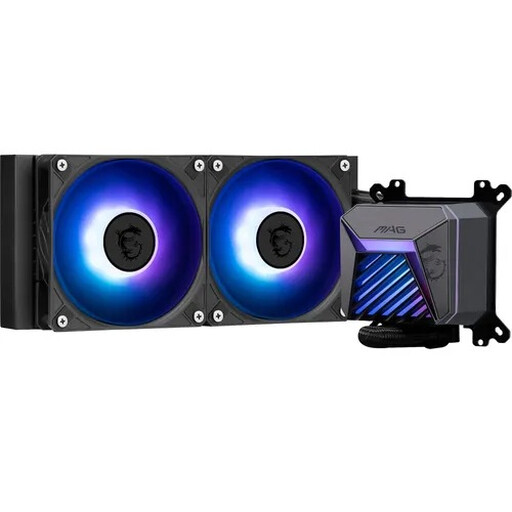
Why this product fits the profile: The 240 mm version requires less mounting space than many 360 mm models and supports Intel LGA 1851/1700 as well as AMD AM5/AM4.
The stated radiator, fan and socket data make it easy to check compatibility before installation. ARGB and PWM are listed as specific connection types.
240 mm radiator, two 120 mm ARGB fans, copper cold plate and 4-pin PWM connector.
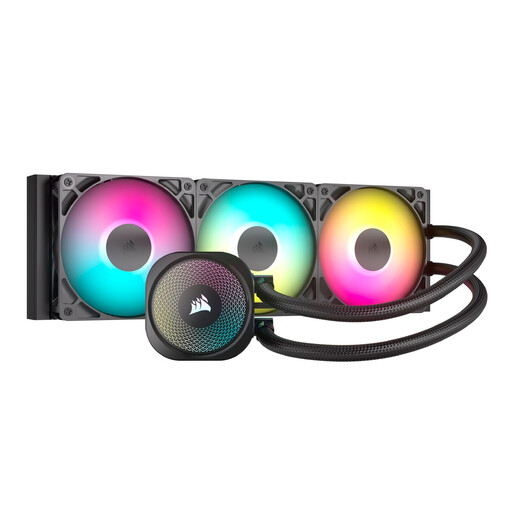
Why this product fits the profile: The feature set is clearly aimed at high-performance gaming PCs and content creation systems with sufficient radiator space.
The 360 mm size is described concretely with three RS120 ARGB fans and direct motherboard connectivity. This allows you to check space and connection requirements in advance.
360 mm radiator, three PWM fans, ARGB control via the motherboard and support for LGA 1851/1700 as well as AM5/AM4.
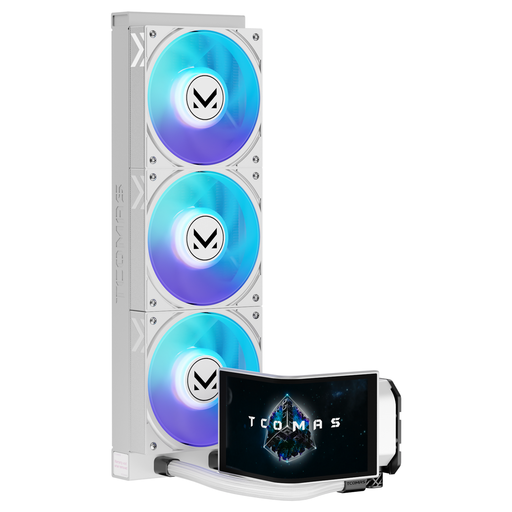
Why this product fits the profile: This model combines a 360 mm radiator with a 6.67-inch curved AMOLED display and customisable on-screen content.
The display and 3D visuals are listed as separate features. This means the cooling decision can be made independently of the aesthetics, based on radiator size and socket.
6.67-inch AMOLED display, customisable visuals, ARGB lighting and compatibility with Intel LGA 1851/1700 as well as AMD AM5/AM4.
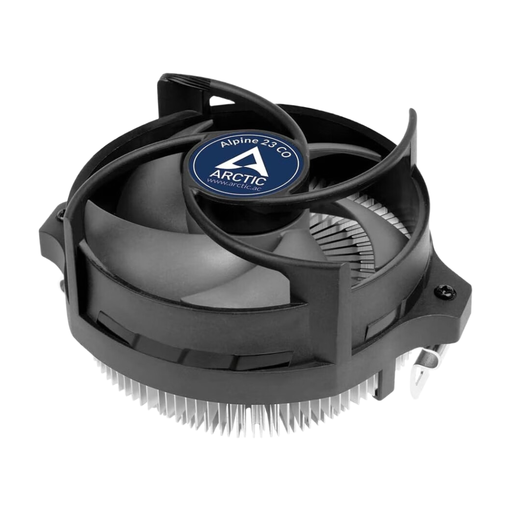
Why this product fits the profile: For compact AMD systems and continuous operation, a small air cooler can be a more sensible choice than an AIO, provided the processor stays within the intended power limit.
The product specifications state a recommended TDP of up to 65 W and a vertical height of 65 mm. This makes it easier to realistically assess suitability for small cases.
Compact design, AMD compatibility for AM5/AM4/AM3(+), pre-applied thermal paste and dual ball bearings for continuous operation.
We have put together a complete, regularly updated list of products that fully meet these strict selection criteria and the safety regulations in force in the EU.
Not always. A 360 mm radiator offers more surface area and three 120 mm fans, but it requires more space and can generate additional noise depending on the fan curve. A 240 mm AIO water cooler can be the more suitable choice for many processors and cases. What matters is the CPU power draw, the case, the mounting position and your desired noise level.
The lifespan depends on factors including pump operation, material quality, operating temperature and dust exposure. Since AIO systems are sealed loops, they should not be opened or refilled. Unusual pump noises, rising temperatures or visible traces of liquid are reasons to check immediately and, if necessary, replace the unit.
The ongoing electricity costs come from the pump and fans. The actual consumption depends on speed, control and operating time. PWM control can adjust operation to the CPU temperature. For a realistic estimate, compare the stated power data with your daily usage time and your electricity tariff.