
Lieferung heute & morgen

Qualitätsgarantie

Willkommens-Angebote freischalten: KOSTENLOSE Lieferung | Bis zu 80 % RABATT | Kostenlose 30-Tage-JoyPlus-Testphase
App herunterladen
An AIO CPU water cooler can be a practical alternative to a large air cooler in a powerful gaming PC, workstation or content-creation system. It combines the CPU cooling block, pump, tubes and radiator in a pre-assembled loop. However, not every model will automatically make your system quieter or cooler.
Before buying, check case compatibility, socket support and the actual features included. Marketing terms such as “High Performance”, “Ultra Silent” and “Gaming Cooling” are no substitute for clear details about radiator size, fan control and connections.
A 240 mm water cooler takes up less space than a 360 or 420 mm model. A larger radiator generally offers more surface area for dissipating heat, but it won’t fit every case. Real-world performance also depends on the fans, pump control, installation and airflow through the PC.
Before buying, check the maximum radiator length and thickness supported in your chosen mounting position. If you plan to mount it at the top of the case, RAM, motherboard heatsinks or voltage regulators may also get in the way.
An ARGB water cooler can enhance the look of your PC, but it doesn’t automatically improve heat dissipation. Important factors include fan diameter, speed range, static pressure, radiator design and the quality of the CPU contact surface.
With addressable RGB, you also need the right connection: many models use a 5 V 3-pin ARGB connector. Don’t confuse it with a 12 V 4-pin RGB header, as this could damage the lighting.
“Compatible with Intel and AMD” isn’t specific enough. You need to check the exact socket. For current systems, for example, look for Intel LGA1851, Intel LGA1700, AMD AM5 or AMD AM4 compatibility. The included mounting brackets are important too, as are any contact or offset frames you may need.
Radiator size is a key factor when choosing a cooler:
As well as the length, check the radiator thickness, fan height and tube routing. A front-mounted radiator can reduce the available space for your graphics card. For a top-mounted radiator, the combined height of the radiator and fans is often the main space consideration.
A quiet CPU cooler can’t be judged by a single decibel figure alone. Readings can vary depending on measurement distance, fan speed and testing conditions. Speed range and control details are more useful.
PWM fans can be controlled by the motherboard according to temperature. According to the product specifications, the two RS120 fans in the CORSAIR NAUTILUS 240 run at 300–2,100 rpm. This lets you adjust the fan curve in the BIOS or motherboard software. Running the fans at a consistently high speed can improve heat dissipation, but usually makes the system noisier.
Several of the models listed feature copper cold plates with microchannels. Make sure the thermal paste is spread evenly, and remember to remove the protective film from the contact surface before installation.
Also check for:
A PC liquid cooler uses a closed loop. Don’t kink or twist the tubes, or install them under tension. If you notice any visible liquid, switch off the computer immediately and disconnect it from the mains.
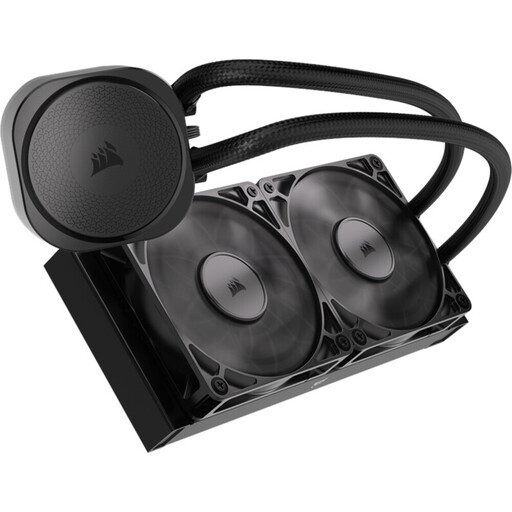
Why this product suits this user type: The 240 mm design is easier to fit in many standard cases. The non-RGB version focuses on cooling and doesn’t need a separate lighting controller.
The product details specify dimensions of 277 × 120 × 27 mm and direct PWM connections. This makes it easier to check the fit against your case before buying.
Two RS120 PWM fans running at 300–2,100 rpm, a copper cold plate and support for LGA1851, LGA1700, AM5 and AM4.
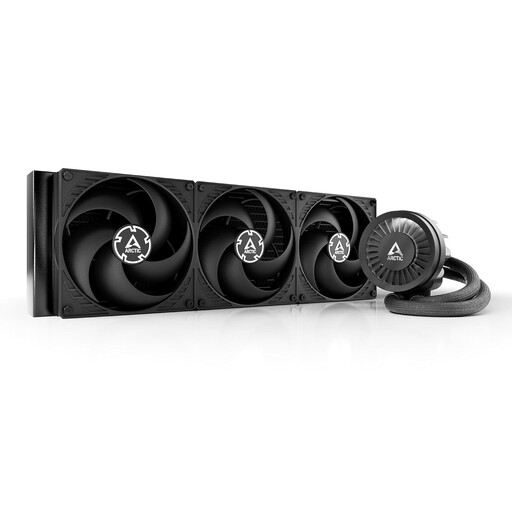
Why this product suits this user type: With a 420 mm radiator and three 140 mm fans, this model is built for powerful processors and sustained workloads. Check case compatibility particularly carefully before buying.
The specifications list the radiator size, number of fans and dimensions separately. This reduces the risk of ordering a large radiator without enough room to install it.
Three S P14 PRO fans, a PWM-controlled pump, an integrated VRM fan and support for Intel and AMD platforms.
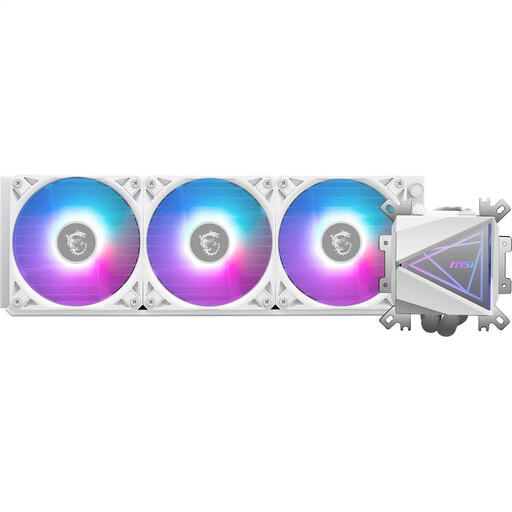
Why this product suits this user type: This white 360 mm model is for anyone looking to pair prominent ARGB lighting with a larger radiator.
The lighting is listed as ARGB GEN2, and the specifications include a 360 mm radiator, three fans and 5 V operation. Still, check that your motherboard has the right connections.
Copper cold plate with microchannels, dual-chamber pump, three 120 mm ARGB PWM fans and support for LGA1700, AM5 and AM4.

Why this product suits this user type: This model is worth considering if you want a display, customisable lighting and system information directly on the cooler, as well as liquid cooling.
The product description specifies the CHIONE-CAST software required, along with the display and control features. This lets you check in advance whether these extras are right for your system.
240 mm design, integrated micro-fan construction, customisable display and sleeved Teflon tubes, according to the product specifications.
We’ve put together a complete, regularly updated list of products that meet these strict selection criteria and fully comply with the safety regulations in force in the EU.
Its lifespan depends on factors including the pump, seals, how long it runs, dust levels and installation. A closed loop normally doesn’t need topping up. Even so, check the fans, radiator and tubes regularly for dust, unusual noises or visible damage.
It depends on the processor, power limits and the performance profile you want. A 240 mm AIO can suit many gaming systems. For sustained high workloads or particularly powerful CPUs, a 360 or 420 mm radiator can offer more headroom, provided your case supports it.
An AIO needs extra power for the pump and usually several fans. Check the technical specifications for the power consumption of the model you’re considering. The difference compared with air cooling depends on fan operation and pump control; an automatic PWM curve can adjust performance to the CPU temperature.