
Lieferung heute & morgen

Qualitätsgarantie

Willkommens-Angebote freischalten: KOSTENLOSE Lieferung | Bis zu 80 % RABATT | Kostenlose 30-Tage-JoyPlus-Testphase
App herunterladen
An AIO CPU water cooler can be a practical alternative to a traditional air cooler for gaming PCs, productive workstations and high-performance desktop systems. However, choosing one can be tricky because there are so many technical specifications to consider. Radiator size, socket compatibility, fan connectors and lighting are often prominently advertised, while important installation requirements are less obvious.
This buying guide explains what PC builders in the UK should look for before buying a CPU water cooler. Our selection is based on clear specifications, including radiator size, supported sockets, connector type and features.
A 360 mm AIO needs space for three 120 mm fans, as well as the radiator and tubing. A 420 mm AIO generally requires space for three 140 mm fans, so it will only fit compatible cases. Even if a PC case supports the radiator length, RAM modules, motherboard heatsinks or the graphics card may get in the way.
Check the case manufacturer’s specifications before buying. For example, the NZXT H7 Flow supports radiators up to 420 mm at the front and up to 360 mm at the top, according to its product description.
A stated noise level depends on the measuring distance, fan speed, surroundings and measurement method. A figure such as 23 dB or 30 dB shouldn’t be treated as a universal benchmark in isolation. Pump noise, airflow noise and case resonance also affect how loud a cooler sounds in practice.
If you’re looking for a quiet CPU cooler, consider PWM control, a suitable fan curve and good case ventilation, as well as the specifications. A lower fan speed can reduce noise, but it also affects cooling headroom under heavy loads.
An ARGB water cooler typically uses 5 V, three-pin connectors. These aren’t interchangeable with standard 12 V, four-pin RGB connectors. Using the wrong connector can damage the lighting. Before buying, check that your motherboard has a compatible 5 V, three-pin ARGB connector, or plan to use a compatible controller.
Sizes can be broadly compared by installation requirements and fan format:
Radiator size alone doesn’t tell you everything about cooling performance. Pump design, contact area, fan pressure, speed range and the processor’s heat output all play a part.
For current systems, check the mounting support for the specific model you’re considering. Common searches include:
A cooler may support several sockets, but could require different mounting brackets. Check the product page and packaging against your motherboard specifications. If you switch platforms, you’ll only be able to keep using your AIO if the required mounting hardware is available.
Many current models use 4-pin PWM connectors to control the fan and pump automatically. Before installation, check whether your motherboard has enough connectors or if you’ll need a splitter.
A sealed AIO normally doesn’t need topping up. Even so, correct installation, careful tube routing and checking for unusual noises or visible leaks are important. Make sure the radiator, pump block and fans are securely fitted before switching on your PC. If liquid leaks out, turn off the PC immediately and unplug it from the mains.
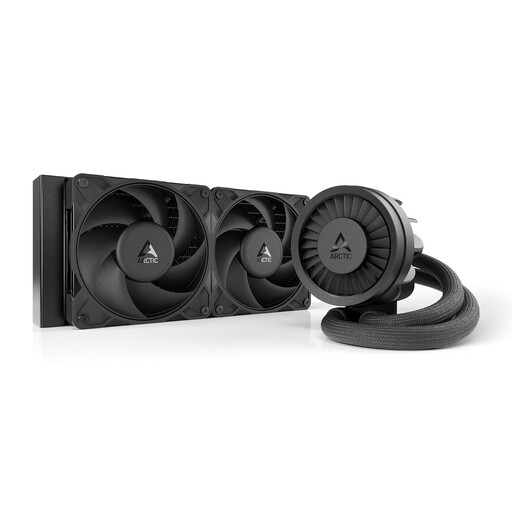
Why this product suits this user: The 240 mm format uses two 120 mm fans and is easier to fit in many compatible mid-tower cases than larger radiators. Support for Intel LGA1851 and LGA1700, as well as AMD AM5 and AM4, covers many popular platforms.
The compact radiator is less likely to clash with your RAM or case lid than a very large radiator. You’ll still need to check that your case supports it before buying.
240 mm radiator, PWM-controlled pump and integrated VRM fan, according to the product specifications; supports Intel and AMD sockets.
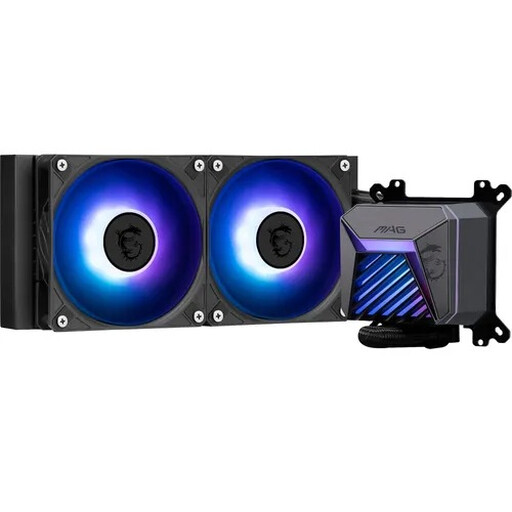
Why this product suits this user: This 240 mm AIO combines a copper cooling plate with two 120 mm ARGB fans and a 4-pin PWM connector. It’s a good fit if you want cooling control and lighting in a compact format.
The product specifications clearly state the supported sockets, radiator size and connector type. For ARGB lighting, your motherboard still needs a compatible 5 V, three-pin connector.
Compatible with Intel LGA1851/LGA1700 and AMD AM5/AM4; two 120 mm ARGB fans with PWM control, according to the manufacturer’s specifications.
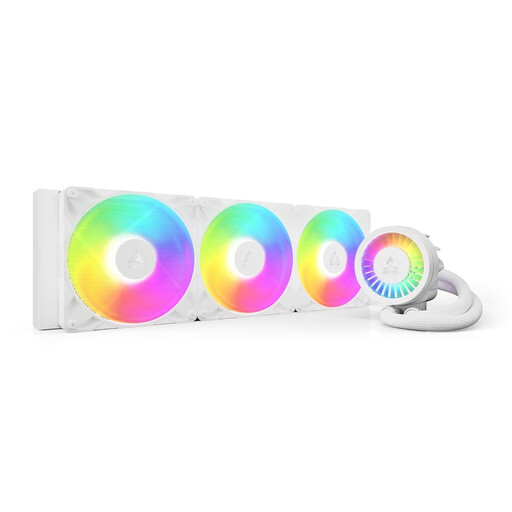
Why this product suits this user: The 420 mm radiator with three 140 mm fans is designed for large cases and users who put their processors under sustained heavy load. It supports Intel LGA1851/LGA1700 and AMD AM5/AM4.
The clearly stated radiator size makes the case dimensions you’ll need easy to identify. This lets you check in advance whether your case can accommodate three 140 mm fans.
Three P14 Pro A-RGB fans, a PWM-controlled pump, an integrated VRM fan and 450 mm tubes, according to the product specifications.
We’ve put together a complete, regularly updated list of products that meet these strict selection criteria and the safety requirements in force in the EU.
A 240 mm AIO is easier to fit in many compact or mid-sized systems. A 280 mm or 360 mm AIO offers more radiator surface area, but needs suitable mounting points. A 420 mm AIO is mainly suited to larger cases. The key factors are case clearance, processor, fan speed and your preferred noise level.
Its lifespan depends on factors including the pump, bearing type, operating time, dust levels and installation. An AIO is a sealed system, but pump noise, wear and leaks can still occur. It’s a good idea to check it regularly for visible issues, keep the radiator fins free of dust and ensure your case has adequate ventilation.
Most of the extra power consumption comes from the pump, fans and, where applicable, ARGB lighting. Actual power use varies by model and fan speed. To keep power consumption down, you can set up a PWM fan curve and switch off the lighting when you don’t need it.