
Lieferung heute & morgen

Qualitätsgarantie

Willkommens-Angebote freischalten: KOSTENLOSE Lieferung | Bis zu 80 % RABATT | Kostenlose 30-Tage-JoyPlus-Testphase
App herunterladen
An AIO water cooler for CPU can be a practical alternative to a large air cooler for powerful gaming PCs, workstations and content creation systems. However, radiator size alone doesn't determine suitability. Case compatibility, socket support, fan control and connection type are at least as important.
If you only focus on RGB lighting, display features or high RPM figures, you can easily overlook crucial details. The points below will help you choose the right all-in-one water cooler and avoid common buying mistakes.
A 360 mm water cooler needs significantly more space than a 240 mm variant. You also need to check radiator width, radiator thickness, fan position and potential collisions with RAM or the motherboard.
A 420 mm water cooler uses three 140 mm fans. This can be appealing for heavily loaded processors, but it requires a suitably large PC case. The "420 mm" designation doesn't necessarily describe the exact overall length of the component.
An AIO water cooler must be compatible with your motherboard socket. For current systems, Intel LGA1851 water coolers and AMD AM5 water coolers are particularly in demand. LGA1700 and AM4 are also supported by many models.
It's important to check the specifications of each product against your own motherboard. A mounting kit for Intel LGA1851 isn't automatically suitable for every older or newer socket. Some Intel models may also require a specific contact frame.
ARGB typically uses a 5 V 3-pin connector. This must not be confused with a 12 V 4-pin RGB connector. A wrong connection can damage the lighting. Before installation, check the manual for both your motherboard and water cooler.
The pump and fans also need the right connections. PWM connectors enable temperature-based speed control. A display or elaborate lighting, on the other hand, doesn't automatically improve cooling performance.
Size alone isn't a reliable indicator of actual noise levels. Pump design, fan bearings, fan curves, radiator construction and the processor's heat output all influence the result.
A quiet CPU cooler shouldn't just be advertised with a low noise rating. What matters is whether the fans and pump can be controlled via PWM and whether a suitable fan curve can be set in the BIOS.
Figures like RPM, airflow and static pressure are technical reference points. High maximum speeds can be useful under heavy load, but they don't automatically lead to quieter operation. For office tasks or video editing with varying loads, finely tuned control is often more practical than constantly high speeds.
Copper contact surfaces conduct heat from the processor into the cooling loop. Aluminium is often used for the radiator. Buyers should also pay attention to the included mounting brackets, hose length and the orientation of the pump head.
Before first start-up, check all connections. The hoses must not be kinked, twisted or installed under tension. With a sealed AIO, the cooling loop should not be opened.
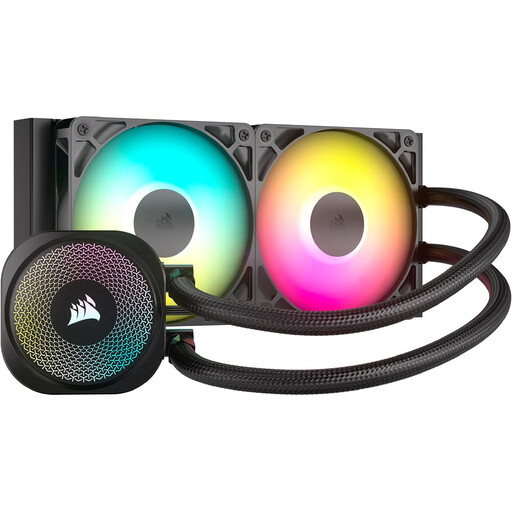
Why this product suits the profile: The 240 mm design requires less mounting space and supports Intel LGA1851, LGA1700 as well as AMD AM5 and AM4. The fan and ARGB connectors connect directly to the motherboard.
The technical specifications list the radiator dimensions of 277 × 120 × 27 mm and the correct 5 V 3-pin ARGB connector.
Two RS120 ARGB fans with PWM control from 300 to 2100 RPM and a copper contact surface.
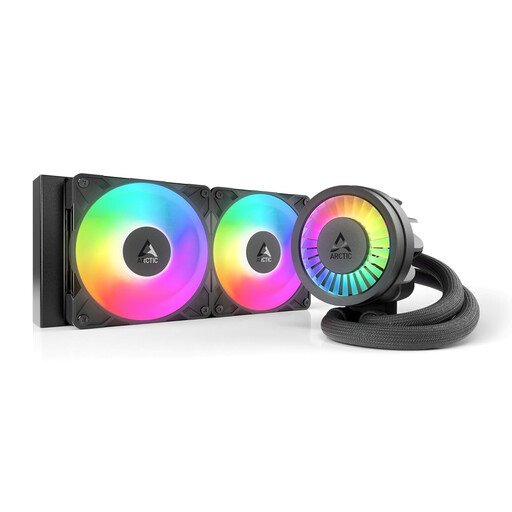
Why this product suits the profile: This model combines a 240 mm cooling surface with a PWM pump, integrated VRM fan and native offset mounting for compatible Intel and AMD platforms.
Compatibility with Intel LGA1851 and LGA1700 is explicitly stated. The contact frame must be observed for the intended installation.
Two 120 mm S12-PRO fans, copper micro-skived fins and integrated cable management according to product specifications.
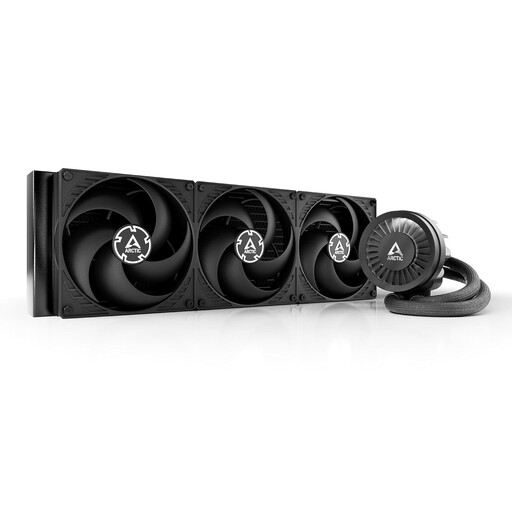
Why this product suits the profile: The 420 mm version is aimed at users with a large case and consistently high CPU load, for example when rendering, compiling or for demanding gaming systems.
The required case size isn't hidden: before buying, you must check for 420 mm radiator mounting points and secure fastening.
Three 140 mm fans, PWM control, integrated VRM fan and a stated airflow of 110 CFM.
We've put together a complete, regularly updated list of products that fully meet these strict selection criteria and the safety regulations in force in the EU.
An AIO normally doesn't require regular fluid refills. However, dust should be removed from the radiator and fans. If you notice unusual noises, visible moisture or a temperature rise despite unchanged usage, switch off the PC immediately and investigate the cause.
For an AMD AM5 water cooler, models explicitly marked as compatible with AM5 in the product specifications are suitable. Additionally, the radiator format, pump mounting and case clearances must match your own system.
A 240 mm AIO can be a suitable option for many gaming systems. Whether it's sufficient depends on the processor, power settings, case ventilation and desired noise levels. For extended high CPU loads, a larger radiator surface area can offer more thermal headroom.
The lifespan depends on factors including the pump, fans, operating time, ambient temperature and installation. Since the loop is usually sealed, it shouldn't be opened. Regular dust removal and tension-free hose routing help avoid unnecessary strain.