
Lieferung heute & morgen

Qualitätsgarantie

Willkommens-Angebote freischalten: KOSTENLOSE Lieferung | Bis zu 80 % RABATT | Kostenlose 30-Tage-JoyPlus-Testphase
App herunterladen
As a Joybuy Product Recommendation Officer, I analyse market information daily to provide you with objective and practical advice. My goal is to help you make the right purchasing decisions without falling for exaggerated marketing claims.
A high-performance AIO water cooler with RGB is often the centerpiece of a modern PC build. It not only promises low CPU temperatures for demanding games and overclocking but also delivers stunning aesthetics. However, the market is flooded with models whose specifications and advertising claims often create more confusion than clarity. Before you invest, you should be aware of the most common pitfalls that lead to disappointment and unnecessary expenses.
Many PC builders focus on aesthetics or advertised cooling performance, overlooking crucial technical details. This often leads to three typical problems:
To avoid these pitfalls, focus on three verifiable core parameters. These are the primary determinants of your new PC water cooler's performance, noise level, and compatibility.
The radiator size is the most important factor for cooling performance. The most common formats are:
The radiator material is almost always aluminium, while the cold plate, which makes direct contact with the processor, should be made of copper to ensure optimal heat transfer.
Ensure that the AIO is explicitly compatible with your CPU socket. The current standards are Intel LGA 1700 / 1851 and AMD AM5. Many manufacturers include mounting kits for both platforms, but double-checking the product description is essential. Some models, like the ARCTIC Liquid Freezer, even offer special contact frames or offset mounting options to optimally position the cold plate over the hotspots of modern chiplet-design CPUs.
A modern AIO should offer PWM (Pulse Width Modulation) control for both the pump and the fans. This allows the motherboard or control software to dynamically adjust speeds based on the CPU temperature. The result is silent operation at idle and maximum performance only when it's truly needed. For RGB lighting, the standardised 3-pin 5V ARGB connector is crucial. It ensures compatibility with most motherboard lighting systems (e.g., ASUS Aura Sync, MSI Mystic Light Sync) and prevents you from being locked into the manufacturer's proprietary software.
Based on these objective criteria, we have identified a few models that are particularly well-suited for specific user profiles.
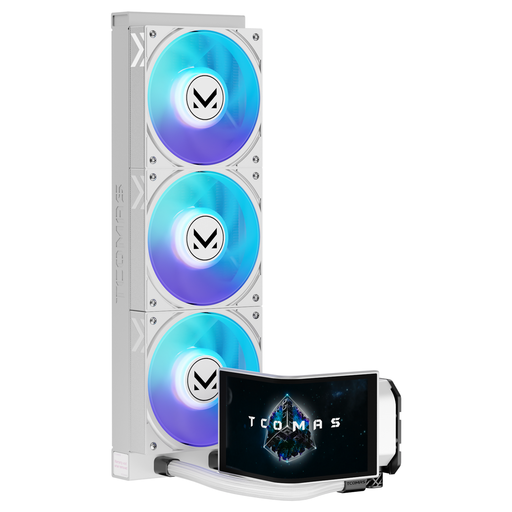
Why This Fits Their Persona: Ideal for users who want to showcase their PC as a visual masterpiece. The large, curved display on the pump head becomes the central focal point and can show system stats, GIFs, or custom animations. A perfect choice for a white AIO in a show build.
Avoids the "RGB Chaos" by using the display as a central, software-controlled visual element that complements the ARGB fans. Explicit support for LGA 1851/1700 and AM5/AM4 prevents the compatibility trap.
The 6.67-inch curved AMOLED display is a unique selling point. The 360mm radiator size also provides high cooling performance for demanding setups.
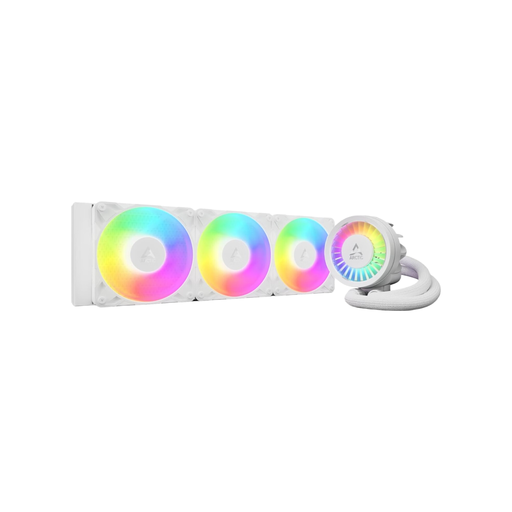
Why This Fits Their Persona: For users who prioritise maximum cooling performance and efficiency. This CPU cooler is designed to dissipate the high thermal loads generated when overclocking high-end CPUs.
Addresses the noise trap with a PWM-controlled pump and an additional VRM fan that cools the motherboard's voltage regulators. The native offset mounting and special contact frame for LGA1700/1851 prevent compatibility and installation issues.
The thick 38mm radiator offers an increased cooling surface area. The integrated cable management, with all cables hidden in the tube sleeving, ensures an extremely clean look.
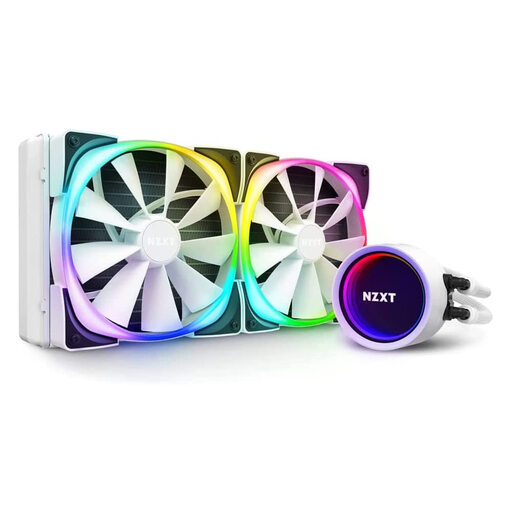
Why This Fits Their Persona: Perfect for users seeking a clean, minimalist design with high-quality RGB lighting. The NZXT Kraken is known for its iconic infinity mirror display and seamless integration into the NZXT ecosystem, making it a popular choice for themed builds.
Solves the "RGB Chaos" through centralised control via CAM software, which allows for easy synchronisation of all NZXT components. The clear socket compatibility information (incl. AM4) and its 280mm size make it a perfect fit for many cases.
The infinity mirror display with a rotatable top ensures the logo is always perfectly oriented. The Aer RGB 2 fans are optimised for quiet operation with high airflow.
We have compiled a complete, real-time updated list of products that fully meet these strict selection criteria.
The lifespan of an AIO water cooler is typically between 5 and 7 years. The limiting factors are pump wear and permeation, a process where coolant slowly diffuses through the tubing over several years. A good indicator of expected durability is the manufacturer's warranty, which ranges from 3 to 6 years for most models.
Not necessarily. While a 360mm AIO has a larger surface area and thus higher theoretical cooling potential, the actual performance depends on the CPU, case airflow, and the quality of the fans. For many mid-range processors, a high-quality 240mm or 280mm cooler is more than sufficient, offers quieter operation, and fits in a wider variety of cases.
That depends on the model. Many modern AIOs use a standardised 5V 3-pin ARGB connector. These can be controlled directly via your motherboard's software. Models with advanced features like an AIO with a display or special lighting effects (e.g., from NZXT) often require the manufacturer's proprietary software to access their full range of functions. Before buying, check the product description for the connector type and software requirements.