
Lieferung heute & morgen

Qualitätsgarantie

Willkommens-Angebote freischalten: KOSTENLOSE Lieferung | Bis zu 80 % RABATT | Kostenlose 30-Tage-JoyPlus-Testphase
App herunterladen
Modern PC components like processors and graphics cards offer impressive performance, but they also generate a significant amount of waste heat. Without adequate cooling, this can lead to thermal throttling, where component performance is automatically reduced to prevent overheating. An Airflow PC Case is specifically designed to enable maximum airflow, thereby keeping operating temperatures low.
This article serves as a guide to help you select a suitable case. We will highlight the key criteria that play a role in the decision-making process and present a selection of models designed for high cooling performance.
The decision for a case should be based on objective technical parameters. Three main aspects are particularly relevant here.
Before you decide on a design, checking compatibility with your existing or planned components is essential. Pay attention to the following points:
A case focused on good cooling is distinguished by specific design features that maximise airflow.
Besides pure cooling performance, aesthetics and user-friendliness also play a role.
Here, we present three models that stand out due to their airflow-optimised features.
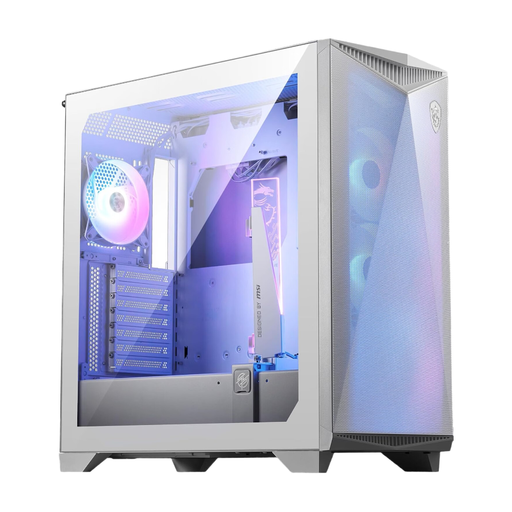
Why It Stands Out The MSI MPG GUNGNIR 300R Airflow is engineered for maximum cooling capacity. It offers space for up to ten 120 mm fans and features a full-surface mesh front. A special feature is the integrated, omnidirectional graphics card support bracket, which stabilises heavy GPUs and is also equipped with ARGB lighting.
Pros
Who It's For For PC builders planning a system with high-end components and extensive air or water cooling. The integrated GPU support and E-ATX compatibility make it a solid choice for demanding gaming PC case builds.
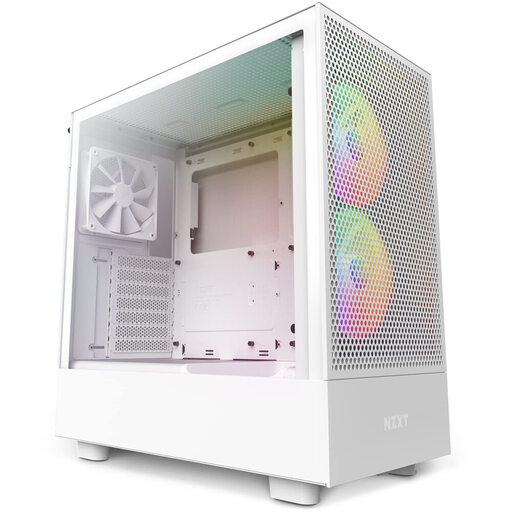
Why It Stands Out The NZXT H5 Flow RGB combines a compact ATX case design with a clever cooling concept. In addition to the perforated front and top panels, it features a dedicated, angled 120 mm fan in the bottom that directs cool air straight to the graphics card. Two pre-installed F140 RGB Core fans provide solid baseline cooling and a customisable look right out of the box.
Pros
Who It's For Ideal for users seeking an aesthetically pleasing and compact system with strong cooling performance for the graphics card. Its thoughtful design and pre-installed RGB fans make it an attractive option for gamers who value both aesthetics and performance.
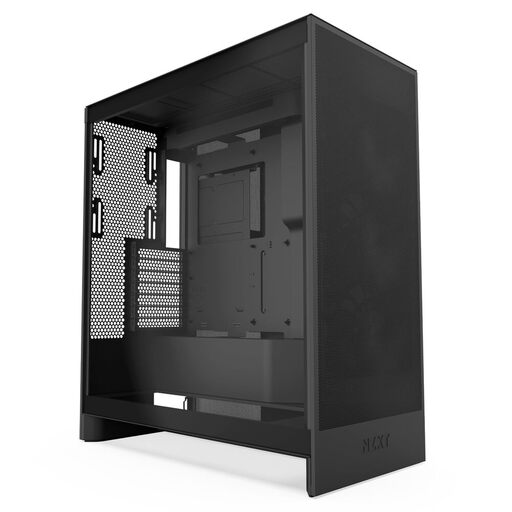
Why It Stands Out The NZXT H7 Flow is a spacious mid-tower case designed for maximum cooling flexibility. It supports up to three 120 mm fans at the bottom for direct airflow to the GPU and offers room for very large radiators—up to 420 mm in the front and 360 mm in the top. Three 120 mm fans are already pre-installed in the front.
Pros
Who It's For For enthusiasts planning a high-performance custom water-cooling loop or needing maximum air cooling for overclocked systems. The generous interior and extensive cooling options provide an excellent foundation for extremely high-performance builds.
If the featured models don't exactly meet your requirements, or if you're looking for different designs and form factors, you might find the right option in our wider selection. Discover more cases for your next PC build.
? Discover our entire selection of desktop computer towers
1. How many fans are necessary for good airflow? There's no one-size-fits-all answer, as the case design is crucial. A common and effective configuration consists of two to three intake fans at the front and one exhaust fan at the rear. The key is to create a clear airflow path from the front/bottom to the rear/top. Additional fans can improve performance, but the basic layout is more important.
2. Is a mesh front panel always better for airflow? For pure airflow, a mesh or perforated front panel is generally more advantageous than a closed front made of glass or plastic. It allows fans to draw in cool air with less resistance, which can directly lead to lower component temperatures.
3. What is the difference between an airflow case and a silent case? An Airflow PC Case, as the name suggests, prioritises maximum airflow through open designs and numerous fan mounts. A silent case, on the other hand, focuses on noise dampening. This is often achieved with sound-dampening materials on the panels and more restrictive airflow, which tends to result in slightly higher temperatures. The choice depends on whether your priority is maximum cooling performance or the quietest possible operation.