
Lieferung heute & morgen

Qualitätsgarantie

Willkommens-Angebote freischalten: KOSTENLOSE Lieferung | Bis zu 80 % RABATT | Kostenlose 30-Tage-JoyPlus-Testphase
App herunterladen
A wireless gaming mouse with 42,000 DPI, an 8K polling rate, an RGB charging dock and tri-mode connectivity looks impressive on paper. But a long list of features isn’t enough to make an informed buying decision. What matters is whether the sensor, shape, wireless connection and software suit your play style and hand size.
According to the product description, the AJAZZ AJ159 APEX Wireless Gaming Mouse is aimed primarily at people with small to medium-sized hands who want a lightweight, symmetrical mouse for gaming and office work. Before buying, though, it’s worth checking for a few common marketing pitfalls.
A 42,000 DPI mouse can offer a very wide sensitivity range. In practice, however, many players use much lower settings. A high maximum figure alone says little about how well a mouse will perform in FPS or MOBA games.
More important are:
According to AJAZZ’s product description, the AJ159 APEX uses a PAW3950 APEX sensor, with up to 42,000 DPI, a tracking speed of 750 IPS and 50G acceleration. These are manufacturer specifications and should be seen as technical maximums, not as an automatic improvement to your aim.
An 8K polling rate means the mouse can send up to 8,000 updates per second to your computer in the appropriate operating mode. The stated polling interval of 0.125 milliseconds is a technical measurement. Whether you notice a difference in-game depends on factors such as frame rate, monitor, game and system load.
Before buying, check:
For the AJ159 APEX, AJAZZ specifies wireless 8K use and a receiver built into the charging dock. A lower setting may make sense with older or less powerful systems.
A gaming mouse with a charging dock is easy to put down and charge. Even so, buyers should check the charging connection, whether the mouse can be used while charging and the stated battery life. If specific details about battery capacity or usage time are missing, it’s harder to make a direct comparison with other models.
The AJ159 APEX comes with a magnetic RGB docking station. According to the product description, its built-in colour TFT display shows details including DPI, battery level, polling rate and LOD setting. That’s handy for checking the mouse at your desk, but it doesn’t replace checking how long it will actually run for.
The PAW3950 sensor is worth considering if you want precise, configurable control. FPS players typically use low to medium sensitivity, while MOBA players often benefit from clearly assigned buttons and steady cursor movement.
Look for the option to switch DPI settings directly and save profiles for different games. An exceptionally high maximum figure shouldn’t be your only selection criterion.
A tri-mode mouse usually offers three connection options:
According to the product description, the AJ159 APEX supports all three modes. For fast-paced games, 2.4 GHz is the obvious choice. Bluetooth may be sufficient for everyday tasks, while USB-C provides a fallback when the battery needs charging.
At 56 grams, according to the product description, the AJ159 APEX falls into the lightweight category. An ultralight gaming mouse can make quick movements easier, but that doesn’t mean it will suit every hand or grip style.
Its symmetrical shape may suit different grip styles. Even so, check the following:
A symmetrical shape doesn’t necessarily mean there are side buttons on both sides. Check the precise button layout before buying.

Why this product suits this profile: This model combines 2.4 GHz wireless, Bluetooth and USB-C, and weighs around 54 grams according to the product description. It’s a good fit if you’re looking for a lightweight mouse for gaming and office work without necessarily needing 8K technology.
Its DPI range of up to 24,000 and 1,000 Hz polling rate are enough for many uses, without putting an unnecessarily high maximum figure centre stage.
Tri-mode connectivity, replaceable 300 mAh batteries according to the product description, and PTFE feet.

Why this product suits this profile: The PAW3950 APEX sensor, stated 8K polling rate and magnetic RGB docking station will appeal if you prefer plenty of configuration options at a dedicated gaming desk.
The three connection options let you use it wirelessly, via Bluetooth or over USB-C. According to the product description, you can also adjust DPI, LOD, polling rate and button profiles in the software.
Weighs 56 grams according to the manufacturer, with an 8K receiver in the docking station and a TFT display for status information.
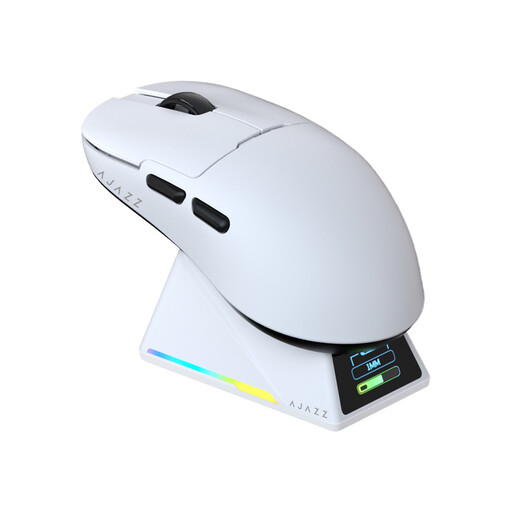
Why this product suits this profile: The combination of 2.4 GHz wireless, Bluetooth and wired connectivity is ideal if you want to use the same mouse with a gaming PC, laptop and office computer.
The charging dock also acts as a receiver holder and status display. That keeps the wireless receiver at your desk, so you don’t need to store it separately.
According to the product description, Huano switches rated for over 100 million clicks, plus replacement feet and grip tape included in the box.
We’ve put together a complete, regularly updated list of products that meet these strict selection criteria and fully comply with the safety regulations in force in the EU.
No. It may be useful at high frame rates and during fast movements, but it isn’t essential. A stable sensor, suitable sensitivity and reliable connection matter most. Choose a polling rate that suits your system and play style.
According to the product description, yes. Bluetooth is suitable for everyday tasks, while USB-C and 2.4 GHz wireless are available for other uses. Before buying, check operating system compatibility, driver support and whether the button layout meets your needs.
The product information available doesn’t state a specific battery life. Actual usage time depends on factors including polling rate, RGB lighting, wireless mode and charge level. Buyers should check the manufacturer’s battery capacity and battery life details directly on the product page.