
Lieferung heute & morgen

Qualitätsgarantie

Willkommens-Angebote freischalten: KOSTENLOSE Lieferung | Bis zu 80 % RABATT | Kostenlose 30-Tage-JoyPlus-Testphase
App herunterladen
Choosing a motherboard is the foundation of any PC build. With the launch of AMD's Ryzen 9000 processors, the B850 motherboard AM5 is coming into focus for many system builders. But the market is flooded with marketing terms and specifications that create more confusion than clarity. Before you make a decision, it's crucial to understand the most common pitfalls that can lead to a bad purchase.
As a Joybuy Product Recommendation Officer, I see customers every day who are left uncertain by exaggerated advertising or unclear product descriptions. This guide is designed to help you overcome these hurdles and make an informed choice.
The 3 Most Common Traps When Buying a Motherboard:
To cut through the marketing hype, focus on these three verifiable core specifications.
The Voltage Regulator Modules (VRM) supply power to your CPU. For the longevity and stability of your system, especially in demanding Gaming Motherboard AM5 setups, the cooling of these components is crucial. Look for massive, well-designed heatsinks on the VRMs. A look at the weight and surface area of the heatsinks is often more revealing than the phase count alone. A board that skimps here can throttle CPU performance (throttling) under load to prevent overheating.
Fast NVMe SSDs are essential for modern PC systems. A good M-ATX B850 motherboard should offer at least two M.2 slots. The critical questions are:
The variety of ports determines your PC's practical usability.
Based on the criteria above, we have identified several Colorful B850 motherboard models that represent a considered choice for different user groups.
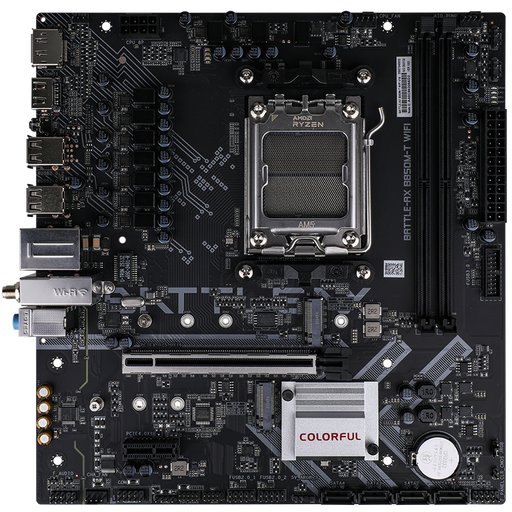
Why This Fits Their Persona: Ideal for users looking for a modern AM5 platform with the essential features for a mid-range PC, without paying for high-end functions they won't use. Perfect for compact builds with a Ryzen 5 or 7 processor.
It focuses on the essentials: a PCIe 5.0 M.2 slot is included without driving up the cost with Wi-Fi 7 or an oversized VRM. The inclusion of Wi-Fi 6E and 2.5G LAN is very solid for this price class.
Offers a CPU-linked PCIe 5.0 M.2 slot, which is not a given in this price segment and ensures excellent future-proofing for storage. The two DDR5 slots are sufficient for most gaming and everyday applications with up to 96 GB of RAM.
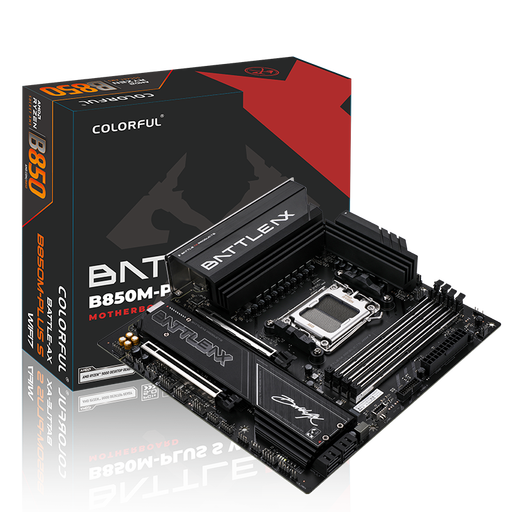
Why This Fits Their Persona: For demanding users and gamers who need a powerful foundation for a Ryzen 7 or 9 processor. The combination of fast connectivity and four RAM slots offers flexibility for the future.
It justifies its price with meaningful upgrades. Instead of just relying on marketing terms, it delivers tangible benefits for power users with 5G LAN and Wi-Fi 7 and avoids the pitfall of hidden bandwidth limitations by providing two CPU-linked M.2 slots.
The combination of four DDR5 slots (up to 192 GB), 5G LAN, and Wi-Fi 7 provides an exceptionally strong and future-proof foundation for connectivity and storage. The enhanced VRM cooling also supports high-performance processors under sustained load.
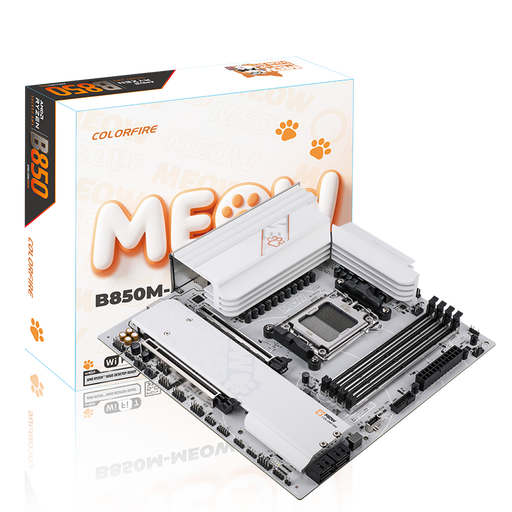
Why This Fits Their Persona: For PC builders who want to create a system with a unique visual identity. This board combines high-end technology with a distinctive design that stands out from the crowd.
It debunks the myth that design-oriented components have to make technical compromises. The specifications are on par with the B850M-PLUS S model, so you don't have to sacrifice performance for aesthetics.
The unique "MEOW" design with orange accents and themed graphics on the PCB and heatsinks makes it the centerpiece of a show build. Technically, it offers the same powerful feature set as its BATTLE-AX sister model, including 5G LAN and Wi-Fi 7.
We have compiled a complete, real-time updated list of products that fully meet these strict selection criteria.
The decision depends on your budget and goals. The B850 chipset is the newer platform, specifically optimized for the AMD Ryzen 9000 series, and often offers a better baseline of PCIe 5.0 connectivity. If you're building a new PC in 2026 with a current processor and want maximum longevity, a B850 motherboard AM5 is the logical choice. However, for more budget-conscious systems based on a Ryzen 7000 or 8000 series processor, a high-quality B650 board can still be a very good and cost-effective alternative.
The M-ATX form factor is a compromise between compactness and expandability. You typically have fewer PCIe slots (often just one x16 for the GPU and another small slot) and rarely more than two M.2 slots. Pay special attention to the clearance between the CPU socket, RAM slots, and the top PCIe slot. Large air coolers or graphics cards can quickly lead to clearance issues here. Carefully measure your case and components.
Yes, absolutely. A motherboard with integrated Wi-Fi 7 is fully backwards compatible with older standards like Wi-Fi 6E, 6 (802.11ax), 5 (802.11ac), and older. You can connect to any existing Wi-Fi network without any issues. However, to take advantage of Wi-Fi 7 benefits like Multi-Link Operation (MLO) and 320 MHz channels, you will need a compatible Wi-Fi 7 router.