
Lieferung heute & morgen

Qualitätsgarantie

Willkommens-Angebote freischalten: KOSTENLOSE Lieferung | Bis zu 80 % RABATT | Kostenlose 30-Tage-JoyPlus-Testphase
App herunterladen
An AM5 mainboard DDR5 forms the technical foundation for a PC with an AMD Ryzen processor. Yet the vast selection of A620, B650, B850 and X870E mainboards often leads to costly mistakes. High DDR5 clock speeds, PCIe 5.0 labels and Wi-Fi 7 logos may look appealing, but they aren’t necessary for every system.
So the key questions are: Does the AMD Ryzen mainboard match your processor? Does it support the number of M.2 SSDs you plan to use? Are the form factor, ports and power delivery sufficient for your needs? The following criteria will help PC builders, gamers, content creators and businesses make a sensible choice.
Figures like DDR5-8000 or DDR5-8400 usually refer to overclocked memory profiles. The actual speed you can achieve depends on the processor, BIOS, memory module and which DIMM slots are populated. EXPO or XMP support makes configuration easier, but it doesn’t replace checking the official memory compatibility list.
For many systems, two matching DDR5 modules running in dual-channel mode are more sensible than chasing an inflated clock speed. If you need 64 GB or more, also check whether the desired capacity per slot is supported.
A PCIe 5.0 mainboard might offer PCIe 5.0 only on the graphics card slot or a single M.2 slot. Other ports may still run at PCIe 4.0. That’s no disadvantage if you’re using a PCIe 4.0 SSD or an existing graphics card.
What matters is the exact allocation: which M.2 slot uses CPU lanes? Which ports run through the chipset? Are SATA or PCIe ports disabled when certain M.2 slots are occupied?
An ATX mainboard usually offers more slots and internal connectors, but it needs a compatible ATX case. A Micro-ATX mainboard fits into more compact cases, though it may have fewer expansion slots. For a small PC, an ITX model could also work, provided you only plan to use a few expansion cards and drives.
Before buying, check the case, graphics card length, CPU cooler height and power supply connections together.
An AM5 socket alone doesn’t guarantee that every Ryzen generation will boot without a BIOS update. The product specifications of each board should match the CPU you intend to use. Many models list support for Ryzen 7000, Ryzen 8000 and Ryzen 9000 processors. You should also consult the manufacturer’s current CPU support list.
Also look for a BIOS flashback or BIOS update button. This feature can be a lifesaver if a processor isn’t recognised initially.
A DDR5 mainboard should offer enough DIMM slots and the total capacity you need. Two slots may be sufficient for a compact office PC; four slots give you more room for future upgrades.
Memory speed figures are often marked with “OC”. This means the speed can be achieved via a profile or manual setting. For stable operation, choose modules from the compatibility list.
M.2 SSD support is one of the most important factors to consider. Check:
For workstations with large project files, three or four M.2 slots can be useful. For a gaming PC with a single system SSD, one or two slots are often enough.
A Wi-Fi 7 mainboard is only worthwhile if your router, operating system and regional frequency regulations support it. For the Wi-Fi 7 models mentioned, full functionality requires Windows 11 version 24H2 or later; under Windows 10, missing drivers may be an issue according to product information.
Wired networks also vary: depending on the model, you’ll find 1 Gbit/s, 2.5 Gbit/s or 5 Gbit/s LAN ports. For businesses or NAS users, this specification can be more important than a high DDR5 OC frequency.

Why this product fits the profile: This Micro-ATX model offers a compact AM5 platform with two DDR5 slots, one PCIe 4.0 x16 slot, one M.2 connector and four SATA ports.
The clearly limited feature set stops you paying for extra functions you don’t need. Before buying, check Ryzen compatibility against the manufacturer’s list.
Micro-ATX form factor, DDR5 dual-channel and HDMI plus VGA output for processors with integrated graphics.
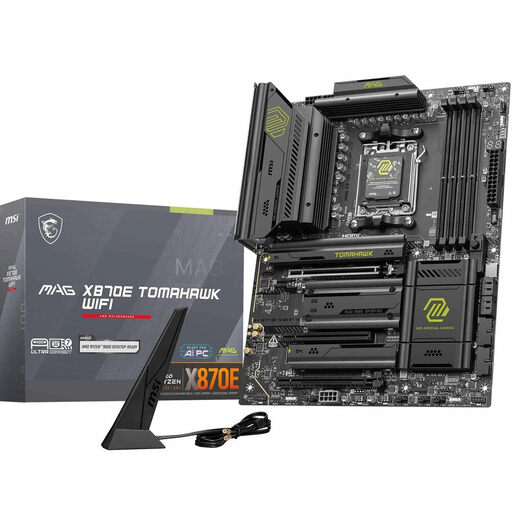
Why this product fits the profile: This ATX mainboard is aimed at users who want to combine multiple fast drives, USB4, PCIe 5.0 and the latest networking standards in one system.
The specification clearly separates PCIe 5.0 graphics, two M.2 Gen5 and two M.2 Gen4 slots. This makes it easy to match your storage needs before buying.
Four DDR5 DIMM slots supporting up to 256 GB, Wi-Fi 7, 5G LAN and two M.2 Gen5 x4 connectors according to product data.
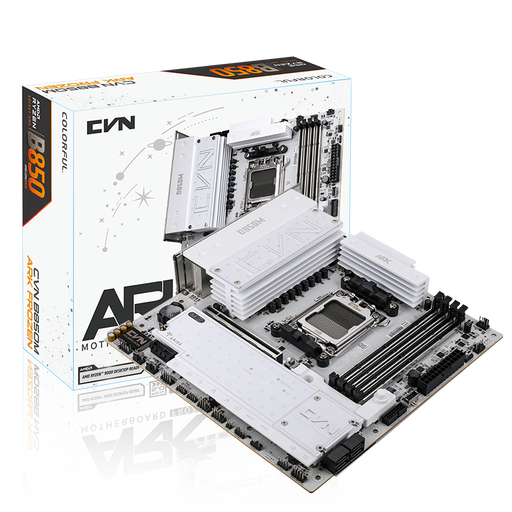
Why this product fits the profile: This M-ATX board combines four DDR5 slots with three M.2 connectors, 2.5 Gbit/s LAN and Wi-Fi 7 for compact work or gaming systems.
The three M.2 slots are clearly labelled by PCIe generation and whether they connect to the CPU or chipset. This reduces the risk of planning for an incompatible storage port.
Up to 192 GB DDR5 according to product data, PCIe 5.0 x16, three M.2 slots and 2.5 Gbit/s networking.
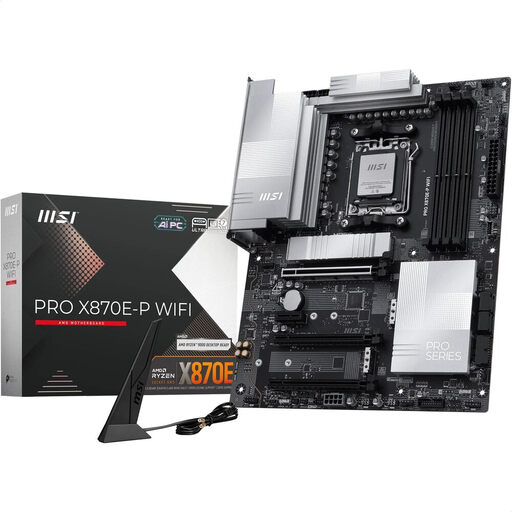
Why this product fits the profile: Content creators and workstations with multiple drives benefit from ATX, three M.2 slots, 5G LAN and USB4 connectivity.
The ports are listed by PCIe generation, network speed and form factor. This lets the buyer check whether the case, SSDs and peripherals will actually work together.
One PCIe 5.0 x16 slot, one M.2 Gen5 and two M.2 Gen4 slots, plus Wi-Fi 7 and 5G LAN according to manufacturer specifications.
We’ve put together a complete, regularly updated list of products that fully meet these strict selection criteria and the safety regulations in force across the EU.
Before installation, disconnect the power supply completely from the mains. Handle the mainboard only by its edges. The contacts on the AM5 socket are particularly delicate. Use the correct standoffs in your case and check the following before first power-on:
For Wi-Fi models, the antennas must be attached. Regional regulations apply for using the 6 GHz band.
No. DDR5 memory is not backwards compatible with DDR4 slots. Switching to DDR5 therefore requires a compatible AM5 motherboard or another platform with DDR5 support.
For a typical gaming PC, one or two M.2 slots are often enough. Content creators, businesses and users with separate system, project and archive drives can benefit from three or more connectors. Also check the lane distribution and any potential deactivation of other ports.
Not necessarily. If you’re using a PCIe 4.0 graphics card and PCIe 4.0 SSD, you can get by with a PCIe 4.0 mainboard. PCIe 5.0 is mainly relevant if you plan to use compatible graphics cards, NVMe drives or future upgrades.