
Lieferung heute & morgen

Qualitätsgarantie

Willkommens-Angebote freischalten: KOSTENLOSE Lieferung | Bis zu 80 % RABATT | Kostenlose 30-Tage-JoyPlus-Testphase
App herunterladen
An AM5 motherboard with DDR5 and WiFi pairs the latest AMD Ryzen processors with fast memory and wireless networking. But choosing the right one involves more than looking at the chipset or a high clock speed. For gaming PC builders, content creators and tech enthusiasts, compatibility, expandability, form factor and the network and storage features you actually need all matter.
As Joybuy Product Recommendation Officer, I review the key specifications and organise them around practical use cases. That can help you avoid common buying mistakes.
Figures such as DDR5-8000 or DDR5-8400 are often overclocked (OC) speeds. They require compatible memory modules, a suitable BIOS and a capable memory controller in the processor. The standard speed may be lower. Before buying, check:
For many systems, a well-matched DDR5 kit running at a moderate speed is a better choice than memory with a higher advertised speed that only runs reliably after manual tweaking.
A WiFi 7 motherboard needs a compatible router and devices to make use of its extra features. Your operating system and available drivers matter too. The same applies to WiFi 6E motherboards: access to the 6 GHz band depends on local regulations, router support and your distance from the access point.
Also check whether Bluetooth is built in and which version the wireless module uses. A motherboard with Bluetooth can save you from needing an extra USB adapter for headsets, controllers and input devices.
On a PCIe 5.0 motherboard, the standard may only be available on certain slots. Some models support it on the primary graphics card slot, while others also offer it on one or more M.2 slots. So check:
These details matter more for game libraries, video editing and large collections of data than a general PCIe mention in the product title.
An AMD Ryzen motherboard with an AM5 socket is designed for Ryzen 7000, 8000 and 9000 series processors, as long as the specific BIOS and manufacturer support are confirmed. A B650 motherboard offers a good balance of features for many gaming systems. A B850 motherboard adds current-generation connectivity and, depending on the model, may offer more storage and expansion options. An X870 motherboard or X870E model is better suited to users who need extensive PCIe and USB connectivity, robust power delivery and plenty of M.2 support.
Before installing your processor, check the manufacturer’s CPU support list. This is especially important with newly released processors or older stock.
An ATX motherboard generally offers more room for expansion cards, M.2 heatsinks and extra connections. An mATX motherboard is more compact, but can still have four RAM slots and several storage connections. For small cases, consider a Mini-ITX motherboard. These usually have just two RAM slots, and you’ll need to pay particular attention to compatibility with your cooler, graphics card and power supply.
Before buying, check that the board is compatible with your case and that the standoffs are in the right places. A 244 mm mATX board won’t necessarily fit every compact case.
A 2.5-Gigabit or 5-Gigabit LAN connection can be useful for local networks and fast data transfers. For wireless connections, weigh up WiFi 6E and WiFi 7 based on your router and driver support. If you’re choosing a high-performance Ryzen processor, also consider VRM cooling, CPU power connectors and the number of fan and pump headers.
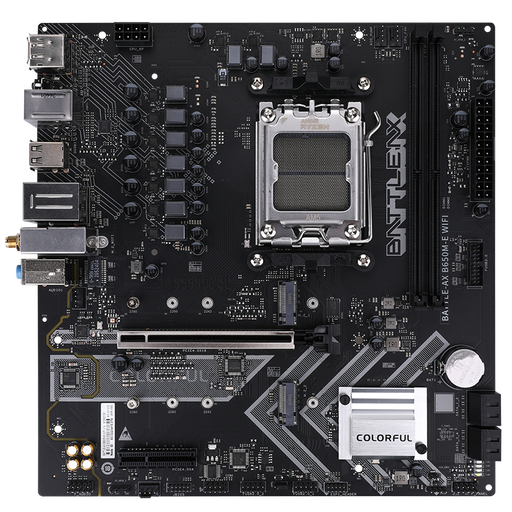
Why this product suits this profile: This mATX board combines AM5, DDR5 and WiFi 6 in a compact design. It’s a good fit for a budget-friendly gaming PC, with two M.2 slots and four SATA connections.
The specifications clearly list two DDR5 slots, two M.2 interfaces and WiFi 6. That makes it easier to assess the board’s expansion options before you buy.
mATX form factor, DDR5 support up to 7600 MHz OC, two M.2 PCIe 4.0 slots and Bluetooth 5.2.
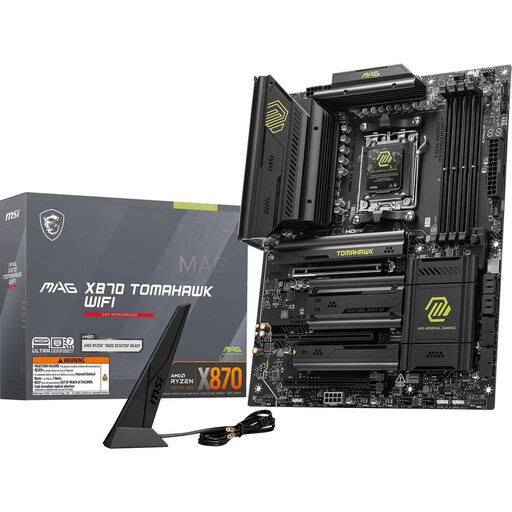
Why this product suits this profile: This ATX motherboard is designed for users who want to combine several fast storage drives, USB4 and the latest wireless standards in a Ryzen system.
The specifications distinguish between two M.2 Gen 5 slots and two M.2 Gen 4 slots. WiFi 7, Bluetooth 5.4 and 5G LAN are also clearly specified.
Four DDR5 DIMM slots, supporting up to 256 GB, PCIe 5.0 x16, USB4 Type-C at 40 Gbit/s and 5G LAN.
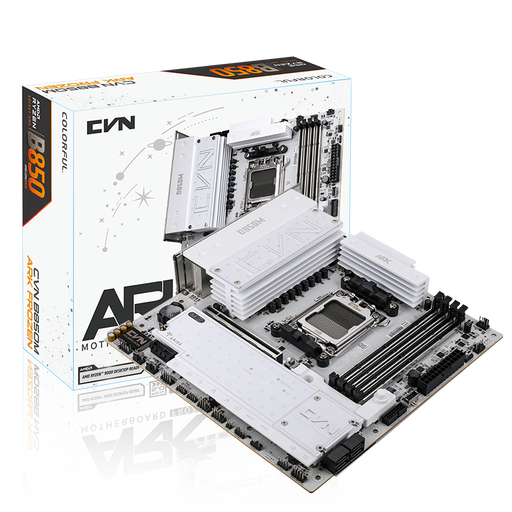
Why this product suits this profile: For compact systems with several SSDs, this B850M motherboard offers three M.2 slots, WiFi 7 and four DDR5 slots.
The storage configuration lists two M.2 PCIe 5.0 slots and an additional PCIe 4.0 slot. This makes it easier to plan for multiple drives.
mATX form factor, three M.2 slots, 2.5-Gigabit LAN, WiFi 7, Bluetooth 5.4 and support for up to 192 GB of DDR5.
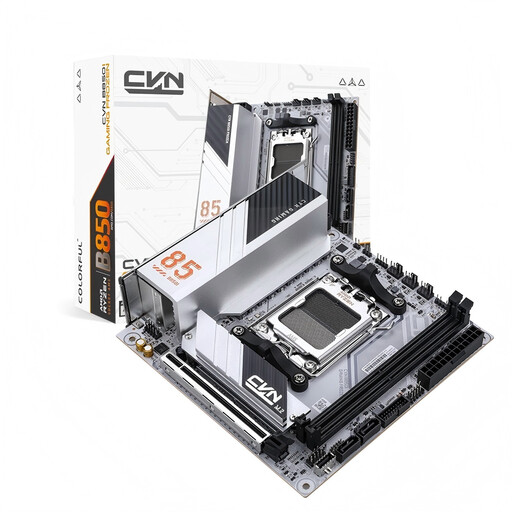
Why this product suits this profile: This Mini-ITX board is designed for small AM5 cases, combining a compact design with PCIe 5.0, WiFi 6E and two M.2 slots.
The 170 × 170 mm dimensions and two RAM slots make the space requirements clear. That makes it easier to check for potential case and cooler clearance issues early on.
Mini-ITX form factor, two M.2 slots, PCIe 5.0 x16, 2.5-Gigabit LAN, WiFi 6E and Bluetooth 5.3.
We’ve put together a complete, regularly updated list of products that meet these strict selection criteria and fully comply with the safety regulations in force in the EU.
Many AM5 models support several Ryzen generations. However, the specific CPU support list and BIOS version are what matter. Before ordering, check the manufacturer’s processor information. An older board may need a BIOS update.
WiFi 6E is enough if your router and devices support it and you don’t need the latest wireless features. WiFi 7 may be worth considering if you’re building a new network, but it’ll only make a practical difference if your router, operating system and client devices are compatible. For a wired setup, a 2.5-Gigabit or 5-Gigabit LAN connection may matter more than the WiFi generation.
How long you can use one depends on BIOS support, processor upgrades, power delivery, cooling and the connections you need. A board with four DDR5 slots, several M.2 connections and a current networking standard will generally offer more room to expand than a stripped-back model. Still, check the official compatibility information before every upgrade.