
Lieferung heute & morgen

Qualitätsgarantie

Willkommens-Angebote freischalten: KOSTENLOSE Lieferung | Bis zu 80 % RABATT | Kostenlose 30-Tage-JoyPlus-Testphase
App herunterladen
Choosing the right AM5 motherboard is the foundation of any high-performance PC, especially with the launch of AMD Ryzen 9000 processors. However, the market is flooded with marketing buzzwords and technical specs that make it difficult to make an informed decision. Many users invest in overpriced features they'll never use or encounter hidden flaws that compromise system stability.
As your Joybuy Product Recommendation Officer, I'm here to help you navigate these pitfalls. This guide focuses on the crucial, objective criteria you need to build a stable and future-proof system.
Common Pitfalls When Buying a Motherboard:
To make a smart buying decision, you should focus on three core areas instead of being swayed by marketing hype.
The chipset determines your system's core feature set. The choice depends directly on your use case and budget.
The Voltage Regulator Modules (VRM) supply the CPU with stable power. A robust VRM configuration with high-quality heatsinks is essential to unlock the full performance of AMD Ryzen 7, Ryzen 9, or future high-end CPUs without throttling. Look for motherboards with sufficiently large heatsinks on the VRM components, especially if you plan on demanding applications or gaming. A good AM5 gaming motherboard is distinguished by a well-designed cooling solution.
The AM5 platform uses DDR5 motherboards by default, which ensures high memory bandwidth. However, pay attention to the supported clock speeds (in MT/s) to fully leverage the potential of your RAM.
For future-proofing, the following connections are also relevant:
Here are three recommendations tailored to different user profiles that specifically avoid the pitfalls mentioned.
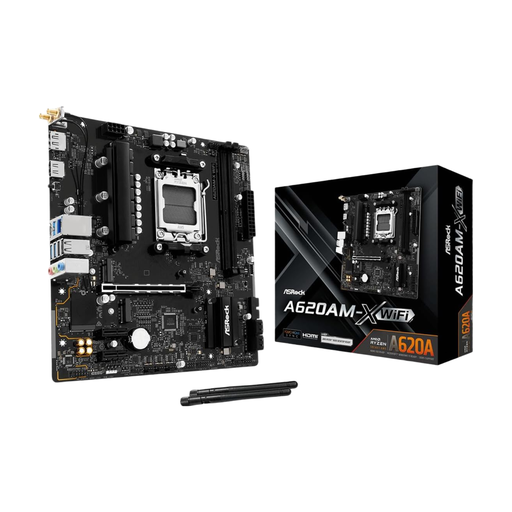
Why it fits the profile: This board offers a cost-effective entry point into the AM5 platform. It's ideal for users building a PC for everyday tasks or entry-level gaming with a Ryzen 5 processor who can do without expensive extras like PCIe 5.0.
It avoids overpaying for unused high-end features. The focus is on the essentials: an AM5 socket and DDR5 support.
Provides a stable foundation for the AM5 platform with DDR5 support at a very accessible price point.

Why it fits the profile: This ATX board offers an excellent balance of modern features and price. It's ideal for gamers and creators who want to build a future-proof system with a Ryzen 7 or 9 processor without spending the budget for an X870E model.
It offers the key PCIe 5.0 features for GPU and SSD without the premium of an X870E chipset. The solid VRM cooling prevents performance throttling.
Support for PCIe 5.0 x16 and one M.2 Gen5 slot, combined with Wi-Fi 7 and 5G LAN for comprehensive, modern connectivity.
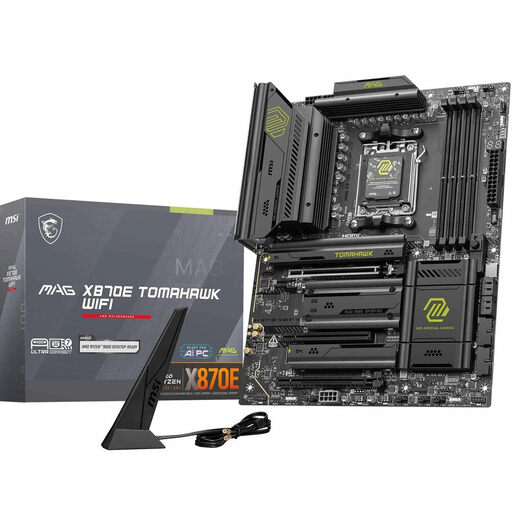
Why it fits the profile: For users who want to get the most out of their motherboard for Ryzen 9000. It is designed for demanding overclocking, multiple high-speed SSDs, and the most powerful graphics cards.
The 14+2+1 phase power design and massive heatsinks ensure that even the most powerful CPUs run stably, avoiding the pitfall of insufficient VRM cooling.
Comprehensive PCIe 5.0 support with one x16 slot and two M.2 Gen5 slots, combined with 5G LAN and Wi-Fi 7 for maximum connectivity.
We have compiled a complete, real-time updated list of products that fully meet these strict selection criteria and safety standards.
The AM5 socket has the same mounting dimensions as the previous AM4 socket. This means that most AM5 CPU coolers designed for AM4 are mechanically compatible. However, it is always wise to check the cooler manufacturer's compatibility list to ensure an appropriate mounting kit for AM5 is included. For high-performance processors like the Ryzen 9, an AIO liquid cooler, such as the Corsair NAUTILUS 360 RS ARGB, is a good choice to keep temperatures in check.
Motherboards with the new 800-series chipsets (e.g., X870E, B850) are designed to support AMD Ryzen 9000 processors right out of the box. For older motherboards with 600-series chipsets (X670, B650, A620), a BIOS update is likely required. Many motherboards offer a "BIOS Flashback" feature, which allows the update to be performed even without a CPU installed, significantly simplifying the process.
That depends entirely on your needs. An X870E motherboard is worth it if you plan to engage in extreme overclocking, use multiple PCIe 5.0 devices (e.g., two graphics cards or multiple Gen5 SSDs), or require the absolute best connectivity available. For the vast majority of gamers and power users, however, a B850 motherboard offers the more sensible and cost-effective solution, as it already covers the most important future-proof features like PCIe 5.0 for the primary GPU and an NVMe SSD.