
Lieferung heute & morgen

Qualitätsgarantie

Willkommens-Angebote freischalten: KOSTENLOSE Lieferung | Bis zu 80 % RABATT | Kostenlose 30-Tage-JoyPlus-Testphase
App herunterladen
An AM5 motherboard forms the foundation of a PC built with an AMD Ryzen 7000, 8000 or 9000 series processor. The choice ranges from compact Micro-ATX boards for budget-conscious systems to fully featured ATX models with PCIe 5.0, multiple M.2 slots and Wi-Fi 7.
When buying, however, it’s not just about the number of ports or a high RAM speed rating. Some typical marketing claims can lead you towards a configuration that doesn’t quite suit your needs.
The AM5 socket is an essential requirement, but it doesn’t guarantee that every Ryzen processor will boot without adjustment. Depending on the model, a BIOS update may be necessary. So, before you buy, check the manufacturer’s CPU support list and pay attention to the BIOS version.
A motherboard for Ryzen should also match the processor you have in mind. A high-performance Ryzen processor places greater demands on the power delivery, cooling and case ventilation than a more energy-efficient model.
Figures such as 8000 or 8400 MT/s often refer to activated EXPO or overclocking profiles. Actual performance depends on the processor, BIOS, memory modules and how the DIMM slots are populated. A DDR5 motherboard with four memory slots offers more flexibility, while compact boards sometimes only have two DIMM slots.
Don’t just focus on speed; also consider:
A PCIe 5.0 motherboard can offer advantages with compatible graphics cards and NVMe SSDs. However, for many gaming and office PCs, PCIe 4.0 is perfectly sufficient. What matters is which interface each function is connected to: a PCIe 5.0 slot for the graphics card doesn’t necessarily mean that every M.2 slot supports PCIe 5.0.
So, check the exact distribution of PCIe lanes and M.2 connectors. With multiple SSDs, interfaces may share certain resources depending on the model.
An A620 motherboard typically focuses on the essentials. It can be sufficient for office PCs, compact systems and budget-conscious Ryzen configurations. B650, B850 and comparable mid-range chipsets usually offer more expansion options. X870 and X870E are aimed at systems requiring extensive connectivity, fast memory access and greater upgrade potential.
Compare the specifics:
An ATX motherboard measuring 30.5 × 24.4 cm typically offers more slots and connectors. It’s well suited to large gaming PCs, workstations and content creator systems.
A Micro-ATX motherboard takes up less space and fits into more compact cases. Before buying, check that there’s enough room for the graphics card, CPU cooler and M.2 heatsinks. Mini-ITX models are particularly compact, but require careful selection of all components and often offer fewer DIMM and expansion slots.
A motherboard with Wi-Fi is a sensible choice if there’s no network cable at the installation location. However, Wi-Fi 6E and Wi-Fi 7 differ in router support, frequency bands and environmental conditions. For consistent data transfer, a wired connection with 2.5 or 5 GbE LAN remains a practical option.
When choosing, also check whether you need USB4, USB-C on the front panel, HDMI or DisplayPort. The video outputs only work if the Ryzen processor you’re using has an integrated graphics unit.

Why this product fits the profile: The Micro-ATX layout, two DDR5 DIMM slots and one M.2 slot make it suitable for a compact Ryzen PC with modest expansion needs.
The clearly limited feature set stops you from paying for high-end ports you won’t use. Check your required storage space and desired CPU beforehand.
AMD A620 chipset, AM5 socket, DDR5 support, PCIe 4.0 x16 and four SATA 6 Gb/s ports.
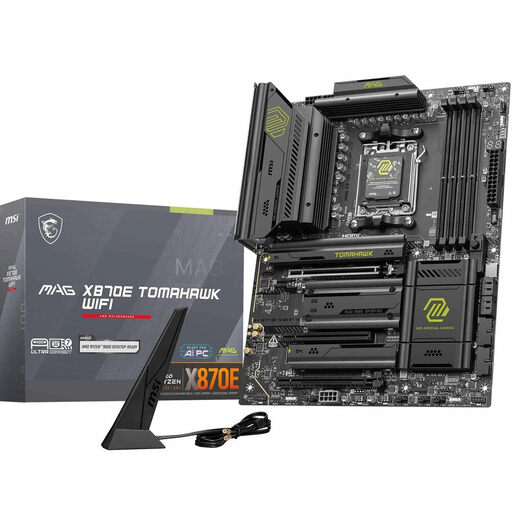
Why this product fits the profile: This ATX board is aimed at users who plan for multiple fast SSDs, the latest networking standards and headroom for powerful Ryzen processors.
The specification lists two M.2 Gen5 and two M.2 Gen4 slots. This lets you tailor your storage plan more precisely to your actual needs.
X870E chipset, PCIe 5.0 x16, up to four M.2 slots, Wi-Fi 7, Bluetooth 5.4 and 5G LAN.
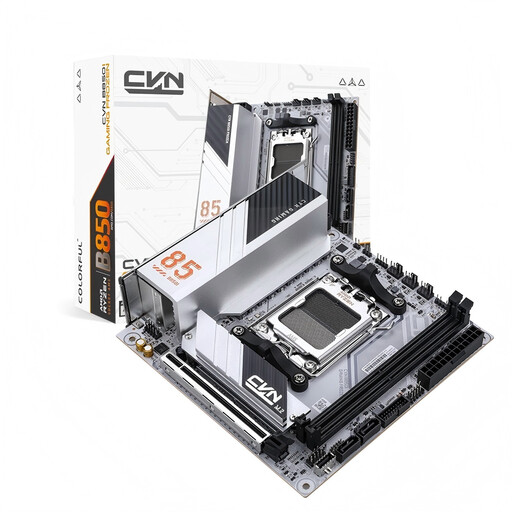
Why this product fits the profile: The Mini-ITX format with Wi-Fi 6E and two differently connected M.2 slots suits small gaming or work PCs.
The details explicitly state the 170 × 170 mm ITX format. This lets you check case compatibility before you buy.
One PCIe 5.0 x16 slot, one M.2 Gen5 and one M.2 Gen4 slot, plus 2.5 GbE LAN.
We’ve put together a complete, regularly updated list of products that fully meet these strict selection criteria and the safety regulations in force in the EU.
Before installation, make sure the case, power supply and CPU cooler are compatible with the motherboard. Switch the system off completely, disconnect it from the mains and protect the components from electrostatic discharge.
Also bear in mind:
Many B650, B850, X870 and X870E models listed in the product specifications support Ryzen 9000 processors. What matters is the official CPU support list, including the required BIOS version. Check these details with the relevant manufacturer before installation.
That depends on the graphics card and SSD. For a PCIe 4.0 graphics card, a PCIe 5.0 slot doesn’t automatically deliver a practical performance benefit. However, it can expand your upgrade options if you plan to use compatible components in the future.
For office work and many games, 32 GB is often a sensible starting point. Content creators, developers and users with large projects can benefit from 64 GB or more. What’s crucial is that the motherboard supports the capacity and module configuration you want.