
Lieferung heute & morgen

Qualitätsgarantie

Willkommens-Angebote freischalten: KOSTENLOSE Lieferung | Bis zu 80 % RABATT | Kostenlose 30-Tage-JoyPlus-Testphase
App herunterladen
Choosing the right motherboard is a crucial step when building a new PC. With the launch of AMD Ryzen 9000 processors and the new X870E and B850 chipsets, the AM5 platform is more relevant than ever. However, selecting a suitable AM5 motherboard can be complex, given the vast array of specifications like PCIe 5.0, DDR5 speeds, and VRM configurations.
This article serves as your guide. It provides objective information on the most important technical features and presents a selection of models for different use cases and budgets. Our goal is to provide you with an informed basis for deciding on your next PC system.
The choice of motherboard influences the performance, expandability, and future-readiness of the entire system. Three criteria are of particular importance.
The chipset is the primary determinant of a motherboard's connectivity and features.
Modern standards ensure your system's performance for years to come.
Stable power delivery is the foundation for reliable operation, especially with high-performance processors like those in the Ryzen 9000 series. The Voltage Regulator Modules (VRMs) on the motherboard are responsible for this. A configuration with numerous phases and high-quality components ensures consistent power output. Equally important are adequate heatsinks on the VRMs, chipset, and M.2 slots to prevent overheating and the associated performance throttling under load.
Based on technical specifications, we have compiled three models for different requirements.
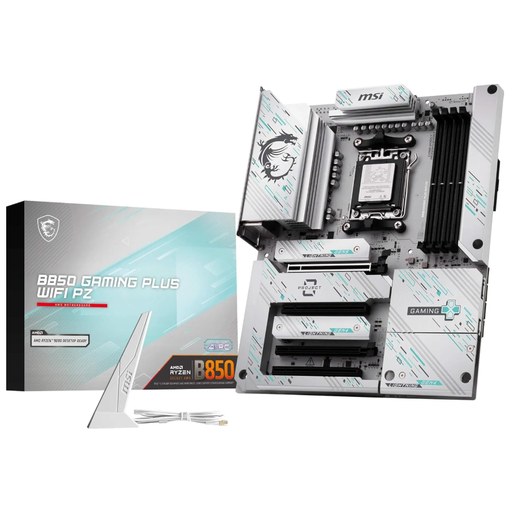
Why It Stands Out: This motherboard represents a modern and well-balanced solution for most users. With the B850 chipset, it offers future-ready features like a PCIe 5.0 x16 slot for graphics cards and an M.2 slot with Gen5 connectivity. The 12-phase power delivery system is designed for stable operation of current Ryzen processors.
Pros:
Who It's For: PC builders and gamers looking for an AMD gaming motherboard with current features and a great price-to-performance ratio. It's a solid foundation for systems with Ryzen 7 or Ryzen 9 processors, without the cost of a high-end X870E model.
View details for the MSI B850 Gaming Plus WIFI PZ
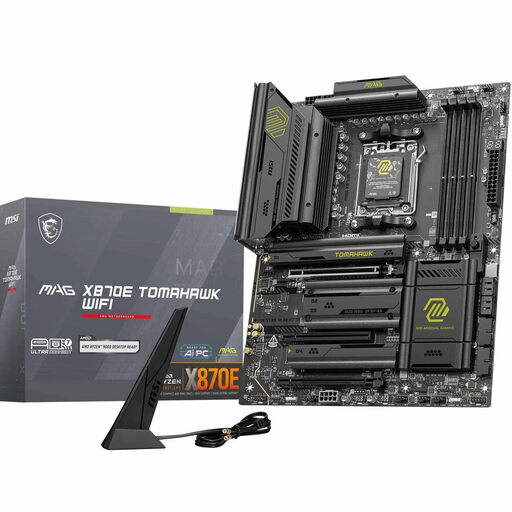
Why It Stands Out: The MAG X870E Tomahawk WIFI is designed for enthusiasts who demand maximum performance and connectivity. The 14+2+1 phase power system and 8-layer PCB provide an extremely stable foundation for high-end CPUs and overclocking. The X870E chipset enables the full bandwidth of PCIe 5.0 for both the graphics card and two M.2 SSDs simultaneously.
Pros:
Who It's For: Users who want to build a no-compromise system with a top-tier Ryzen 9000 series model. Ideal for overclockers, content creators, and gamers who use multiple high-speed components and aim for the best possible performance.
View details for the MSI MAG X870E Tomahawk WIFI
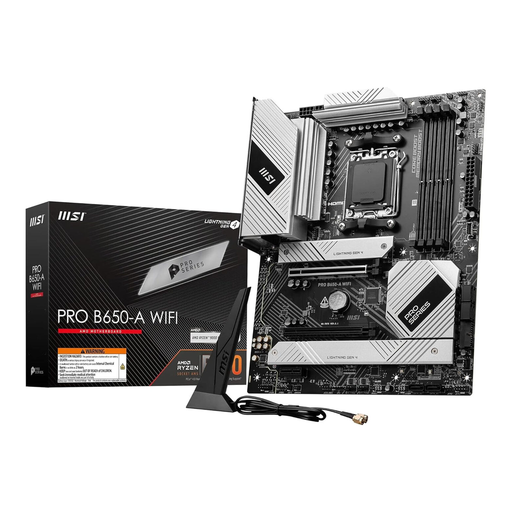
Why It Stands Out: This motherboard is a proven and cost-effective choice for the AM5 platform. It offers a solid feature set for mainstream systems, including compatibility with the entire Ryzen 7000 to 9000 processor family, support for fast DDR5 memory, and reliable cooling for the power delivery system.
Pros:
Who It's For: Budget-conscious PC builders whose needs are met by PCIe 4.0 speeds. It's an excellent foundation for systems with Ryzen 5 or Ryzen 7 processors for gaming and productivity, where a pragmatic price-to-performance ratio is a priority. If you want to buy an MSI motherboard that is reliable and attractively priced, this is a great option.
View details for the MSI PRO B650-A WIFI
The models presented here cover common scenarios. However, every PC build is unique. If your requirements are more specific or you want to compare more options, you might find the right product in our broader selection.
Discover our full range of Gaming PC Motherboards and find the perfect board for your system.
Which AM5 motherboard is best for a Ryzen 9000 processor? The choice depends on the specific CPU model and your use case. For high-end processors like the Ryzen 9 9950X, an X870E motherboard with robust power delivery is recommended to ensure stable performance, especially when overclocking. For mid-range Ryzen 9000 series models, a high-quality B850 motherboard is typically a very good and often sufficient choice.
Is a B650 motherboard still a good choice for 2026? Yes, for many users, a B650 motherboard remains a very sensible option. It supports all current AM5 processors (potentially after a BIOS update) and DDR5 memory. The main trade-off is usually limited PCIe 5.0 support, which is often restricted to either the graphics card slot or one M.2 slot. For users who don't absolutely need maximum bandwidth for both components simultaneously, it offers an attractive price-to-performance ratio.
What is the main difference between the B850 and X870E chipsets? The primary difference lies in the implementation of PCIe 5.0. According to AMD's specifications, X870E motherboards must provide PCIe 5.0 for both the primary graphics card slot and at least one M.2 storage slot. B850 motherboards must offer PCIe 5.0 for the graphics card, but not necessarily for an M.2 slot as well. Additionally, X870E boards tend to offer more high-speed USB ports and more extensive overclocking features.