
Lieferung heute & morgen

Qualitätsgarantie

Willkommens-Angebote freischalten: KOSTENLOSE Lieferung | Bis zu 80 % RABATT | Kostenlose 30-Tage-JoyPlus-Testphase
App herunterladen
If you're building or upgrading a PC with an AMD Ryzen processor, you'll find a huge selection of AM5 motherboards to choose from. Names like B850 motherboard, X870 motherboard, AMD motherboard with DDR5 or motherboard with Wi-Fi 7 sound technically impressive – but on their own, they don't tell you whether the board is right for your planned system.
As a Joybuy Product Recommendation Officer, I filter the relevant information using clear, understandable criteria. What matters isn't the number of buzzwords, but the combination of CPU compatibility, slots, memory support, case format and connectivity.
An X870E motherboard typically offers more high-speed connections and additional PCIe and M.2 options than a simpler B or A model. However, that doesn't automatically mean every feature is necessary for your PC. If you only plan to use one graphics card, one NVMe SSD and two memory modules, you probably don't need four M.2 slots or USB4.
Specifications like DDR5-8000 or DDR5-8400+ MT/s usually refer to overclocking profiles. The actual speed you can achieve depends on your CPU, memory modules, BIOS version and memory configuration. Before buying, you should check the manufacturer's Memory QVL and the recommended slots. For two modules, A2 and B2 are often the ones to use.
A PCIe 5.0 motherboard can only provide PCIe 5.0 on certain slots. On some models, this standard applies to the graphics card slot; on others, it also covers one or more M.2 slots. What's more, the available connectivity can depend on the Ryzen processor you're using. That's why you should always check the product description and manual before buying.
An AM5 motherboard needs a processor for the AM5 socket. The models listed here support Ryzen processors from the 7000, 8000 and 9000 series, depending on the manufacturer's specifications. With a newer processor, a BIOS update may be required. So check:
The term "Ryzen motherboard" alone isn't enough, as older AMD platforms use different sockets.
A motherboard with DDR5 is the relevant standard for AM5 systems. Four DIMM slots offer more flexibility than two, especially for future memory upgrades. Key details include:
For gaming and typical productivity tasks, two matching modules are often easier to configure than filling all four slots. If you're aiming for high clock speeds, you should consult the manufacturer's compatibility list.
An ATX motherboard like the MSI PRO B840-P WIFI or the MSI MAG X870 Tomahawk WIFI needs an ATX-compatible case. An mATX motherboard measures 244 × 244 mm, making it much more compact and suitable for smaller cases. Before buying, check the mounting holes, graphics card length, and clearance for the CPU cooler and M.2 heatsinks.
The following points are also important for the feature set:
With Wi-Fi 7, you also need to consider operating system and driver compatibility. Some product details note that Windows 11 version 24H2 or later is required for full functionality.
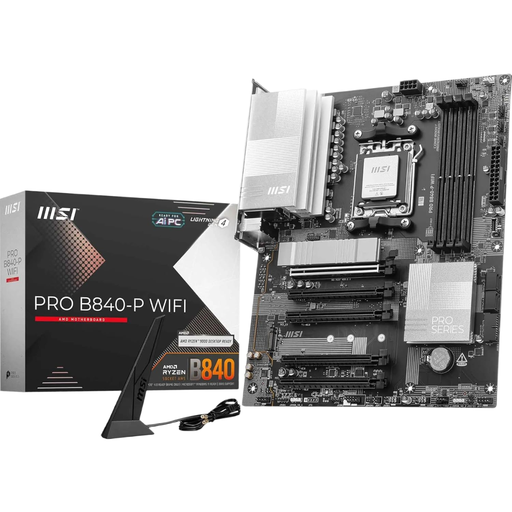
Why this product fits the profile: This ATX board combines AM5, four DDR5 slots and integrated Wi-Fi 7 with a straightforward feature set, making it ideal for a versatile everyday or gaming PC.
The product specs clearly state two M.2 slots and PCIe 4.0 x16. This makes it much easier to assess the actual expansion potential than relying on generic PCIe marketing.
Four DDR5 DIMM slots, 2.5 Gb LAN, Wi-Fi 7 and Bluetooth 5.4.
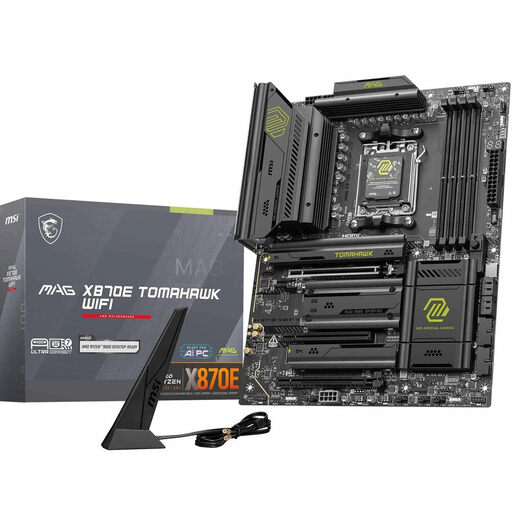
Why this product fits the profile: This X870E ATX motherboard is designed for users who plan to use multiple fast drives, high memory frequencies and extensive connectivity.
Two M.2 Gen5 and two M.2 Gen4 slots make the storage connectivity concrete and easy to understand.
PCIe 5.0 x16, four M.2 slots, Wi-Fi 7, 5G LAN and USB4 at 40 Gbit/s.
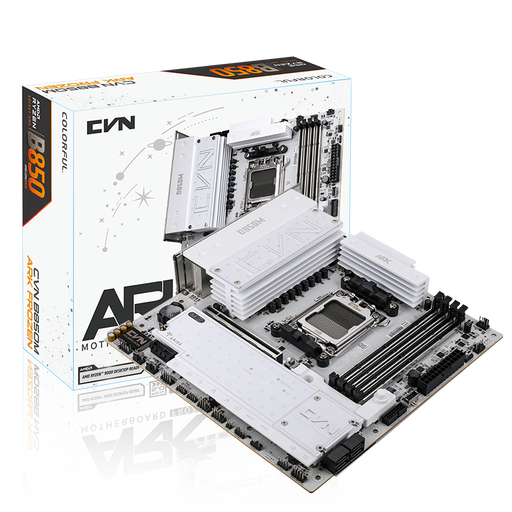
Why this product fits the profile: This mATX board is designed for compact systems with multiple M.2 drives, a PCIe 5.0 graphics card and wireless networking.
The compact format is backed up by specific dimensions and a clearly listed slot layout. This lets you check case compatibility in advance.
Three M.2 slots, PCIe 5.0 x16, 2.5 Gb LAN and Wi-Fi 7.
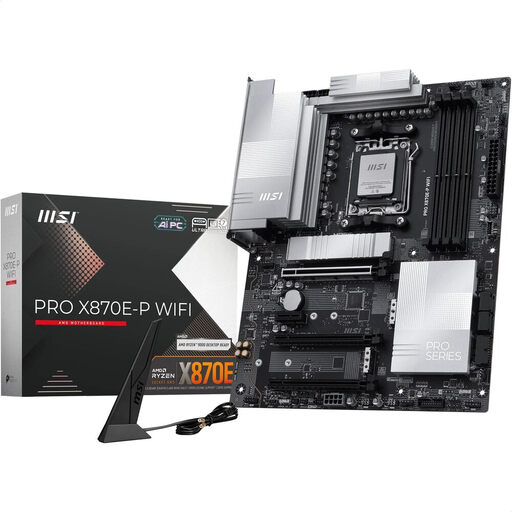
Why this product fits the profile: For extensive work and gaming systems, this ATX motherboard offers fast storage and network connections, plus a power delivery system designed for high loads.
The specifications clearly distinguish between one PCIe 5.0 x16 slot, one Gen5 M.2 slot and two Gen4 M.2 slots.
Four DDR5 slots supporting up to 256 GB, Wi-Fi 7, 5G LAN and USB4 Type-C.
Before you order, check your case, power supply and cooler together. When installing, disconnect the power supply and take precautions against electrostatic discharge. Do not touch the AM5 socket with your fingers. After the first boot, check the BIOS version, boot order and EXPO profile.
A high memory clock or a powerful Ryzen processor can place additional demands on your cooling and power supply. For stable operation, make sure the CPU cooler, case fans and M.2 heatsinks are all correctly installed.
We've put together a complete, regularly updated list of products that fully meet these strict selection criteria and the safety regulations in force in the EU.
Many current B650, B850 and X870 models list Ryzen 9000 in their compatibility lists. Even so, you should check the CPU support list and the required BIOS version for your specific model before installation.
Not necessarily. A graphics card can also run in a PCIe 4.0 slot. PCIe 5.0 is particularly interesting if you're planning to use new expansion cards or very fast NVMe SSDs in the long term.
The lifespan depends on operating conditions, cooling, power supply quality and upgrades. A well-ventilated case, up-to-date firmware and a suitable power supply reduce typical stresses. Compatibility with future CPUs cannot be guaranteed across the board, so you should always check the manufacturer's specifications.