
Lieferung heute & morgen

Qualitätsgarantie

Willkommens-Angebote freischalten: KOSTENLOSE Lieferung | Bis zu 80 % RABATT | Kostenlose 30-Tage-JoyPlus-Testphase
App herunterladen
An AM5 motherboard forms the technical foundation for a PC with the latest AMD Ryzen processors. Whether you’re building a gaming PC, a workstation or a content creator system, the right board determines which processors, memory, SSDs and expansion cards you can use later on.
However, buying one can often lead to unnecessary extra costs. A high price doesn’t automatically mean you’ll need all the ports it offers. Equally, a budget board might be unsuitable if the BIOS support, memory configuration or case size doesn’t match your planned system.
AMD uses the AM5 socket for Ryzen processors from the 7000, 8000 and 9000 series, provided the motherboard supports the CPU according to the manufacturer. Older AM4 boards, such as an A520 motherboard, require DDR4 memory and are not compatible with AM5 processors.
So don’t just look for the “AMD Ryzen” label – pay attention to the combination of Socket AM5, the chipset and the official CPU compatibility list.
Many product descriptions quote very high memory clock speeds. These figures often refer to overclocking using AMD EXPO or XMP and depend on the processor, BIOS version and the specific RAM modules. The maximum stated speed is therefore not a guaranteed standard value.
It’s more practical to check the following points:
A PCIe 5.0 motherboard can have different slots and M.2 connectors. On some models, only the graphics card slot is PCIe 5.0-capable; on others, one or more M.2 slots also support it. What’s more, actual support can depend on the Ryzen processor you’re using.
So check the breakdown in the spec sheet:
The chipset doesn’t determine speed alone, but it does affect features and expandability.
A more expensive chipset is only worthwhile if you’ll actually use the extra ports or expansion options.
An ATX motherboard typically measures around 305 × 244 mm and offers more slots as well as greater spacing between components. A Micro-ATX motherboard is more compact and fits into smaller cases, but often has fewer expansion slots.
Before you buy, you should check:
A motherboard with Wi-Fi can make a separate network adapter unnecessary. The choice ranges from Gigabit Ethernet and Wi-Fi 6 to Wi-Fi 7 motherboards with Bluetooth. For Wi-Fi 7, you’ll need a compatible operating system, up-to-date drivers and a suitable Wi-Fi router. In the UK, regional regulations for certain frequency bands may also apply.
For large file transfers or NAS systems, a 2.5 Gbit/s, 5 Gbit/s or faster LAN port can be relevant. For typical internet use, however, Gigabit Ethernet is often sufficient.

Why this product fits the profile: This Micro-ATX board is aimed at compact AM5 systems with DDR5 memory and a single graphics card.
The technical specifications clearly and separately list Socket AM5, DDR5, a PCIe 4.0 x16 slot and one M.2 connector.
Two DDR5 DIMM slots, up to 96 GB of memory, one M.2 PCIe 4.0 x4 connector and HDMI 2.1.
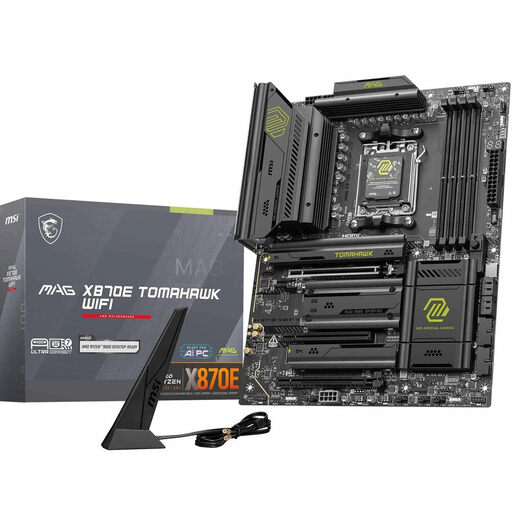
Why this product fits the profile: This ATX board combines Ryzen 7000, 8000 and 9000 support with extensive memory and port features.
The feature set separately lists PCIe 5.0, two M.2 Gen5 slots and two M.2 Gen4 slots, rather than just advertising “High Speed” in general.
Four DDR5 slots up to 256 GB, Wi-Fi 7, 5 Gbit/s LAN and USB4 Type C with up to 40 Gbit/s according to product specifications.
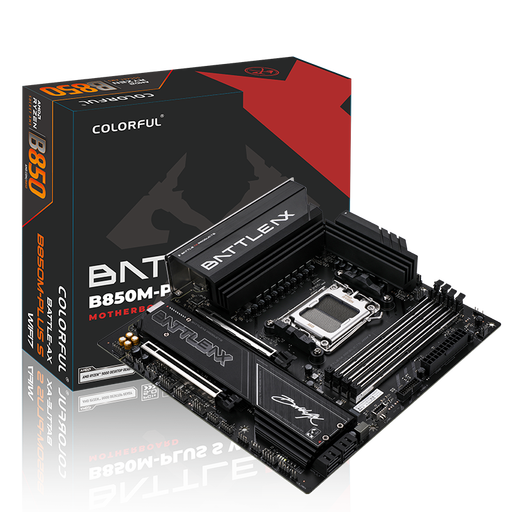
Why this product fits the profile: This Micro-ATX board is ideal for compact systems with Wi-Fi 7, fast networking and multiple expansion options.
Wi-Fi 7, 5 Gbit/s LAN and PCIe 5.0 are described with specific ports and operating system notes.
Four DDR5 slots up to 192 GB, two M.2 slots, PCIe 5.0 x16, Bluetooth 5.4 and three 5V ARGB headers.
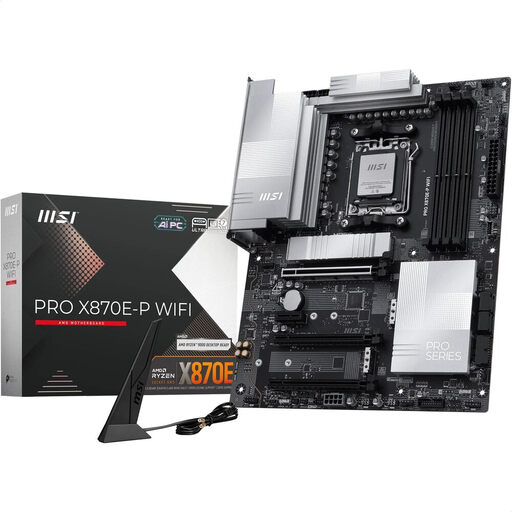
Why this product fits the profile: This ATX motherboard offers plenty of memory and expansion options for workflows involving large files and multiple drives.
The three M.2 connectors are split between Gen5 and Gen4; PCIe 5.0, USB4 and 5 Gbit/s LAN are also specifically mentioned.
Up to 256 GB DDR5, Wi-Fi 7, Bluetooth 5.4, PCIe 5.0 x16 and one M.2 Gen5 x4 connector.
We’ve put together a complete, regularly updated list of products that fully meet these strict selection criteria and the safety regulations in force in the EU.
Many B650, B850 and X870E models support these Ryzen series. What matters, however, is the specific CPU support list and, where applicable, the BIOS version. Before installation, you should check the motherboard manufacturer’s details for your particular processor.
The lifespan depends on the power supply, cooling, BIOS support and planned upgrades. A board with four DDR5 slots and multiple M.2 connectors usually offers more options for future expansion than a particularly compact model with two DIMM slots.
An X870E motherboard can be worthwhile if you need PCIe 5.0, several fast M.2 drives, USB4, Wi-Fi 7 or a robust power delivery system. For a gaming PC with one graphics card and one SSD, a B650 or B850 motherboard may already offer more suitable features. What matters is which ports and expansions you’ll actually use.