
Lieferung heute & morgen

Qualitätsgarantie

Willkommens-Angebote freischalten: KOSTENLOSE Lieferung | Bis zu 80 % RABATT | Kostenlose 30-Tage-JoyPlus-Testphase
App herunterladen
An Android tablet can make learning, mobile working, streaming or gaming much easier. The range stretches from compact entry-level devices to powerful tablets with a SIM card. At the same time, many product specs can look more impressive on paper than they actually are in daily use. High RAM numbers, large batteries or terms like "AI" alone don't tell you much about how well a device will really suit you.
This buying guide shows you which technical details actually matter before you buy, and which devices are best for different types of use.
Manufacturers often quote figures like "20 GB RAM" or "32 GB RAM". Part of this is usually physical memory, which is then expanded virtually using internal storage. This can help when switching between apps, but it doesn't replace a more powerful processor or a larger amount of genuine RAM.
So pay attention to the exact wording, for example 4 GB + 12 GB virtual memory. For simple tasks like web browsing, video playback and word processing, a moderate spec is perfectly adequate. For more demanding games or heavy multitasking, you also need to consider the processor, graphics performance and display.
The term 5G Wi-Fi usually refers to the 5 GHz Wi-Fi band. It does not mean a connection to the 5G mobile network. If you want to go online without Wi-Fi when you're out and about, you need a genuine 5G tablet or a 4G LTE tablet with a SIM card slot or eSIM support.
So before you buy, check the following:
A figure like 8,800 or 10,000 mAh is a useful guide, but it's not a guaranteed battery life. Display brightness, processor, mobile data, refresh rate and gaming all have a big impact on power consumption. A tablet with a large display will often use more energy than a compact model under similar usage.
Also check the charging speed, the type of port used and what's included in the box. Some devices don't come with a mains adapter.
For watching series, reading PDFs and using split-screen, a tablet with a large display of around 11 inches or more can be more comfortable. A 12- or 14-inch tablet gives you more workspace, but it's less portable. Compact devices around 8 to 9 inches are easier to carry and hold in one hand.
The resolution should match the display size. A higher resolution can make text and images look sharper. A refresh rate of 90 or 120 Hz gives smoother motion, but it can increase power consumption depending on how you use it.
Don't just compare the number of processor cores. The chip series, clock speed, graphics solution and operating system optimisation are also important. The performance you need for office work, video streaming and e-learning is different from what you need for a gaming tablet.
For internal storage, 128 GB is a practical starting point for many everyday users. If you store lots of videos, games or offline maps, choose a model with a microSD slot. Some devices support cards up to 2 TB according to the product specs; actual compatibility can depend on the card and format.
An Android 15 tablet or Android 16 tablet can offer modern features and security options. What really matters, though, is how long the manufacturer provides security and system updates. Check the update commitment before you buy.
For productive work, USB-C, Bluetooth, GPS and a headphone jack are all handy. A tablet with a stylus is great for handwritten notes and sketches, provided the stylus is actually included in the box. With Samsung models, for example, an S Pen may be included; with other devices, the stylus is only available in certain bundles.
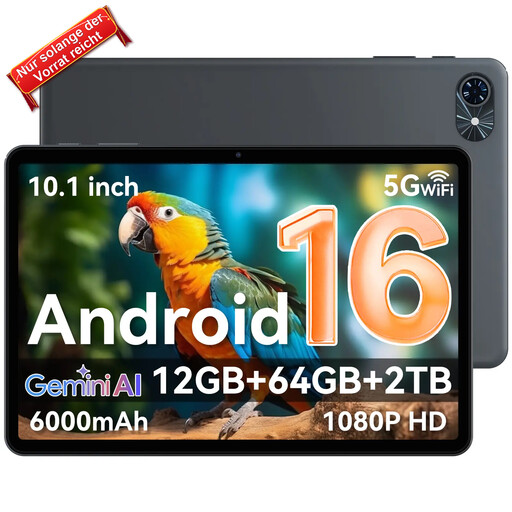
Why this product fits the profile: This 10.5-inch model is aimed at users looking for an Android tablet for streaming, browsing and simple everyday tasks. The 64 GB of internal storage can be expanded with a memory card if needed.
The product spec clearly separates 4 GB of physical RAM from 8 GB of expansion. It also doesn't confuse 5G Wi-Fi with 5G mobile data.
10.5-inch display, 6,000 mAh battery, Bluetooth 5.0 and Android 16 according to the product specs.

Why this product fits the profile: This model combines a high-resolution AMOLED display with mobile data, an S Pen and Samsung DeX. It's ideal for professionals and students who want to combine note-taking, multitasking and mobile use.
The specs clearly distinguish between 5G mobile data, Wi-Fi 6E, eSIM and Nano-SIM. The S Pen is explicitly listed as included.
11-inch Dynamic AMOLED 2X display with 120 Hz, 12 GB LPDDR5X RAM, 5G and microSD support up to 2 TB according to the product specs.
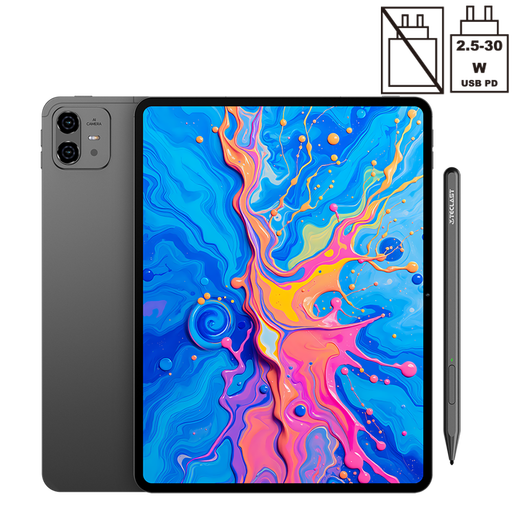
Why this product fits the profile: This 12.7-inch tablet is aimed at users who want to combine drawing, note-taking, media playback and mobile internet in one device.
The pressure sensitivity with 4,096 levels and the included T-Pen are specifically stated. Dual-SIM 4G LTE is listed separately from 5G Wi-Fi.
2K display, 10,000 mAh battery, 256 GB storage, Dual-SIM 4G LTE and expandable storage according to the product description.

Why this product fits the profile: The compact format is ideal for users who prefer gaming and streaming on the go. The performance-focused chipset and high refresh rate display are designed for smooth visuals.
The product page explicitly states that no mains adapter is included. A certified USB-C PD charger is required for charging.
8.8-inch 2.5K IPS display with 144 Hz, Snapdragon 7+ Gen 3, 256 GB storage and 7,300 mAh battery according to the product specs.
We've put together a full, regularly updated list of products that fully meet these strict selection criteria and the safety regulations in force in the EU.
Battery life depends on display brightness, processor, app usage and mobile data. Manufacturer figures for video playback are only comparable under specific conditions. For heavy users, you need to consider battery capacity, charging speed and an energy-efficient processor together.
A tablet with a SIM card can use mobile data over 4G LTE or 5G, depending on the model. Phone calls and SMS, however, aren't supported on every device. So check the details on SIM type, mobile bands and supported features.
For streaming and cloud use, 64 GB can be enough, as long as you don't store many files offline. 128 GB or 256 GB gives you more room for study materials, photos, games and multiple user profiles. A microSD slot can add even more flexibility.