
Lieferung heute & morgen

Qualitätsgarantie

Willkommens-Angebote freischalten: KOSTENLOSE Lieferung | Bis zu 80 % RABATT | Kostenlose 30-Tage-JoyPlus-Testphase
App herunterladen
An Android tablet with a keyboard and stylus promises the perfect blend of productivity and mobility—a flexible alternative to a laptop for university, the home office, or creative projects. However, the market is flooded with options whose technical specs often overpromise and underdeliver. Before you make a decision, it's crucial to understand the most common pitfalls that can lead to an unsatisfying purchase.
This guide will help you separate marketing hype from reality and find a device that truly meets your needs.
Many budget-conscious buyers fall into traps that severely limit their new device's utility. Pay close attention to these three points:
To avoid buyer's remorse, focus on the objective technical features that are critical for your use case.
A tablet PC with a keyboard should be able to handle multiple tasks smoothly. An octa-core processor is a good foundation for this. When checking the RAM, pay attention to the amount of physical RAM. For smooth multitasking, such as researching for university while simultaneously writing papers, 6 GB or 8 GB of physical RAM is a solid starting point. Virtual expansion is a nice bonus, but not a substitute for actual RAM.
Display quality is crucial for a pleasant work and media experience. A 2K resolution (approx. 2000 x 1200 pixels) ensures a sharp image. A higher refresh rate (e.g., 90 Hz) makes animations and scrolling appear smoother.
Also, check the connectivity options. Do you only need Wi-Fi, or are you often on the go? A tablet with 4G SIM support gives you the freedom to be online even without a Wi-Fi hotspot—ideal for commuters or for attending lectures in different buildings as a tablet for university.
A true 2-in-1 tablet experience lives or dies by the quality of its accessories. A magnetically attachable keyboard with good tactile feedback and a precise stylus, ideally with pressure sensitivity, transform the tablet into a productive tool. Pay attention to the battery capacity, specified in milliampere-hours (mAh). Values of 8,000 mAh or more suggest solid battery life for a full day of work or university.
Here are some recommendations tailored to specific user profiles that purposefully avoid the pitfalls mentioned.
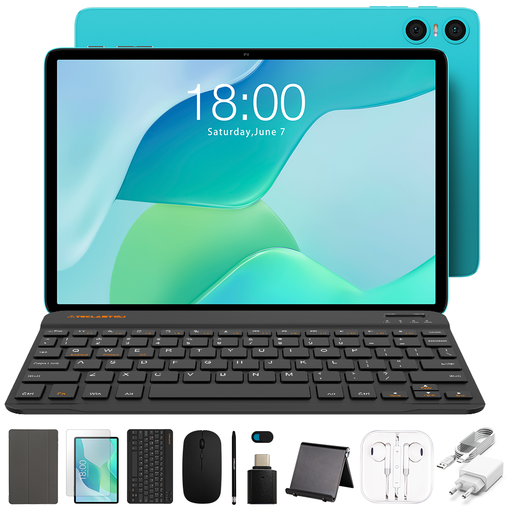
Why it's a good fit: This bundle is a great choice for students or users who need a device for basic tasks like email, web browsing, and word processing. It offers a complete starter package at a very accessible price point.
It bypasses the incomplete accessory trap by being sold as a complete bundle from the start, including a keyboard, case, mouse, and stylus. There are no unexpected additional costs.
The all-inclusive accessory package makes it ready to use out of the box. Its performance is tailored for everyday office and web applications.
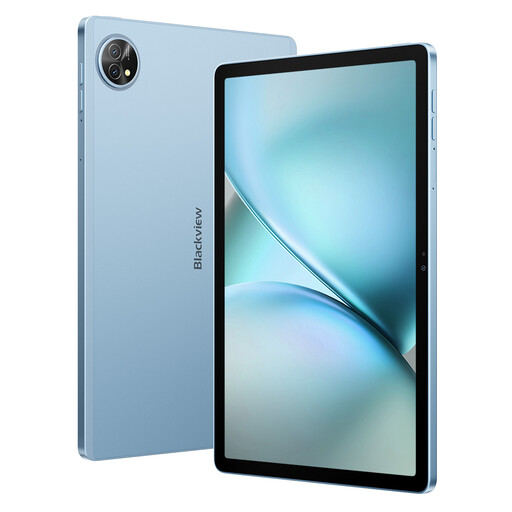
Why it's a good fit: Ideal for students and home office users who need a versatile device for notes, research, video conferencing, and entertainment. The PC mode provides a desktop-like interface for more productive work.
It features Widevine L1 certification for HD streaming and provides a clear specification for its physical RAM (8 GB). The 4G connectivity ensures independence from Wi-Fi networks.
The 11-inch 2K display with a 90 Hz refresh rate ensures a smooth and sharp viewing experience. The dual SIM capability with 4G/5G support offers maximum flexibility.

Why it's a good fit: The large display and pressure-sensitive stylus are tailored to the needs of digital artists, design students, and demanding multitaskers who require a large canvas and precise input.
It directly addresses the low-quality accessory pitfall: according to the manufacturer, the stylus supports 4096 levels of pressure sensitivity, setting it apart from basic styluses and qualifying it for creative work.
The large 12.7-inch 2K display provides ample space for creative projects and multitasking. The Helio G99 processor delivers solid performance for more demanding applications and games.
We have compiled a complete, up-to-date list of products that fully meet these strict selection criteria and all relevant safety standards.
1. What does "virtual RAM" mean on an Android tablet? Virtual RAM is a software feature that uses a portion of the internal storage (ROM) as temporary memory. This can help keep more apps open in the background. However, this technique is significantly slower than the physical, soldered-on RAM chip. A tablet with 8 GB of physical RAM is generally more powerful than one with 4 GB of physical and 8 GB of virtual RAM.
2. Can I draw precisely with any tablet that has a stylus? No. Precise drawing and writing require an active stylus with pressure sensitivity. Many budget-friendly bundles only include a simple capacitive stylus, which merely simulates a fingertip. Look for specifications like "4096 levels of pressure sensitivity" if you plan to use the tablet for digital art or detailed handwritten notes.
3. Is a tablet with a SIM card a good choice for university? A tablet with 4G SIM support can be very beneficial for students. Wi-Fi in lecture halls or libraries is often congested or unreliable. With your own mobile data connection, you have access to lecture materials, online research tools, and cloud storage anytime, anywhere, without depending on public networks.