
Lieferung heute & morgen

Qualitätsgarantie

Willkommens-Angebote freischalten: KOSTENLOSE Lieferung | Bis zu 80 % RABATT | Kostenlose 30-Tage-JoyPlus-Testphase
App herunterladen
An Android tablet with stylus needs to cover several tasks: sketching, taking notes during your studies, editing documents, streaming videos and staying connected on the go. In practice, however, it’s not individual features but unclear product descriptions that often lead to the wrong purchase. What really matters are the actual stylus compatibility, the meaning of advertised RAM sizes and mobile network support.
The specification 4096 pressure levels describes how finely a compatible stylus can distinguish the pressure applied. On its own, though, it says nothing about the quality of the drawing app, latency, palm rejection or tilt recognition. So check whether the included T-Pen is actually supported and whether your preferred apps make use of these features.
A tablet for drawing should also offer a sufficiently large working area, precise touch detection and a stable stylus connection. For handwritten notes, other features such as low weight and good palm rejection are more important than a high pressure-level count.
With a tablet boasting 20 GB of RAM, the figure is often made up of physical memory plus virtually allocated storage. For example, the TECLAST ArtPad Pro is listed as having 8 GB of physical RAM plus 12 GB of virtual memory. Virtual memory uses part of the internal storage and is not the same as additional real RAM.
For streaming, note-taking and having several apps open, this setup can be sufficient. For demanding drawing projects or heavy multitasking scenarios, you should also consider the processor, app compatibility and the available internal storage.
A 4G LTE tablet needs a compatible SIM card and must support the frequency bands used by your mobile network provider. Dual-SIM doesn’t automatically mean that two cards are active simultaneously with all functions. Before buying, it’s worth checking the device’s technical specifications and the network bands of your tariff.
A 12.7-inch tablet offers more space for drawing, reading and editing documents than a compact model. A 2K display tablet shows content at a higher resolution; fine lines and small text can appear clearer as a result. However, resolution alone doesn’t replace good colour reproduction or suitable brightness for your intended use.
The TECLAST ArtPad Pro combines a 12.7-inch display with 2K resolution. If you prefer an especially large working window for split-screen applications, you could also consider a 14-inch model. Bear in mind, though, that weight and the space it takes up in your rucksack will increase.
Pay attention to three points:
A package with a tablet with keyboard and protective case can be useful for studying and office work. For creative use, the keyboard shouldn’t unnecessarily restrict the drawing area. The accessories can also vary depending on the specific offer.
256 GB of storage gives you more room for drawing projects, offline videos, documents and apps than 64 or 128 GB. Still, check whether a microSD card is supported and whether apps or files can be moved to the additional storage. If you regularly work with large video or graphics files, don’t judge the available storage by the advertised figure alone.
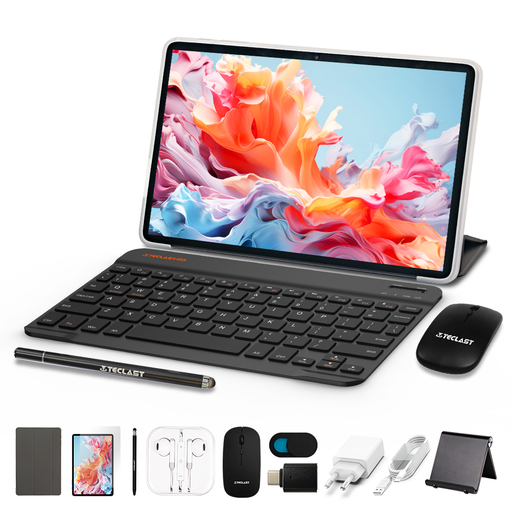
Why this product suits the profile: This set is aimed at users who want a complete accessory package for notes, simple drawings and mobile office tasks.
The product name explicitly mentions the stylus, keyboard and folio case. This makes it easier to understand the accessory contents before buying.
10.1-inch display, 128 GB storage, 120 Hz specification plus keyboard, mouse and stylus accessories.
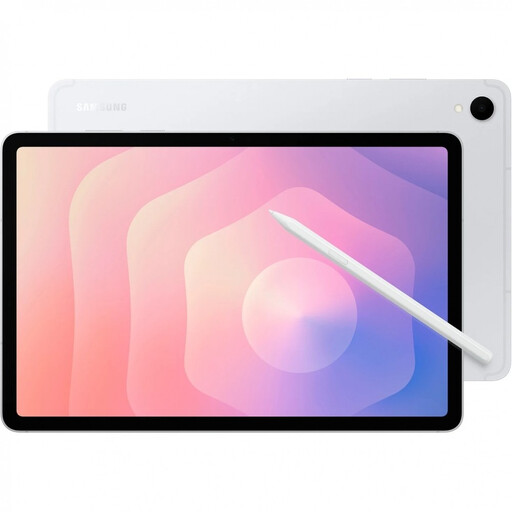
Why this product suits the profile: This model combines an AMOLED display, 5G connectivity and an included S Pen for notes, drawings and productive work.
The S Pen with 4096 pressure levels is explicitly mentioned. The 5G support and microSD slot are also clearly listed.
11-inch AMOLED display with 2560 × 1600 pixels, 120 Hz, 12 GB RAM and expandable storage up to 2 TB.

Why this product suits the profile: The 12.7-inch format, 2K resolution, 4G LTE and comprehensive accessories suit creative users and mobile professionals.
The specifications separate 8 GB of RAM from 12 GB of virtual memory. The T-Pen, 4096 pressure levels, Dual-SIM 4G LTE and 256 GB storage are also clearly stated.
10,000 mAh battery, 18 W USB-C charging input, Widevine L1 plus keyboard and protective case as part of the stated package.
We’ve put together a complete, regularly updated list of products that fully meet these strict selection criteria and the safety regulations in force in the EU.
For drawing, a compatible active stylus, precise pressure detection and a sufficiently large display are crucial. A 12.7-inch 2K model like the TECLAST ArtPad Pro offers a larger working area. For handwritten notes, a more compact device with a lower weight can be more practical.
Battery life depends on display brightness, mobile network use, app usage and video playback. A battery with 8,800 or 10,000 mAh offers a greater capacity reserve than smaller models, but doesn’t allow a blanket statement about actual usage time. For a long lifespan, avoid extreme temperatures and use a suitable charger.
The tablet itself doesn’t incur monthly charges. However, for mobile internet you’ll need a separate mobile tariff or an additional SIM card. The costs depend on the provider, data allowance and contract model. At home, Wi-Fi can allow you to use the tablet without an additional tablet tariff.