If you want to see your frames, preview and tool panels at the same time, start by comparing the resolution and screen dimensions with your desk. For colour-managed previews, the right colour mode and correctly configured colour management are also important. Choose ports and a stand to suit your laptop and workspace, rather than judging suitability by a colour gamut figure or high refresh rate alone.
Which monitor is right for you?
Keep an eye on frames and timeline
If you want to see the preview, frames and tools at the same time, you’ll need to balance screen space against the room you have on your desk. EIZO and ASUS specifications illustrate the different resolutions available on 27-inch screens.
Animation with a colour-managed preview
If you’re working to a specific output format, your colour workflow should be set up to match. The Blender Foundation explains that the choice of display colour space depends on the target device and its capabilities.
Laptop use and limited desk space
If you work on a laptop, check the ports on the specific laptop and monitor. The stand’s dimensions and adjustment options also matter when setting up your screen. The German Social Accident Insurance (DGUV) lists lighting and ergonomic workstation design among the relevant considerations for screen-based work.
What should you look for when buying?
First, compare the usable workspace with the dimensions of your desk. Then decide on your output format, laptop connection and preferred adjustment options.
| What you need |
What to check before buying |
Who it matters most to |
| See frames and preview at a glance |
Resolution, screen size and stand dimensions; check your software at the scaling setting you plan to use. |
If I want to arrange the timeline, preview and tools together, the workspace needs to fit on my desk. This is the top priority for around 25% of consumers. |
| Judge colours accurately |
Check your output format, the available colour mode and colour management in your software and operating system. |
If I animate for a specific output format, I want the display and colour workflow to match it. Around 25% of consumers put a colour-managed preview first. |
| Pay only for the features you need |
Compare specific models against the features you need, and check the relevant product page. |
If I mainly need the basics for working with frames, I don’t want to pay for features I won’t use. Around 20% of consumers prioritise the features they need and keeping the initial cost down. |
| Fit it on a small desk |
Check the stand’s depth, adjustment options and potential glare where you plan to put it. |
If desk space is limited, getting the right position matters more to me than extra features. Around 15% of consumers prioritise how the monitor will fit into their workspace. |
| Connect it to a laptop |
Check the video output, monitor input and cables; confirm the required charging power separately. |
If I want to use the monitor with my laptop, I need to be sure that the specific connection will meet my needs. Around 15% of consumers put laptop connectivity first. |
Avoid common misconceptions
-
A high DCI-P3 figure doesn’t prove accurate SDR colour reproduction
Colour gamut coverage and a correctly configured display are two different things. The Blender Foundation notes that an unsuitable colour-space mapping can lead to distorted results.
First decide on your output target, then check the colour mode, profile and settings in your animation software.
-
USB-C doesn’t automatically mean video and sufficient charging power
The name of a port alone doesn’t confirm which features will work with a particular combination of monitor and laptop.
Check video output and power delivery separately in the specifications for both devices.
-
Screen size alone doesn’t tell you how much space you’ll need
The stand and how you position the monitor affect how much desk space remains free and whether you can place the screen where you need it.
Measure the space available and compare the stand’s dimensions and adjustment options. Also consider light sources that could cause glare on the screen.
Key brands at a glance
ASUS
The ProArt PA278QV is a 27-inch WQHD option for an SDR workflow using sRGB or Rec.709.
- ASUS lists 100% sRGB and Rec.709, factory calibration and an adjustable stand for the PA278QV.
- The listed connections for this model are HDMI and DisplayPort. ASUS distinguishes it from the PA278QGV; manufacturer specifications don’t replace testing an individual unit.
BenQ
The DesignVue PD2705U is a 27-inch 4K option with USB-C.
- BenQ lists 99% sRGB and 99% Rec.709 for the PD2705U.
- For an accurate colour preview, the colour mode and software settings need to match your output target.
LG
The UltraFine 27UP850K-W combines a 27-inch 4K screen with USB-C and an adjustable stand.
- LG lists 95% DCI-P3 as a typical figure for this model.
- The typical gamut figure alone doesn’t prove the accuracy of an individual unit or guarantee the right display for sRGB content.
EIZO
The ColorEdge CS2740 is a 27-inch 4K option for a dedicated colour-managed workflow.
- EIZO describes it as offering room for a timeline and palettes.
- Whether additional colour features are useful depends on your output target and how your workflow is set up.
Dell
The UltraSharp U2724D is a 27-inch WQHD option if an adjustable screen position and workspace are your priorities.
- Dell lists a resolution of 2560 × 1440 and a height-adjustable stand.
- These model specifications alone don’t establish whether it’s suitable for a particular colour-critical animation workflow.
Joybuy products for animation frames
The following Joybuy picks include QHD and 4K monitors for working with frames and previews. Compare screen size and features with your workspace, and check which colour and connection options you actually need.
 No image available
MSI PRO MP273UPDE E6, 27-inch, 4K UHD, IPS
The 4K resolution may appeal if you want a high-resolution workspace for frames and previews.
Listed in the product name: 27 inches, IPS, 60 Hz and HDR Ready.
View at Joybuy
 No image available
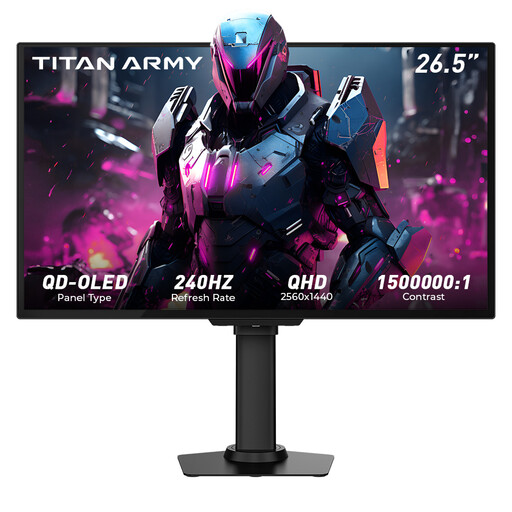
TITAN ARMY G2785S Flta, 26.5-inch, QD-OLED, QHD
QHD is an option if you want to arrange frames and previews on a single monitor.
Listed in the product name: 2560 × 1440, HDR10 and 240 Hz.
View at Joybuy
 No image available
MSI MAG 272QPDE QD-OLED X24, 27-inch, QHD
The 27-inch QHD specification gives you an idea of how much space you’ll need to arrange previews and frames.
Listed in the product name: 2560 × 1440, 240 Hz and USB-C.
View at Joybuy
 No image available
INNOCN 2751S PLUS, QHD
QHD is an option for a workspace with room for frames and previews.
Listed in the product name: IPS, 275 Hz, 1 ms, 99% sRGB and 99% Adobe RGB (1931). For a colour-critical preview, also check the colour mode and settings for your output target.
View at Joybuy
 No image available
INNOCN CB27U1, 27-inch, 4K UHD
The 4K resolution may be useful for viewing frames and interface elements in detail.
Listed in the product name: 3840 × 2160, IPS, 120 Hz, USB-C with 90 W Power Delivery, HDMI, DisplayPort and a height-adjustable stand.
View at Joybuy
Frequently asked questions
Is a wide colour gamut enough for a reliable animation preview?
No, a wide colour gamut on its own isn’t enough. Set up the display for your output target and check the colour management settings in your software and operating system. The Blender Foundation notes that a mismatch between display settings and the device can distort results.
How should I set up a monitor in a student bedroom?
Measure the screen and stand, and check that the monitor fits in the space you have in mind. Position it so you can see the display clearly and minimise glare from light sources. This is general workspace advice, not a blanket legal requirement for a private student bedroom.
What should I check about energy use and faults?
Compare the EU energy label and the consumption figures for the specific model; the European Commission explains how electronic displays are labelled. If you buy faulty goods from a business seller, you have a statutory guarantee of at least two years, as explained by the European Union’s Your Europe service. This is separate from a manufacturer’s warranty.
Can I cancel an online monitor purchase in Germany?
For online consumer purchases, you generally have a 14-day right of withdrawal from the date you receive the goods. The Verbraucherzentrale advises that you must notify the retailer if you wish to withdraw. Check the terms of your specific purchase, and distinguish the right of withdrawal from claims relating to faulty goods.


