PDF annotators
You highlight entries or passages and want to use the annotated file again after your field trip.


If your reading list includes colour illustrations, or you need apps beyond PDFs, a colour tablet could suit the way you plan to use it. Try the whole process, from importing to exporting, with one of your own files. If you mainly read prepared texts and add handwritten notes, E-Paper is another option. Choose based on your lighting conditions, the apps you need, and the stylus and offline features available.
You highlight entries or passages and want to use the annotated file again after your field trip.
You read longer passages in changing daylight and want to compare matte colour displays and E-Paper using your own pages.
You can’t rely on having a connection while you’re out, so you prepare your reading list, PDFs and any necessary account set-up before you leave.
A good fit if: your reading list includes colour illustrations or you want to use apps beyond PDFs.
Consider: Apple does not list a Pencil in the box contents for the iPad (A16); also check how readable your file is in the lighting conditions you expect.
A good fit if: you want colour apps and more room for fixed PDF pages, and prefer a matte finish.
Consider: Lenovo’s matte display is specific to the Tab P12 with Matte Display ZAD50005SE variant; a matte finish does not guarantee readability in direct sunlight.
A good fit if: reading and handwritten notes are your priorities, and you can transfer your files to the device in advance.
Consider: the reMarkable Paper Pro’s proprietary operating system may limit the apps you need. Check app availability, your file and the export process on the device itself.
| What matters | What to check before buying | Who it matters most to |
|---|---|---|
| Using PDFs again | Import a typical PDF, annotate it, then open the exported file on the device you plan to use afterwards. | If I need to open or share my highlights later, I test the whole file process. Around 36% of consumers put keeping and sharing annotated PDFs first. |
| Reading in daylight | View a page with small text or images on the specific display variant in the lighting conditions you expect. | If I read for long periods outdoors, I care about how my own pages look in changing light. Around 29% of consumers prioritise readability in daylight. |
| Access without internet | Transfer files in advance, then try opening and annotating them without Wi-Fi. | If I can’t count on a reliable connection where I’m going, I still want to be able to open my prepared reading list. Around 21% of consumers make offline access their main concern. |
| Stylus and accessories | Check the box contents and compatible stylus for the exact device variant. | If I want to write by hand straight away, I check that the right stylus is actually included. Around 14% of consumers prioritise the total cost of a stylus set-up that’s ready to use. |
A compatible stylus model isn’t necessarily included in the box. Without the right stylus, you won’t be able to use your planned handwritten workflow straight away.
Before buying, compare the box contents and exact stylus model for the device variant you’re ordering.
If the right stylus isn’t included, you’ll need to budget for it separately; make sure it’s compatible with your tablet.
You may be able to use a prepared file offline, while transferring it, syncing or using some extra features may still require a connection.
Set up your device before you set off and test opening, annotating and exporting a real file, including without Wi-Fi.
Lenovo specifically describes the Tab P12 with Matte Display ZAD50005SE as the matte variant; the name Tab P12 alone doesn’t confirm that it’s this version.
Check the full variant name and model number on your order.
The reMarkable Paper Pro uses a proprietary operating system, while BOOX lists Android 15 for the Note Air5 C. That doesn’t mean every app you need is available on both devices.
Check the specific app you need and your PDF workflow on the device before choosing either option.
The Galaxy Tab S10 FE is a colour tablet option with an S Pen for handwritten PDF work.
The iPad (A16) is a colour tablet option for marking up documents in supported iPad apps.
The Tab P12 with Matte Display ZAD50005SE is a matte colour display variant, offered with a “+ Pen”.
According to the manufacturer, Paper Pro is designed for documents and handwritten work.
The Note Air5 C is an E-Paper option where you can check whether the Android apps you need are available, as well as consider stylus input.
This selection includes three colour tablet variants with stylus input and one E-Ink device for handwritten notes. For your reading list, check the specific app, offline access and readability where you plan to use it.
 No image available
For handwritten notes on a colour tablet if you prefer a larger display.
The product title lists a 13.4-inch 2K display, Android 15 and an included T-Pen with 4096 pressure levels. The product description advises against exposing the device to direct sunlight for extended periods.
 No image available
For reading and handwritten notes on an E-Ink device; check that your PDF and the way you want to work are a good match.
The product details list a 10.65-inch E-Ink display and an included protective case; the description also lists an included stylus. According to the product description, real-time transcription in 16 languages requires an internet connection.
 No image available
For handwritten notes on a colour tablet if you’d also like a keyboard for typing.
The product title lists a 12.7-inch 2K display, Android 15, an included T-Pen with 4096 pressure levels, a protective case and an English Bluetooth keyboard. The product description advises against exposing the device to direct sunlight for extended periods.
 No image available
For handwritten notes on a colour tablet if you’d like to include a protective case.
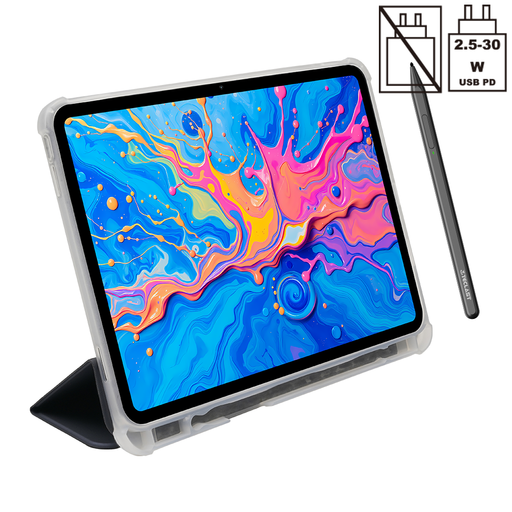
The product title lists a 12.7-inch 2K display, Android 15, an included T-Pen with 4096 pressure levels and a protective case. The product description advises against exposing the device to direct sunlight for extended periods.
Transfer the documents you need before you set off, try opening them without a connection, then check that you can export them. reMarkable says you can use a reading list offline after signing in and transferring your content; converting handwriting, however, requires Wi-Fi and a sign-in. You should also test the offline process on other devices and apps.
No: stylus compatibility and having a stylus included are two different things. Apple lists compatible Pencil models for the iPad (A16), but doesn’t include a Pencil in its listed box contents. Samsung says the S Pen is included with the Galaxy Tab S10 FE. Check the variant you’re ordering and the app you plan to use.
For a consumer purchase, your statutory rights are against the seller; this is separate from a manufacturer’s warranty. The Verbraucherzentrale says new goods are generally covered by a two-year legal guarantee and explains the requirements for making a claim.
Electrical waste must not go in household rubbish. The Umweltbundesamt lists recycling centres and retailers as free return options.
No. The Bundesnetzagentur explains that the manufacturer uses the CE mark to declare that it has carried out a conformity assessment procedure and complies with the relevant requirements. The mark is not an independent test of the readability or PDF features of a particular tablet.