
Lieferung heute & morgen

Qualitätsgarantie

Willkommens-Angebote freischalten: KOSTENLOSE Lieferung | Bis zu 80 % RABATT | Kostenlose 30-Tage-JoyPlus-Testphase
App herunterladen
The search for the right mechanical gaming keyboard can quickly become overwhelming. The market is filled with technical jargon, marketing promises, and an enormous selection of products. Many users invest in a model that ultimately doesn't fit their needs or has quality defects that only become apparent after a few weeks. As your Joybuy Product Recommendation Officer, I'll help you identify the crucial features and avoid common purchasing traps.
Before we dive into the important technical details, let's highlight three common issues that often lead to disappointment:
To make an informed decision, focus on three core technical aspects that directly influence the typing feel, durability, and customisability of your keyboard.
The mechanical switches under each key define the typing experience. The three main types are:
A hot-swap keyboard is a decisive advantage here. It allows you to change the switches without soldering. This is ideal for users who want to customise their typing feel or easily replace faulty switches, and it's a central feature in the growing German custom keyboard scene.
The way the circuit board (PCB) is secured inside the case has a major impact on sound and feel. While many standard keyboards use a rigid "tray mount" construction where the PCB is screwed directly to the case, the gasket mount keyboard is becoming increasingly prevalent. Here, the PCB is "suspended" between silicone or foam gaskets. The result is a significantly softer, more flexible typing feel and a dampened, fuller sound, as vibrations and harsh bottom-outs are absorbed.
In addition to the aforementioned mechanical keyboard ISO-DE layout, the form factor is also important. A 75% keyboard, for example, offers an excellent compromise: it is significantly more compact than a full-size keyboard but retains the essential function keys (F-row) and arrow keys.
For a clean, clutter-free setup, a wireless mechanical keyboard is ideal. Modern models often offer "Tri-Mode" connectivity:
Here are some models tailored to specific user needs that avoid the pitfalls mentioned above.
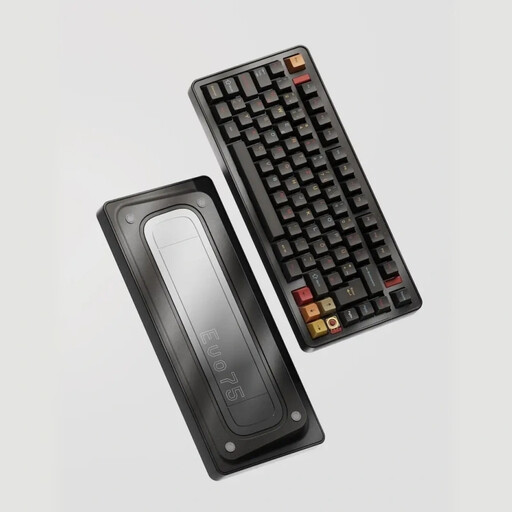
Why This Fits Their Persona: This model is aimed at discerning users who value customisation and a high-quality typing experience. The aluminium case, flexible leaf-spring mount, and VIA compatibility for full key remapping make it a solid foundation for a custom keyboard.
With its ISO-DE layout, it bypasses the most common source of frustration for German users. Instead of relying on a "gaming" label, it focuses on verifiable premium features like hot-swap and a flexible mounting style.
Full German key layout; Hot-swappable for 3-pin and 5-pin switches; Tri-mode connectivity for maximum flexibility.
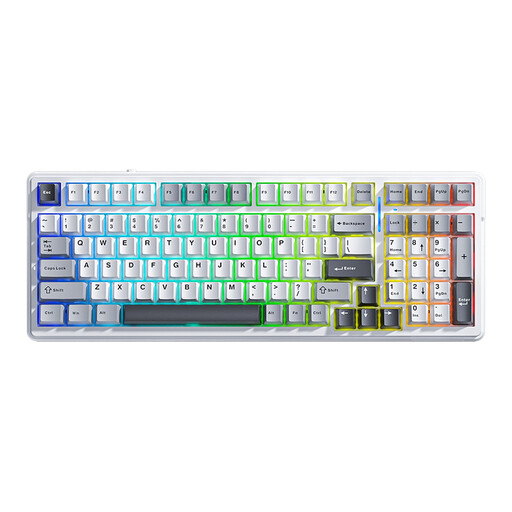
Why This Fits Their Persona: This keyboard combines sought-after gaming features like a low-latency 2.4G connection and a customisable RGB keyboard with a high-quality gasket-mount structure. The 99-key layout is a great compromise, integrating a number pad into a compact frame.
Instead of just focusing on looks, it offers real added value in typing feel and durability with its gasket mount structure and hot-swap function, which goes beyond mere "gaming" aesthetics.
Dampened and soft typing feel due to gasket structure; Hot-swappable for easy customisation; Low-latency wireless connection.
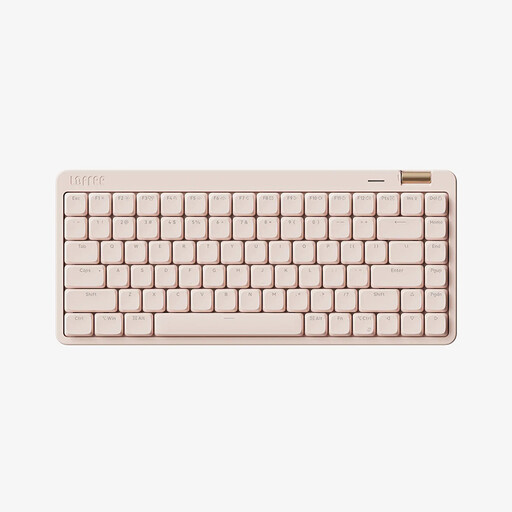
Why This Fits Their Persona: Perfect for users seeking a compact, versatile, and quiet keyboard for the workplace or home office. The minimalist design and low-profile switches provide a professional appearance and pleasant acoustics.
It avoids the "gaming" aesthetic trap and focuses on functional aspects. The low-profile switches make it a great option for a quiet mechanical keyboard that delivers on its acoustic promise.
Compact 75% layout saves space; Tri-mode connectivity for multi-device setups; Quiet, linear low-profile switches.
We have compiled a complete, up-to-date list of products that fully meet these strict selection criteria and German safety regulations.
The ISO-DE layout is the German standard. It features an extra key next to the left Shift key, a tall, two-row Enter key, and dedicated keys for umlauts (?, ?, ?) and the ?. The American ANSI layout has a wide, single-row Enter key and a different arrangement of special characters, which is impractical for German users.
Yes, absolutely. A hot-swap keyboard offers excellent future-proofing. You don't have to commit to one type of switch from the start. If your preferences change or you simply want to try out different switches—for example, quieter ones for the office or faster ones for gaming—you can easily swap them out without having to buy a whole new keyboard.
Regular maintenance is simple. Use a soft brush or compressed air to remove dust and crumbs from between the keys. The keycaps can be removed with a keycap puller and cleaned in lukewarm soapy water. Make sure they are completely dry before reattaching them. Avoid letting any liquids get inside the keyboard case.