
Lieferung heute & morgen

Qualitätsgarantie

Willkommens-Angebote freischalten: KOSTENLOSE Lieferung | Bis zu 80 % RABATT | Kostenlose 30-Tage-JoyPlus-Testphase
App herunterladen
Depending on the model, an Anycubic 3D printer can be used for prototypes, functional parts, figures and multi-colour decorative objects. However, there are significant differences between an open-frame FDM printer, a CoreXY 3D printer and a combo bundle with ACE Pro. If you focus only on the stated print speed or the number of colours, you may end up paying for features that you rarely use in your own workflow.
This buying guide explains which technical specifications matter and which typical purchasing and marketing pitfalls you should consider in Germany.
Specifications such as 600 mm/s generally describe a maximum value under specific conditions. A lower speed may be more suitable for dimensionally accurate components, overhangs or demanding materials. For the models listed, the recommended print speed is in some cases 300 mm/s, while acceleration can reach up to 20,000 mm/s².
The key factor is therefore not just the maximum figure, but how the motion system, extrusion, cooling, material profile and print quality work together.
A multi-colour 3D printer switches between filaments. This creates purge and flushing structures, which require additional material and can extend print times. The descriptions “8-colour 3D printer” or “16-colour 3D printer” also refer to the possible number of colours, not automatically to the number of material units included in the package.
So check whether the desired combo bundle already includes ACE Pro or ACE 2 Pro, and how many filament channels are available as standard.
PLA is straightforward to use for many decorative models. PETG, TPU, ASA and fibre-reinforced filaments, however, have different requirements in terms of temperature, adhesion, drying and enclosure. An open-frame printer may be suitable for PLA, while ABS or ASA can benefit from an enclosed design and more controlled environmental conditions.
The material feed must also be suitable: according to the product specifications, TPU is not compatible with ACE Pro on the Kobra 3 V2 Combo and must be fed directly into the printer. These limitations should be taken into account before buying.
Build volume determines how large a model can be produced in a single print. The Anycubic Kobra X offers 260 × 260 × 260 mm, while the Kobra 3 V2 Combo has a build volume of 255 × 255 × 260 mm. The Kobra S1 Combo and Kobra S1 ACE 2 Pro Combo both offer 250 × 250 × 250 mm.
The footprint is also important. A CoreXY system such as the Kobra S1 requires sufficient space, with dimensions of around 400 × 410 × 490 mm, as well as a stable, well-ventilated surface. Schools, workshops and small businesses should also allow room for filament, tools and the material feed system.
A 3D printer with automatic levelling can simplify preparation. The LeviQ-3.0 systems used in the Anycubic models mentioned support automatic levelling and Z-offset adjustment. However, this does not replace checking the print bed, ensuring correct assembly and selecting a suitable filament profile.
Also check whether the print bed is heated and review its temperature range. The Kobra S1 models are specified as reaching up to 120 °C, while the Kobra 3 V2 reaches up to 110 °C. The PEI spring-steel plate can make it easier to remove finished prints, provided the temperature and adhesion are set correctly.
The Kobra X features an open frame. This makes access easier and may be sufficient for PLA, PETG and many creative applications. The Kobra S1 is designed as a fully enclosed CoreXY 3D printer. Its enclosure can shield the printing process from draughts and is particularly interesting for users who want to work more frequently with ABS or ASA.
An enclosed design does not automatically make a printer suitable for every material. Always check the nozzle temperature, heated bed, filament recommendations and the manufacturer’s guidance.
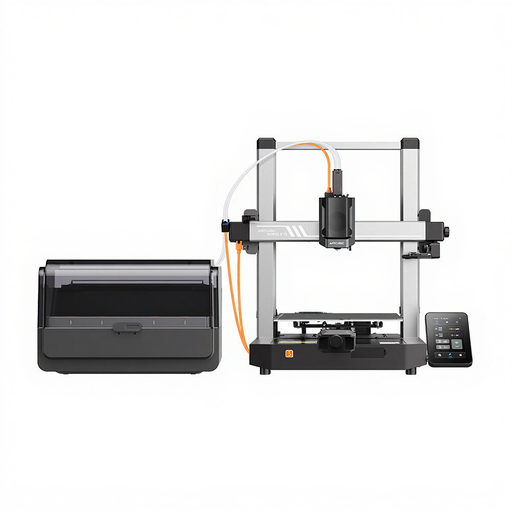
Why this product suits this profile: This bundle combines 4- or 8-colour printing with a build volume of 255 × 255 × 260 mm and automatic levelling. It offers beginners an accessible introduction to multi-colour FDM printing.
The product data lists recommended and maximum speeds separately. It also specifies material limitations, filament detection and TPU restrictions when used with ACE Pro.
Up to 600 mm/s, LeviQ 3.0, AI spaghetti detection, filament tangle detection and support for PLA, PETG and TPU.
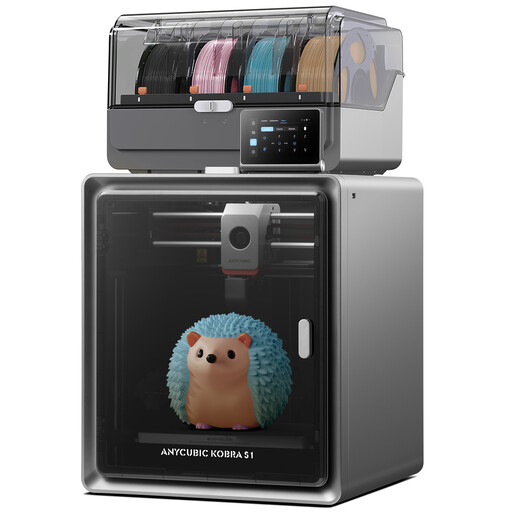
Why this product suits this profile: The enclosed CoreXY system combines multi-colour printing, active filament drying and a nozzle designed for temperatures of up to 320 °C. It is well suited to users who regularly work with different materials and produce larger print runs.
The specifications clearly point out the material limitations: TPU 95A must be fed directly into the printer and is not intended for multi-colour printing via ACE 2 Pro.
4 colours as standard, expandable to up to 16 colours, filament drying up to 65 °C, AI spaghetti detection and quiet operation down to 44 dB in Quiet mode.
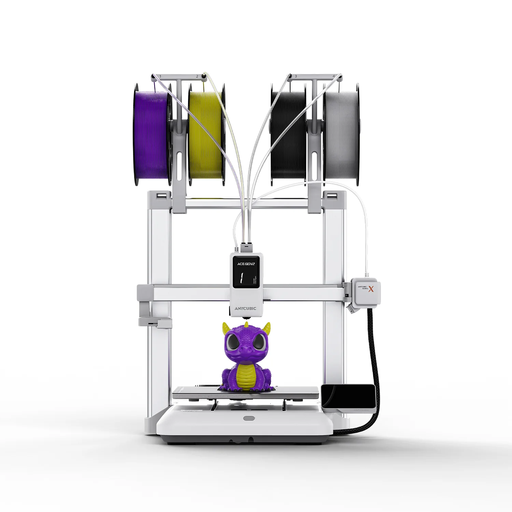
Why this product suits this profile: The open system offers a build volume of 260 × 260 × 260 mm and an integrated 4-colour configuration. It is suitable for makers, model builders and workshops that prefer quick access to the build chamber.
The selection makes the open frame clear. If you need an enclosed chamber for ABS or ASA, you can consider a Kobra S1 model instead.
Build volume of 260 × 260 × 260 mm, up to 600 mm/s, expandable from 4 to up to 19 colours, plus support for PLA, PETG, TPU, PVA, PLA-CF, PETG-CF and ASA.
We have put together a complete, regularly updated list of products that fully meet these strict selection criteria and the applicable safety regulations in the EU.
After unpacking, you may need to remove transport locks, install the print head and display, and connect cables, filament tubes and, where applicable, ACE Pro, depending on the model. Automatic levelling and the material profile are set up before the first print. The assembly instructions for the specific model should always be followed.
Service life depends on print volume, maintenance, filaments and operating conditions. Regularly cleaning the print bed, checking the nozzle and belts, and storing filament in a dry environment can reduce maintenance requirements. Wear parts such as nozzles, print beds and PTFE tubes need to be replaced depending on usage.
In addition to the purchase price, the main costs are filament, electricity and wear parts. Multi-colour printing can result in higher filament consumption because of purge material. ACE systems may also involve additional costs for extra units or compatible accessories. For a realistic calculation, consider material consumption, print duration and planned colour changes together.