
Lieferung heute & morgen

Qualitätsgarantie

Willkommens-Angebote freischalten: KOSTENLOSE Lieferung | Bis zu 80 % RABATT | Kostenlose 30-Tage-JoyPlus-Testphase
App herunterladen
Choosing the right Anycubic Resin 3D Printer can be a challenge given the multitude of models and technical specs. Manufacturers tout ever-higher resolutions and speeds, but not every innovation is relevant for every use case. As your Joybuy Product Recommendation Officer, I'll help you understand the key features and avoid common purchasing pitfalls, ensuring your investment leads to precise and reliable printing results.
Before you make a decision, you should be aware of some common marketing promises that often lead to disappointment in practice.
To make the right choice, focus on the technical specifications that directly impact your specific projects.
The XY resolution, measured in micrometres (?m), defines the smallest detail a printer can render on the horizontal plane. For users looking for a 3D printer for miniatures or jewellery prototypes, a low ?m value (e.g., 17–25 ?m) is crucial. The build volume (length × width × height), on the other hand, determines the maximum size of your models. A large build volume is ideal for prototypes or cosplay parts but often comes with a slightly lower XY resolution. The key is to find the right compromise between level of detail and model size for your needs.
The light source cures the 405nm UV resin layer by layer. Modern Anycubic printers like the Anycubic Photon Mono use advanced COB (Chip-on-Board) light sources with Fresnel lenses. These ensure significantly more uniform light distribution across the entire print area than older matrix LED systems. Even exposure is the key to warp-free prints and a high success rate. Also, pay attention to compatibility with different resin types. Whether it's standard, ABS-Like Resin for mechanical parts, or water-washable resin for convenience – flexibility in material choice is an important factor. The correct Anycubic printer settings for the respective resin are essential for success and are often provided by the manufacturer.
Here are some recommendations tailored to specific use cases and requirements.
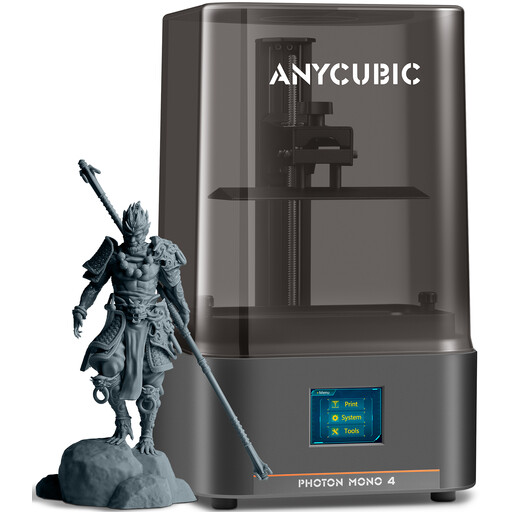
Why This Fits Their Persona: Ideal for users who want to get into high-resolution 3D printing on a limited budget. Its compact design fits on any desk, and the 10K resolution delivers a level of detail that is excellent for miniatures and small prototypes.
This model bypasses the "resolution trap" by offering a very high XY resolution of 17 × 17 μm in an affordable package. The focus is on tangible detail quality rather than pure marketing numbers.
Excellent detail reproduction thanks to the 10K display and stable Z-axis guide. Compatible with a wide range of standard resins, which keeps running costs low.
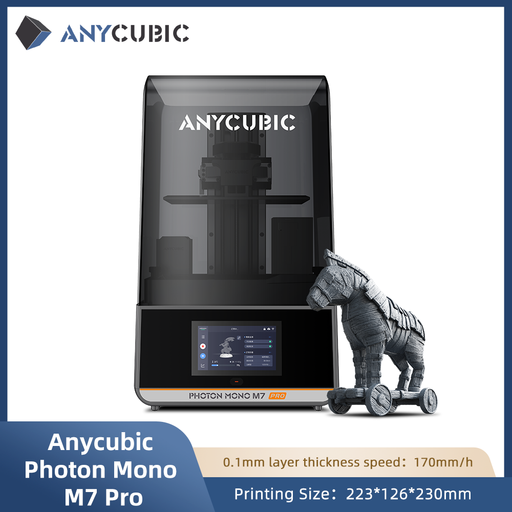
Why This Fits Their Persona: Designed for professional environments like engineering firms, dental labs, or small-batch manufacturers where speed, reliability, and an automated workflow are crucial. The intelligent assistance features minimise manual intervention and print failures.
This model addresses the "hidden costs" trap through efficiency. The automatic resin feeding and removal and the heater with temperature control reduce material waste and downtime, lowering the total cost of ownership.
Extremely high printing speed (up to 170 mm/h with high-speed resin) combined with a 14K resolution for maximum productivity and detail. Intelligent workflow assistance for stable, automated operation.
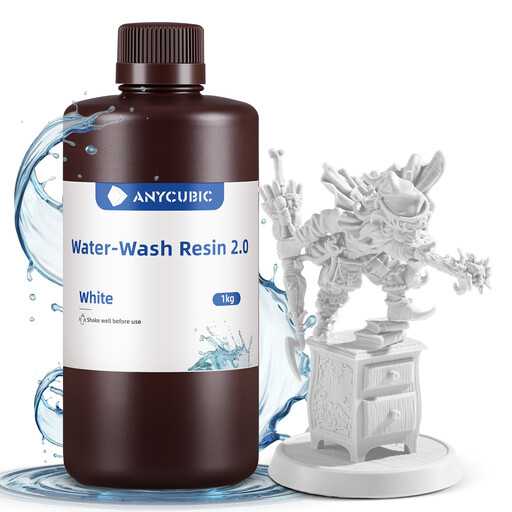
Why This Fits Their Persona: Perfect for hobbyists and home users working in apartments or poorly ventilated spaces. The simple cleaning with water eliminates the handling of harsh and strong-smelling isopropyl alcohol (IPA), making the entire process safer and more pleasant.
This resin solves the problem of "hidden running costs and hassle". It saves the expense of IPA and significantly simplifies post-processing. The low-odour formulation ensures a more comfortable working environment.
Cleans with regular water, low viscosity for fast printing speeds, and high precision with low shrinkage. Ideal for detailed models with straightforward post-processing.
If you're searching for the right material for your next project, we've compiled a full list of products that meet strict selection criteria.
1. What are the running costs of an Anycubic Resin 3D printer? The main cost factors, besides the printer itself, are buying resin (consumable), replacing wear-and-tear parts like the FEP or ACF film in the resin tank, and occasionally replacing the LCD screen after several thousand operating hours. Additionally, there are costs for cleaning agents (isopropyl alcohol or water for water-washable resin) and electricity.
2. How do I find the right Anycubic printer settings for a specific resin? Anycubic provides official tables on its website with recommended printing parameters for each printer and resin combination. These are an excellent starting point. Additionally, slicing programs like Photon Workshop or Chitubox offer pre-configured profiles. Online communities are also a valuable source for tried-and-tested settings.
3. Is a 14K resin printer always the better choice? Not necessarily. A 14K resin printer offers a higher pixel count, which can potentially allow for finer details. However, the actual print quality is just as heavily influenced by the stability of the Z-axis, the uniformity of the light source, and the quality of the optics. A well-engineered 10K printer with a precise XY resolution (in ?m) can, in practice, deliver sharper and more reliable results than a cheaper 14K model with mechanical compromises.