
Lieferung heute & morgen

Qualitätsgarantie

Willkommens-Angebote freischalten: KOSTENLOSE Lieferung | Bis zu 80 % RABATT | Kostenlose 30-Tage-JoyPlus-Testphase
App herunterladen
The need for personal safety, whether for yourself or your loved ones, is a fundamental desire. Whether on your way home at night, jogging in the park, or for children on their way to school—a personal alarm can provide invaluable peace of mind. Modern devices promise rapid help in an emergency through app connectivity and GPS tracking. However, the market is crowded, and many products fail to deliver on their promises.
This guide will help you identify the crucial features and avoid common pitfalls, enabling you to make an informed decision for greater on-the-go safety.
Many buyers are swayed by clever marketing or seemingly low prices, only to discover later that the device is unreliable in a real emergency. Pay close attention to these two points:
To make a well-founded choice, you should carefully examine three technical parameters. These determine how reliably a device will perform in an emergency.
There are essentially two types of alarms, which are often combined:
Some devices combine both functions, allowing for a flexible response to different situations.
A panic button with GPS is only as good as its connection and tracking accuracy. Note the following technical aspects:
An alarm that is hard to find or complicated to activate in an emergency defeats its purpose.
Based on the criteria mentioned, we have identified different user profiles and matched them with suitable solutions.
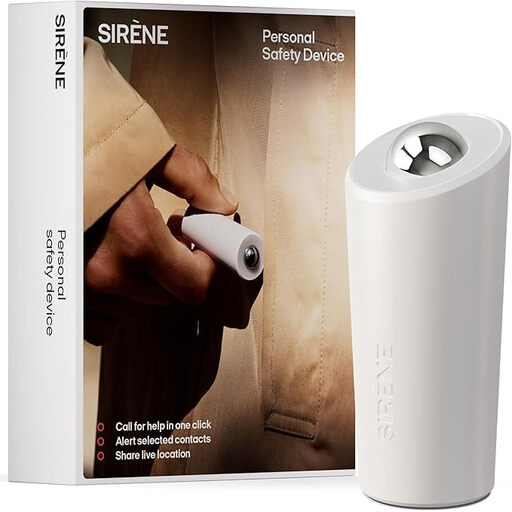
Why This Fits Their Persona: Ideal for individuals who always have their smartphone with them and are looking for a discreet yet powerful digital safety solution. Perfect for a keychain on the way to university or after work.
According to the manufacturer, the app can bypass the silent mode on contacts' phones to make the alarm impossible to ignore. The app is free and requires no subscription for core functions, thus avoiding the cost trap.
Combines rapid digital alerting, including live location sharing, with a compact, lightweight design (4.7 cm). Activation is via a simple button press.

Why This Fits Their Persona: For users who do not own a smartphone or need a solution without technical hurdles. Operation is usually self-explanatory (e.g., by pulling a pin), and the focus is on deterrence through a loud local alarm.
This device is independent of apps, subscriptions, or smartphone connectivity. It serves a single, reliable function: to make noise. There are no hidden digital costs.
Maximum simplicity and reliability. The extremely loud siren is an effective way to draw attention to an emergency in the immediate vicinity. The batteries often last for several years.
We have compiled a complete, up-to-date list of products that fully meet these strict selection criteria and UK safety regulations.
The pairing between the alarm device and the smartphone is typically done via Bluetooth and works without the internet. However, to send an alarm notification with your location to your contacts, your smartphone needs an active mobile data or Wi-Fi connection. The GPS position itself can be acquired offline, but it cannot be transmitted.
False alarms are most often triggered by accidentally pressing the button in a purse or pocket. When buying, look for models with a protected or recessed trigger. Some devices also require a long press (e.g., 2-3 seconds) or a double-click to send an alarm, which reduces the likelihood of false alarms.
Battery life varies greatly depending on the model and usage. Simple pocket alarms with replaceable coin-cell batteries can last for several years. Rechargeable devices with Bluetooth and app connectivity need to be charged every few weeks to months, depending on the manufacturer. Check the manufacturer's specifications and see if the app provides a low-battery warning.