
Lieferung heute & morgen

Qualitätsgarantie

Willkommens-Angebote freischalten: KOSTENLOSE Lieferung | Bis zu 80 % RABATT | Kostenlose 30-Tage-JoyPlus-Testphase
App herunterladen
A MagSafe wallet promises to simplify your daily life: your smartphone and most important cards combined in one minimalist unit. But the market is flooded with products whose quality and functionality vary dramatically. Many buyers only realise after a few weeks that while their new magnetic iPhone card holder looks good, it fails in everyday use. Before you make a decision, it's crucial to understand the typical weaknesses often hidden behind appealing marketing.
This guide will help you separate the best from the rest. We focus on the three most common problems that lead to a bad buy and show you which objective criteria to look for when making your choice.
To avoid the problems mentioned above, you should base your choice on three core parameters. These will help you objectively evaluate the performance and longevity of a MagSafe wallet.
The foundation of any MagSafe accessory is its magnetic connection. A high-quality wallet features a precisely aligned magnet array that ensures a strong and stable attachment to an iPhone (12 series and later) or a compatible MagSafe case. The magnets must be strong enough to keep the wallet securely on the device, even during movement, without interfering with the iPhone's functionality. Look for product descriptions that explicitly mention a secure and firm connection.
The material determines not only the look but also the durability of your iPhone wallet.
Regardless of the material, reinforced stitching and solid construction are crucial to prevent fraying or falling apart.
Think carefully about what you need in your daily routine. Most MagSafe wallets hold two to three cards. Models that promise more are often impractically thick. Useful extra features can significantly increase its practical value:
Here are some recommendations tailored to different user profiles that meet the quality criteria mentioned above.

Why it's a good fit: For users who want seamless integration into the Apple ecosystem and the highest level of design and functional reliability. It's the benchmark by which others are measured.
The magnetic force is perfectly calibrated for the iPhone. The FineWoven material is durable, according to Apple, and made from recycled content. Its functionality is minimalist but perfected.
Supports the "Find My" feature, which shows the wallet's last known location when it's detached from the iPhone. Holds up to 3 cards.
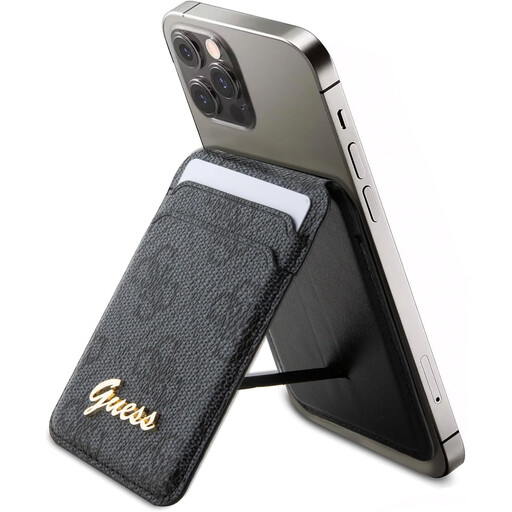
Why it's a good fit: Perfect for users looking for more than just a card holder. The combination of a wallet and a versatile stand makes it a multifunctional tool for everyday life.
The stand function is a core, well-designed feature, not an afterthought. The MagSafe system ensures a secure attachment, while the faux leather is designed for durability.
The foldable structure serves as a stable stand for the iPhone in both portrait and landscape modes. It also offers card slots and a magnetic closure.
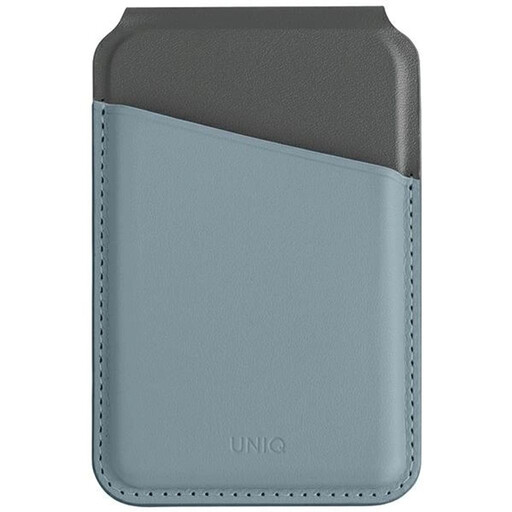
Why it's a good fit: Perfect for anyone who values not only convenience and style but also the protection of their personal data. It combines multiple functions in one slim package.
This wallet directly addresses the data security gap that many other models ignore. The combination of RFID protection, a stand function, and a secure magnetic closure offers a well-rounded package.
The integrated RFID protection prevents unauthorised scanning of credit and debit cards. It also features a stand function and a magnetic closure for added security.
We've compiled a complete, up-to-date list of products that meet these strict selection criteria.
1. Does a MagSafe wallet really stay securely on an iPhone? Yes, a high-quality MagSafe wallet designed for use with the iPhone adheres very securely. The magnetic force is calibrated to hold it firmly in place during everyday use, while still allowing it to be intentionally removed when needed. Security heavily depends on the quality of the magnets, which is why choosing a model with strong adhesion is crucial.
2. How many cards fit in a MagSafe card holder? Most models are designed to hold two to three standard-sized cards (e.g., credit card, ID). This is the optimal compromise between capacity and a slim profile. Some wallets may have space for an extra banknote, but overstuffing should be avoided to maintain its shape and function.
3. Can I wirelessly charge my iPhone with the MagSafe wallet attached? No, you generally need to remove the MagSafe wallet before wireless charging (with both a MagSafe charger and a standard Qi charger). The cards and the wallet's material block the power transfer. However, thanks to the magnets, detaching and reattaching it is a quick and easy process.