
Lieferung heute & morgen

Qualitätsgarantie

Willkommens-Angebote freischalten: KOSTENLOSE Lieferung | Bis zu 80 % RABATT | Kostenlose 30-Tage-JoyPlus-Testphase
App herunterladen
The market for AR (Augmented Reality) and AI glasses is growing rapidly, and with it, the confusion in choosing the right device. Manufacturers advertise immersive experiences and intelligent assistants, but not every product lives up to its promises. Before you make a decision, it's crucial to understand the most common pitfalls that can lead to a poor purchase.
As your Joybuy Product Recommendation Officer, I'm here to help you navigate the marketing noise. This guide focuses on objective criteria to help you make an informed choice.
The 3 Most Common Traps When Buying AR Glasses:
To avoid these traps, you should focus on verifiable technical specifications. The following three aspects are critical for a satisfying user experience.
The quality of the virtual screen is the heart of any smart glasses with a display. Look for models with Micro-OLED displays. This technology offers high contrast and deep black levels, which is especially important for an intense cinematic experience when used as personal theatre glasses.
Another critical metric is the Field of View (FOV). It's measured in degrees and describes how large the virtual screen appears in your line of sight. A value around 50° FOV is considered a good standard for an immersive feeling, comparable to a large cinema screen from a few metres away. A high refresh rate of 120 Hz is also essential for smooth visuals, especially when used as AR glasses for gaming.
The most versatile and future-proof connection method is USB-C with DisplayPort support (DP Alt Mode). This standard allows for video, audio, and power transmission through a single cable. Before buying, check carefully whether your smartphone, laptop, or gaming console supports this standard. Many modern devices (e.g., iPhone 15 and newer, many Android flagships, Steam Deck, ROG Ally) are equipped with it. For consoles like the PS5 or Nintendo Switch, special adapters are often required and not always included.
Define your primary use case. Are you looking for glasses with real-time translation for business trips? Then models with integrated microphones, AI connectivity, and a discreet design are relevant. These AI glasses often focus on audio feedback and don't necessarily need a display.
If, however, you're seeking an immersive experience for movies and games, XR glasses with high-quality displays, 3D capability, and broad console compatibility are the right choice. Here, display quality and comfort are the most important criteria.
Here are some recommendations tailored to specific user profiles and their requirements.
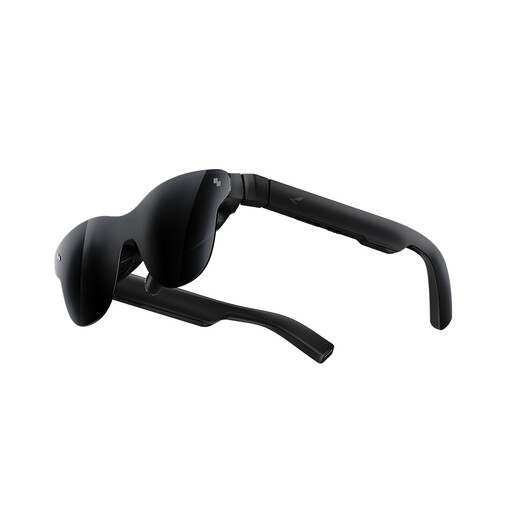
Why This Fits Their Persona: Ideal for film and gaming enthusiasts seeking a private cinema experience. The glasses project a virtual 201-inch screen and support 3D content, making them an excellent home theatre alternative.
It sidesteps the compatibility trap with broad plug-and-play connectivity via USB-C, working with iPhone 17/16/15, Android, Switch 2, Steam Deck, and PS4/5.
As one of the first AR glasses to support HDR10 for vibrant colours. The 120 Hz refresh rate ensures extremely smooth visuals in games.
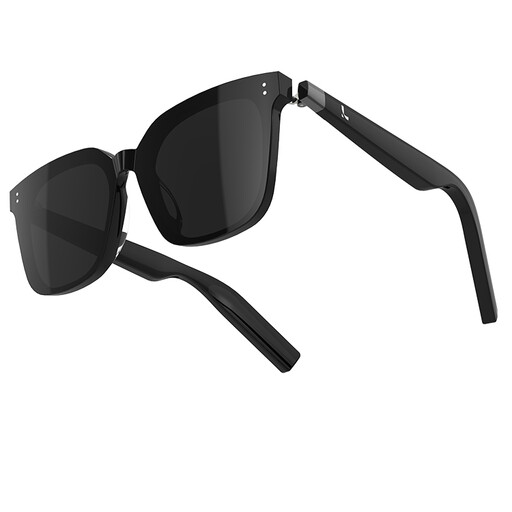
Why This Fits Their Persona: Designed for business professionals and travellers who need a discreet tool for communication and productivity. The focus is on audio features, not a display.
Avoids the trap of exaggerated AI promises by specifying concrete features: real-time translation in 128 languages and AI Note for meeting summaries with integration for ChatGPT, Gemini, and Claude.
Long battery life of up to 12 hours of use and a lightweight, modular design. The open-ear audio system allows you to remain aware of your surroundings.
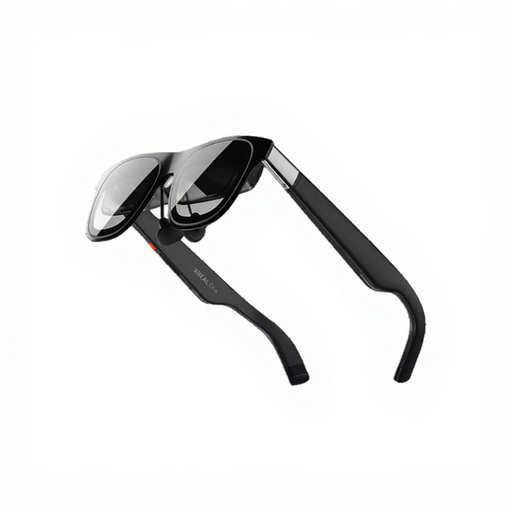
Why This Fits Their Persona: A balanced option for users who want to try high-quality AR technology for both media consumption and light productivity tasks without committing to a single use case.
It counters the issue of poor comfort with a low weight of just 84 grams and a three-level adjustable lens transparency that adapts to different lighting conditions.
Features the XREAL X1 Spatial Computing Chip for native 3-DoF spatial tracking. The 120 Hz display with a 50° field of view offers a high-quality visual experience.
It depends on the model. Some glasses, like the Rokid Max 2, offer built-in diopter adjustment for nearsightedness (typically from 0 to -600 diopters). Other models require the purchase of special prescription lens inserts that must be fitted by an optician. Wearing AR glasses over your regular glasses is not recommended, as it can affect the fit and image quality.
Power delivery methods vary. Many smart glasses with a display, designed for media consumption, do not have their own battery and are powered directly by the connected device (smartphone, laptop) via USB-C. This keeps the weight of the glasses low. In contrast, AI glasses focused on audio and productivity often have an integrated battery that allows for several hours of use.
For AR glasses with display functionality, a USB-C port with DisplayPort Alternate Mode (DP Alt Mode) on the source device (e.g., smartphone or laptop) is the most important requirement. This standard allows for the transmission of high-resolution video signals. A standard USB-C port used only for charging or data transfer is not sufficient. Therefore, always check the technical specifications of your device.