
Lieferung heute & morgen

Qualitätsgarantie

Willkommens-Angebote freischalten: KOSTENLOSE Lieferung | Bis zu 80 % RABATT | Kostenlose 30-Tage-JoyPlus-Testphase
App herunterladen
AR glasses combine digital content with your real-world surroundings or create a private, portable display. Depending on their design, they can be used for films, gaming, navigation, presentations, translation or hands-free audio. Product names often overlap: smart glasses, XR glasses, Smart Glasses, video glasses and AI glasses can be technically very different devices.
To avoid your purchase in Germany being let down by unclear specifications or compatibility issues, it is worth focusing on how you will actually use the glasses rather than eye-catching marketing terms.
Terms such as “virtual cinema screen” or a screen size of over 200 inches describe a virtual display, not a physical screen. You should also consider resolution per eye, refresh rate, field of view (FOV) and the quality of the optical display.
A wide field of view can be helpful for gaming and films, while a high refresh rate of, for example, 120 Hz enables smoother motion. For everyday use, it is also important to know whether the glasses still allow you to see your surroundings or significantly darken your field of view.
Many video glasses and portable displays use USB-C. However, the port alone does not indicate whether a smartphone or games console can output a video signal. USB-C DisplayPort Alt Mode is often required. iPhone, Android, Mac, PC and handheld devices may also require additional adapters or docking solutions.
Before buying, you should therefore check:
Glasses with real-time translation, ChatGPT integration or meeting notes may require a smartphone, an internet connection and a user account, depending on the model. Speech quality, latency and supported languages may depend on network coverage and the app being used.
For devices with a camera or audio recording, privacy and consent must also be considered. Conversations must not be recorded or transferred to the cloud without a legal basis. Camera-free models may therefore be a more suitable choice for offices, meetings and public spaces.
When choosing AR glasses with a display, buyers should consider the specifications together. Micro-OLED or Micro-LED displays can enable a compact design with a highly detailed image. Brightness is often measured in nits. A higher value can improve readability in bright surroundings, but it does not replace suitable shading or good optics.
The field of view is specified in degrees. A larger FOV value makes virtual content appear more expansive, but it can also increase the demands on fit, eye distance and image centring. For films, a stable and evenly visible display is important; when working, readability and minimal distraction matter more.
The weight is distributed mainly across the nose pads and arms. Models weighing between around 36 and 78 grams can feel noticeably different during everyday use. Adjustable nose pads, flexible arms and a well-balanced frame design are practical criteria for longer sessions.
If you need prescription lenses, check whether prescription lenses can be fitted, whether dioptre correction is integrated and whether fitting must be carried out by an optician. A sun clip option can be useful when light conditions change.
Display glasses are often powered through the connected device or a battery. Smart glasses with audio features can last for several hours or even a full working day, depending on volume, Bluetooth connection and AI usage. For glasses with integrated displays, compare charging time, battery capacity and the charging case.
Also pay attention to protection ratings such as IPX4 or IP65. These ratings do not mean complete protection against water. Swimming, showering and charging a damp device remain off-limits unless the manufacturer explicitly states otherwise.
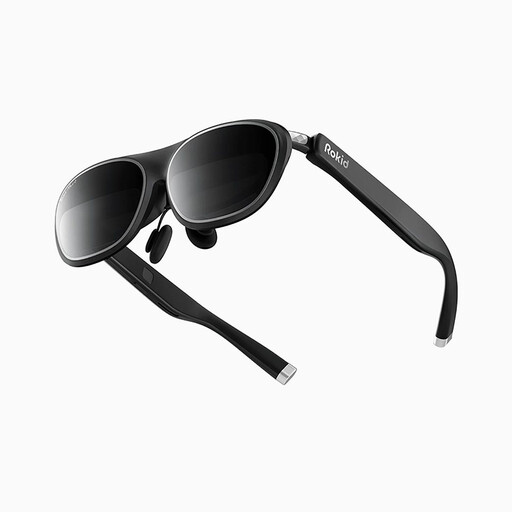
Why this product suits this profile: These glasses are aimed at users who want to enjoy films and gaming or use a large mobile screen with Android, PC and compatible consoles.
The technical specifications state 120 Hz, a 50° FOV and USB-C compatibility. Dioptre correction of up to 600D is also specified; however, you should still check compatibility with your specific device before buying.
Micro-OLED display, 120 Hz refresh rate and operation without its own battery, according to the product description.
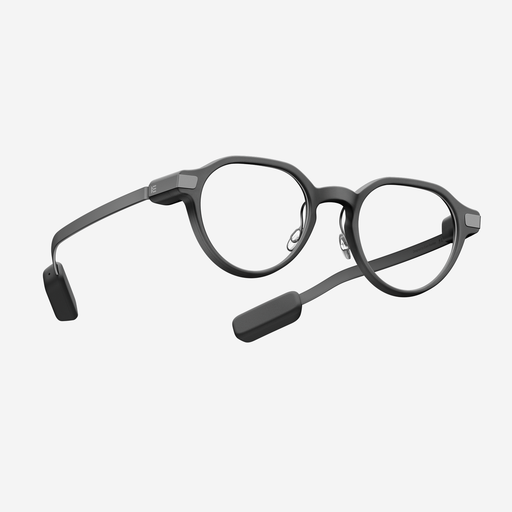
Why this product suits this profile: The camera-free design with a Micro-LED display is intended for professionals, presenters and users who prefer discreet prompts in everyday life.
The lack of a camera reduces recording-related concerns and creates a clearer distinction from camera-based AI glasses. For translation and AI features, you should take the app connection into account.
36-gram weight, a camera-free display and up to two days of regular use, according to the product specifications.
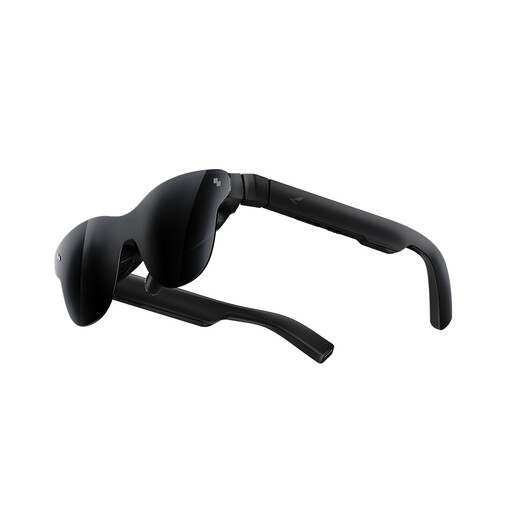
Why this product suits this profile: Film and series fans, as well as gamers, get a portable display for smartphones, computers, handhelds and compatible consoles.
The product description states USB-C plug-and-play support for several device categories. Before buying, you should still check whether your specific device supports the required video output.
HDR10 specification, 120 Hz and a weight of 76 grams; 3D content and a virtual 201-inch display are also listed.
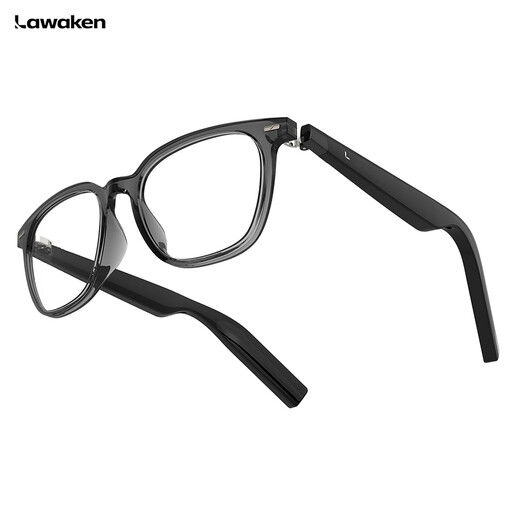
Why this product suits this profile: These audio smart glasses focus on calls, music, AI assistance and translation without an integrated display.
The product data lists Bluetooth 5.3, open speakers, IPX4 and IP5X. This makes it easier to assess where the glasses can be used; they are not intended for submersion or safety-critical activities.
33 grams without lenses, up to 12 hours of use and support for several AI services, according to the product description.
We have put together a complete, regularly updated list of products that fully meet these strict selection criteria and the safety regulations applicable in the EU.
AR glasses are not safety glasses. Display and immersive features should not be used when driving, cycling, crossing roads or operating machinery. Navigation, translation and AI outputs can also be delayed or inaccurate, and they are no substitute for paying attention to your surroundings.
During longer film or gaming sessions, regular breaks are advisable. If you experience dizziness, headaches, eye strain or discomfort, stop using the glasses. In Germany, additional data protection requirements apply to glasses with audio recording. Inform anyone you are speaking to when recording is active and this is legally required.
This depends on the model and the particular smartphone. Display glasses often require USB-C with DisplayPort support or a suitable adapter. Audio and AI glasses generally connect via Bluetooth and a companion app. Before buying, compare the manufacturer’s compatibility list with your own device.
Not for every feature. Video transmission from a compatible device can take place locally. Real-time translation, cloud storage, ChatGPT features, navigation and meeting summaries, on the other hand, often require an app and an internet connection. Without a network connection, individual features may be limited or unavailable.
The usage time per charge depends on display brightness, volume, wireless connection and active AI features. Models with a display are often powered through the connected device, while audio and AI glasses have their own battery. For long-term use, replacement parts, charging accessories, prescription lenses and available software updates are important points to check.