If you mainly want to play with a joystick and large action buttons, like on an arcade machine, an arcade stick is likely to suit you better. For relaxed gaming from further away, a compatible retro gamepad may be more practical. The key factors are the explicitly supported gaming platform, the game’s input mode, the buttons you need and, for a wired connection, the distance to your seat – not simply whether it’s described as “retro” or “USB”.
Which controller is right for you?
Arcade enthusiasts
If you prefer to play retro games using a joystick and several action buttons, compare arcade sticks by gaming platform, button layout and footprint. Information from 8BitDo, MAYFLASH and HORI applies to specific models and configurations.
Players who like to game from the sofa
If you sit some distance from your gaming platform, first check whether a suitable wireless connection is possible or whether the cable will reach where you sit. A compact retro gamepad may be a good choice if a joystick is less important to you; 8BitDo and Retro-Bit offer a range of models and connection options.
Fans of classic home computer games
If you’re looking for classic games with just a few fire buttons, a simple joystick could be the right style of controller. Check that its button layout and connection work with your PC or retro system; Speedlink lists DirectInput among the features of the COMPETITION PRO EXTRA.
What should you consider when buying?
Wireless arcade stick
A good choice if: you want a joystick and don’t want a controller cable running through your gaming area. 8BitDo lists Bluetooth, 2.4 GHz and USB-C for its Arcade Stick, for supported Switch and Windows configurations.
Consider: These connection options don’t guarantee general compatibility with TVs or any console. Check that the wireless connection or receiver works with your gaming platform.
Wired arcade stick
A good choice if: you prefer a joystick and action buttons, and can connect a cable to your platform. MAYFLASH lists XInput and DirectInput support on Windows for the F300; HORI says its Fighting Stick Mini for Switch is suitable for Switch and for XInput games on Windows 10/11.
Consider: According to the manufacturer, the HORI stick doesn’t support DirectInput games on PC. Also check that the cable will reach where you sit.
Classic joystick
A good choice if: you play games with just a few fire buttons on a compatible PC or Android device. Speedlink lists DirectInput for the COMPETITION PRO EXTRA and says it can be used with Android via an OTG adapter.
Consider: Its four fire buttons aren’t the same as the eight-button layout of a fighting stick. According to Speedlink, the included games only run on Windows.
Retro gamepad
A good choice if: you prefer a compact directional pad to a joystick. 8BitDo offers an M30 2.4G for the Genesis Mini and Mega Drive Mini; Retro-Bit lists compatibility for its wired Saturn USB pad with PC, Mac, Genesis Mini and Switch, among other platforms.
Consider: The different 8BitDo M30 versions use different wireless receivers. With the wired Retro-Bit pad, the cable needs to reach where you sit.
| What matters to you |
What to check before buying |
Who this matters most to |
| Platform and input mode |
Check the full model variant and the input mode used by the game. A USB connection alone doesn’t confirm that a particular game will recognise the controller. |
If you switch between PC and console or want to play a specific PC game, recognition is crucial. Around 31% of consumers put platform and input-mode compatibility first. |
| Connection and distance from your seat |
Check where your PC or console is, whether the wireless connection or receiver works with your platform, and whether a cable will reach where you sit. |
If you play from the sofa, the connection to your gaming platform matters – not just the distance to the screen. Around 25% of consumers prioritise seating distance and connection route. |
| Joystick or directional pad |
Decide whether you want a physical joystick or prefer a compact pad, then compare the specific designs. |
If your choice mainly comes down to how you want the controls to feel, the design is key. Around 25% of consumers prioritise the feel of a joystick or directional pad. |
| Buttons and in-game controls |
Check that the directional, action and menu buttons you need are available on the controller and suit the game. |
If your game requires several different commands, the controller’s button layout should match. Around 13% of consumers focus mainly on the number of buttons and in-game controls. |
| Space and additional accessories |
Measure the space available and check the connection, what’s included and whether you may need an adapter for your platform. |
If you have limited space or want to avoid extra accessories, dimensions and connection options matter. Around 6% of consumers prioritise space and ease of set-up. |
Common misconceptions when buying a controller
-
“USB” means every game will recognise the controller
PC compatibility varies even between specific arcade sticks: MAYFLASH lists XInput and DirectInput for the F300, while HORI only lists XInput games on PC for its Fighting Stick Mini for Switch.
Before buying, check the game, platform, connection and full model variant. An unsupported input mode may require extra set-up or prevent you from using the controller with the game you want to play.
-
M30 models with similar names use the same wireless receiver
8BitDo distinguishes between the M30 version for original Genesis and Mega Drive consoles and the version for Genesis Mini and Mega Drive Mini. They use different receivers.
Check the full console and model variant, as well as what’s included, rather than choosing based only on the name “M30 2.4G”.
-
For a big screen, only the controller’s range matters
The controller needs to connect to the gaming platform. For using the Speedlink COMPETITION PRO EXTRA with Android, Speedlink specifically lists an OTG adapter.
Plan the route from your seat to the console or PC, and check that the connection and any additional accessories work with your set-up. Depending on the model, you may need an adapter.
Key brands at a glance
8BitDo
Its range includes arcade sticks and retro pads for specifically named platforms.
- For its Arcade Stick, 8BitDo lists Bluetooth, 2.4 GHz and USB-C for supported Switch and Windows versions.
- The M30 versions for original and Mini consoles use different wireless receivers. Check which version you need.
MAYFLASH
Arcade sticks such as the F300 may suit buyers comparing specific PC input modes.
- For the F300, MAYFLASH lists XInput and DirectInput on Windows, as well as switchable directional controls.
- The platform details apply to this model and don’t guarantee compatibility with every game or every stick from the brand.
HORI
The Fighting Stick Mini for Nintendo Switch is a compact wired stick for the Switch and Windows configurations specified by the manufacturer.
- HORI lists eight action buttons, a cable length of around 2.5 m and a footprint of around 210 × 150 mm.
- According to HORI, this version supports XInput games on Windows 10/11, but not DirectInput games.
Speedlink
The COMPETITION PRO EXTRA is a classic USB joystick for retro and home computer games with simple controls.
- Speedlink lists DirectInput, four fire buttons and use with Windows or Android via an OTG adapter.
- According to Speedlink, the included downloadable games only run on Windows; this model isn’t an eight-button fighting stick.
Retro-Bit
The SEGA Saturn 8-Button Arcade Pad is a wired alternative in the style of a Saturn pad.
- For its USB version, Retro-Bit lists PC, Mac, Genesis Mini and Switch, among other platforms.
- Make sure you choose the USB version: it’s different from the versions available for original consoles and the wireless versions.
Joybuy controllers for PC and Switch
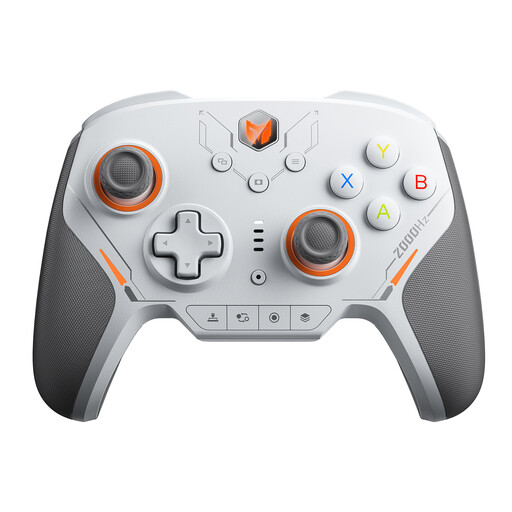
The Joybuy controllers below are designed for wireless use with PC or Switch. Before buying, check that your specific game and platform are supported.
 No image available
BIGBIG WON BLITZ2 wireless controller
According to the product title, this wireless version is designed for PC and Switch. Check compatibility with the specific game you want to play.
The product title lists 16 mechanical micro-switch buttons, TMR joysticks and a 2000 Hz report rate.
The product title also lists iOS and Android as compatible platforms.
View on Joybuy
Frequently asked questions
Can I connect the controller straight to my TV and play?
The controllers mentioned here connect to a gaming platform, not to the TV as a replacement for that platform. Check which device runs the game and sends the picture to your screen, and whether the controller is compatible with that device.
What should I check if a controller doesn’t respond in a PC game?
Compare the input mode used by the game with the model specifications, and check the button layout. For the F300 on Windows, MAYFLASH lists XInput and DirectInput; according to the manufacturer, the HORI Fighting Stick Mini for Switch only supports XInput games on PC.
Are all 8BitDo M30 2.4G controllers compatible with the same receiver?
No. 8BitDo distinguishes between the version for original Genesis and Mega Drive consoles and the version for Genesis Mini and Mega Drive Mini, and specifies different receivers for each. Check the full model name and what’s included.
What are my rights in Germany if an online purchase is unsuitable or faulty?
According to the Verbraucherzentrale, online purchases generally come with a 14-day right to cancel, which you need to notify the retailer about. If an item is faulty, statutory consumer rights are separate from any voluntary manufacturer’s guarantee. Check your purchase documents and contact the seller about your specific situation.


