For DRM-free architecture PDFs and note-taking in bright daylight, a large colour e-paper device could be a good fit. If you need colour illustrations, frequent zooming or specific book apps, a large colour tablet may be the better choice. The key is to test a sample page in your usual lighting and check the file format, copy protection, app access and exact device specification. A peak-brightness figure alone doesn’t tell you how easy a page will be to read in direct sunlight.
Which reading situation suits which type of device?
Daylight PDF readers
You often read architecture PDFs outdoors and want to view or annotate pages with as little distracting glare as possible. Check that your files work on your chosen device without DRM. reMarkable lists PDF and EPUB as supported formats, but doesn’t support DRM-protected e-books.
Art book and plan readers
You want to view photographs, colour drawings and fine details across as much screen space as possible, and are happy to use a larger device. Apple and Samsung offer tablets with large-screen options; check how well your book pages work on the device using your own material.
Readers with an existing e-book library
You use books from particular shops or lending services and need the right app or support for the relevant copy protection. Check access to specific titles before deciding based only on screen size or anti-glare features.
What should you look for when buying?
| Buying criterion |
What to check |
Who will value this most? |
| Readability in daylight |
Check reflections from typical viewing angles, and try a light and a dark page from your own book on the display. |
When I read outdoors, I want to be able to make out the page in bright surroundings without reflections obscuring important details. Around 25% of consumers rank daylight readability as their top priority. |
| Space for plans |
View a typical double-page spread and the smallest important labels in both portrait and landscape orientation. |
When looking at large-format plans, I want to see as much of the page at once as possible, with less switching between sections. Around 25% of consumers prioritise the available page area. |
| Colour illustrations and ease of use |
Display the same colour book page, including its legend, and try zooming and turning pages. |
When photographs and colour-coded drawings matter, I want to judge their impact directly on the device. Around 20% of consumers put colour reproduction and ease of use first. |
| Access to books |
For a specific title, check the file format, DRM, required app and the note-taking features you want. |
I want to be able to open the books I already own or plan to buy, rather than run into copy protection or a missing app after purchase. Around 15% of consumers say access to their books is their most important criterion. |
| Portability and extra features |
Check the device with its case for weight and handling; compare what’s included in the package with the extra features you actually need. |
If I carry the device around often, a handy size and only the features I really use matter to me. Around 15% of consumers prioritise portability and the range of extra features. |
Common buying misconceptions
-
Confusing peak HDR brightness with guaranteed readability in sunlight
Apple lists 1,600 nits as the peak brightness for HDR content on the iPad Pro. This isn’t a general SDR reading figure, and heat can also affect use in direct sunlight.
Compare the SDR figures and try a page from your own book in the light you expect to use the device in. Also consider shade and the manufacturer’s guidance on using the device in warm conditions.
-
Assuming PDF support means you can access every e-book
Supported file formats don’t tell you whether a purchased or borrowed, copy-protected book can be opened on the device. reMarkable supports PDF and EPUB, but not DRM-protected e-books.
Before buying, check a specific title, including its file format, copy protection and the reading app it requires.
-
Assuming every version comes with anti-glare features, a stylus and extra functions
Features can vary by model and package. Apple only offers nano-texture glass on iPad Pro models with 1 TB or 2 TB of storage. Samsung sells a separate anti-reflective screen protector for certain Ultra models, while reMarkable features differ depending on whether you have Connect.
Check the exact storage option, what’s included in the package and the features you actually plan to use.
Key brands at a glance
Apple
iPad Pro and iPad Air models offer large colour displays in a range of configurations.
- Apple Germany lists Tandem OLED, P3 and up to 1,000 nits for SDR content on the 13-inch iPad Pro. Apple lists 600 nits for the 13-inch iPad Air.
- Nano-texture glass on iPad Pro is only available with 1 TB or 2 TB of storage. Brightness figures are no substitute for checking how your book page looks in daylight.
Samsung
The Galaxy Tab Ultra range offers large colour displays to try out with full pages, plans and handwritten notes.
- Samsung Germany lists a 14.6-inch display and an included S Pen for the Galaxy Tab S12 Ultra.
- The anti-reflective screen protector for certain Ultra models is sold separately. Reduced reflections are a manufacturer claim, not the result of an independent comparison in sunlight.
reMarkable
The Paper Pro is an 11.8-inch colour e-paper device for documents and handwritten notes.
- reMarkable says the display can be used in direct sunlight and supports PDF and EPUB.
- DRM-protected e-books aren’t supported. Built-in features are available without Connect; other cloud and app features depend on the plan you choose.
BOOX
The Note Air5 C pairs a 10.3-inch colour e-paper display with Android 15.
- BOOX promotes the anti-glare display for use in direct sunlight and lists a microSD card slot.
- The smaller screen may mean more zooming when viewing large-format architecture plans. Check that your specific book app and titles will work.
HUAWEI
The MatePad 11,5 S 2026 is a mid-sized colour tablet with a PaperMatte display.
- HUAWEI claims a 50% reduction in surface reflections. This is a manufacturer claim, not an independent comparison.
- Check that the reading app you need is available on the specific device configuration and that the stylus you want is included in your chosen package.
Tablets for architecture PDFs and note-taking
This selection features colour tablets for reading and annotating architecture PDFs. If you plan to use a device for a long time in direct sunlight, check the warnings from the product or its manufacturer.
 No image available
Teclast ArtPad Pro 2025, 13.4-inch, 2K, 256 GB
The large display and included T-Pen could be useful for annotating architecture PDFs by hand.
13.4-inch 2K display; T-Pen with 4,096 pressure levels; 256 GB; Android 15.
The product warning advises against exposing the tablet to sunlight for extended periods.
View at Joybuy
 No image available
TECLAST ArtPad Pro, 12.7-inch, 2K, 256 GB, accessory bundle
The 12.7-inch display and T-Pen let you read PDF pages and add handwritten notes on the device.
12.7-inch 2K display; T-Pen supports 4,096 pressure levels; 256 GB; Android 15.
The bundle includes a stylus, a protective case and an English Bluetooth keyboard. The product warning advises against exposing the tablet to sunlight for extended periods.
View at Joybuy
 No image available
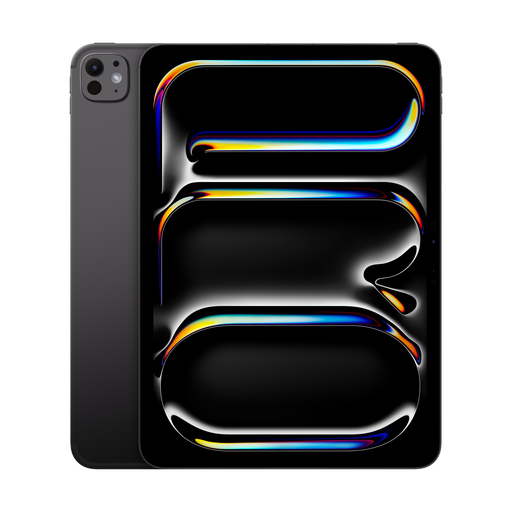
Apple 11-inch iPad Pro (2025), Wi-Fi + Cellular, 2 TB, nano-texture glass, Space Black
This configuration could be worth considering if you want to try a colour tablet with nano-texture glass and access to the book apps you need.
11-inch display; Wi-Fi + Cellular; 2 TB; nano-texture glass.
Apple warns against prolonged exposure to direct sunlight. Check readability in the lighting conditions you expect to use the device in.
View at Joybuy
Frequently asked questions
Can I copy any architecture e-book I buy as a PDF to an e-paper tablet?
No, it depends on the file format and copy protection of the title. reMarkable supports PDF and EPUB, but not DRM-protected e-books, so check access to a specific book before buying.
How can I test an architecture PDF with notes on a device?
Try a permitted sample page in full-page view, zoom in on small labels and test the stylus input. reMarkable describes PDF importing and annotation; the manufacturer says converting a PDF into an editable notebook requires Connect.
Can I keep a tablet at maximum brightness in sunny weather?
Don’t rely on maximum brightness staying unchanged over long periods. Apple warns against prolonged exposure of iPads to direct sunlight, while Samsung notes that display brightness may change in hot conditions or with heavy use. Check the guidance for your specific model.
What extra costs and rights should I consider when buying online in Germany?
Check whether the stylus, screen protector and extra features you need are included in your chosen package. The Verbraucherzentrale says that online purchases of goods generally come with a 14-day right of withdrawal, but notes that exceptions apply. Your statutory rights if goods are faulty are separate from any voluntary manufacturer’s guarantee.


