People checking archive files
If you mainly listen to restored files through headphones at a small desk, you’ll need a suitable connection and easy-to-reach level controls. Extra recording inputs matter most if you also want to connect a source.


You don’t automatically need an audio interface to play restored files that have already been digitised. What matters is the headphone or speaker connection you need, easy-to-reach level controls and compatibility with your computer. If you also want to record an analogue stereo source, look for two line inputs that can be used at the same time. An article in the IASA Journal discusses quality control as part of a workflow; manufacturers’ connection and format specifications alone don’t demonstrate better detection of restoration errors.
If you mainly listen to restored files through headphones at a small desk, you’ll need a suitable connection and easy-to-reach level controls. Extra recording inputs matter most if you also want to connect a source.
If you want to record an analogue stereo output on your computer as well as check files, make sure two line inputs can be used at the same time. The number of sockets alone doesn’t tell you whether they’re suitable for this connection.
If you switch between headphones and speakers at a cramped workspace, check that the outputs are suitable and the level controls are easy to reach. Separate controls don’t automatically mean you can assign independent mixes.
Start with the playback connection for files you already have. Extra line inputs are mainly important if you want to connect an analogue stereo source.
| What you need | What to check before buying | Who is it important to? |
|---|---|---|
| Headphone monitoring in a small space | Check the headphone socket and plug, the position of the level control, and the space the unit takes up with cables connected. | If I check restored files through headphones at a small desk, I need a suitable connection and straightforward level control. Around 33% of consumers put headphone monitoring first. |
| Analogue stereo recording | Check that two line inputs can be used at the same time, and that you have the right cables and input level for the source. | If I want to record an analogue stereo source as well as listen to digital files, I need to be able to connect both channels correctly. Around 27% of consumers prioritise stereo recording. |
| Switching between headphones and speakers | Check the type and number of outputs, as well as the level controls. If needed, check that the routing you want is explicitly documented. | If I switch between headphones and speakers at a cramped workspace, I want the outputs I need to be easy to reach. Around 20% of consumers make this their main buying consideration. |
| Computer compatibility | Check the operating system and version, available USB port, power supply and current driver requirements for the model. | If I want to set up the interface with my existing computer, compatibility comes before extra inputs or monitoring options. Around 20% of consumers put this first. |
The Audient iD4 MKII documentation lists a microphone/line input and a separate instrument input. Don’t assume these are two equivalent line inputs without checking.
Check the exact model to confirm whether both channels can be used as line inputs at the same time and how the inputs are configured.
Otherwise, you may need extra hardware or a different interface for the stereo source you plan to connect.
According to the manufacturer, the RCA outputs on the MOTU M2 are mirrored. So extra sockets don’t prove that headphones and speakers can receive different signals.
If you need independent signals, check explicitly that the model supports the routing you need.
Maximum sample rate and bit-depth specifications describe a format, not the quality of a checking workflow or how well it detects restoration errors.
Check which formats your files and working setup actually need, and choose the playback connection you want separately.
Driver and power requirements vary by model. For example, Audient specifies a driver installation on Windows and a stated power requirement for the iD4 MKII.
Check the requirements for the exact model against your computer and available connection, and consult the manufacturer’s instructions.
Installing drivers and supplying power may involve extra setup steps.
The Scarlett 2i2 (4th Gen) has two line inputs, as well as headphone and speaker outputs, making it an option to consider if you also want to connect a stereo source.
The MOTU M2 combines two combo inputs with headphone, balanced line and mirrored RCA outputs.
The iD4 MKII may suit you if you mainly need playback and occasional source connections, provided its specific input configuration meets your needs.
According to Steinberg, the UR22C has two input and output channels, monitor mix and MIDI connections, making it worth considering if you need more than just archive monitoring.
According to Arturia, the MiniFuse 2 has two inputs, speaker and headphone connections, and a monitor mix control for a compact workspace.
The Joybuy products below offer different ways to play files that have already been digitised. They include DACs and a preamp, not just audio interfaces.
 No image available
As a USB DAC with a headphone amplifier, the Q4 is designed to provide playback from a PC.
The product name lists Bluetooth, an optical input, 24-bit 192 kHz, Treble/Depth Control and a remote control.
 No image available
If your computer has an analogue 3.5 mm output, the AUX connection described may work for playback.
The product name describes an MM phono preamp with GE5654 valves and a headphone amplifier. The T4 PRO is described as a preamp, not an audio interface.
 No image available
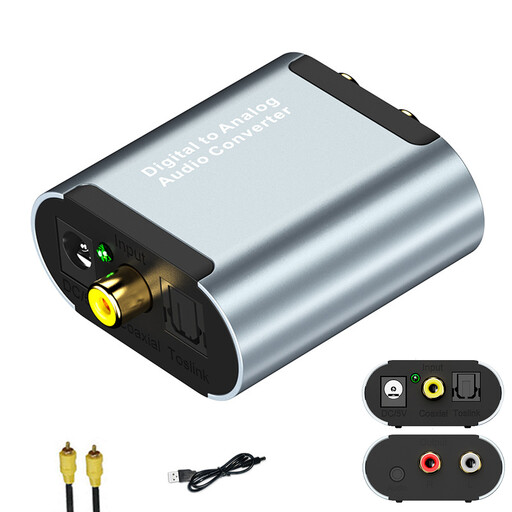
This converter can provide a playback connection if your computer has a compatible optical or coaxial digital output.
The product name lists optical and coaxial inputs, a 3.5 mm audio output and USB power. It’s described as a digital-to-analogue converter, not an audio interface.
No, not just to play files you already have. First, check which headphone and speaker connections you need. Two line inputs are relevant if you also want to record an analogue stereo source. This doesn’t prove that a particular interface will make restoration errors easier to hear.
Check the system requirements for the exact model against your computer. Then select the interface as your audio device in both the operating system and your audio software. For the iD4 MKII, Audient specifically describes installing the iD driver on Windows.
For the MOTU M-Series, the manufacturer’s instructions recommend disconnecting the device from the computer first and cleaning it with a dry cloth only. For other models, follow the relevant instructions.
No. For consumer purchases in Germany, statutory rights relating to faults apply against the seller; a guarantee is an additional voluntary promise with its own terms. Online purchases also generally come with a 14-day right to cancel, subject to the conditions and exceptions that apply to the specific purchase.
When monitoring the market for electrical and electronic products, Germany’s Federal Network Agency lists factors including correct CE marking, identifiable manufacturer details, the required instructions and warnings in German, and a declaration of conformity. The European Commission explains that CE marking is the manufacturer’s declaration that a product meets the applicable EU requirements; it isn’t an independent mark of audio quality.