What should you look for when buying?
Standard USB-A stick
A good choice if: you mainly use your scripts on devices with USB-A ports and don’t need built-in password protection.
The trade-off: USB-A alone won’t give you access on USB-C devices or provide a backup on a second storage device.
USB-A/USB-C dual stick
A good choice if: you want to move scripts between devices with compatible ports without using the cloud.
The trade-off: two connectors are no substitute for encryption or an additional archive copy.
Encrypted USB stick
A good choice if: your scripts are confidential, or you’ll be carrying the stick around and access protection matters.
The trade-off: password management and unlocking need extra care; encryption is no substitute for a separate backup.
The BSI says that the lifespan of storage media cannot be predicted precisely. Whatever type of stick you choose, keep a separate local copy and test that you can open important versions from it.
| What matters |
What to check before buying |
Who is this especially important for? |
| A local archive you can restore |
Keep a separate local copy and test that you can open important files from it. |
If I need to access older versions even after a stick fails, being able to restore them matters to me. Around 36% of consumers put a restorable archive first. |
| Confidential scripts |
Check the model’s encryption, unlocking process and what happens if you forget the password. |
If I don’t want others to read versions of a play, the protection needs to be practical to use every day. Around 29% of consumers prioritise keeping file access confidential. |
| Access across different devices |
Check your devices’ ports and choose a compatible file system; back up files before formatting. |
If I switch between computers with different ports, I want to be able to open my scripts locally. Device compatibility is a priority for around 21% of consumers. |
| Space and organisation for different versions |
Check how much data you already have and what you expect to add; give versions clear, consistent names. |
As my archive of versions and supporting files grows, I need space and a clear filing system. Around 14% of consumers prioritise storage space for a growing collection. |
USB sticks at Joybuy
Here you’ll find USB sticks for local file storage and moving files between devices, including single sets and multipacks. Some models list both USB-A and USB-C connectors.
 No image available
Kexin 2-in-1 USB 2.0 stick, 2 × 32 GB, USB-A and USB-C, pack of 2
For transferring files locally between devices with USB-A and USB-C ports. According to the product description, the pack contains two sticks, each with 32 GB of storage.
View at Joybuy
 No image available
USB 2.0 sticks, pack of 5, 8 GB each
For keeping several local file copies separate. The product description lists five sticks, each with 8 GB of storage.
View at Joybuy
No image available
USB 2.0 sticks, pack of 5, 16 GB each
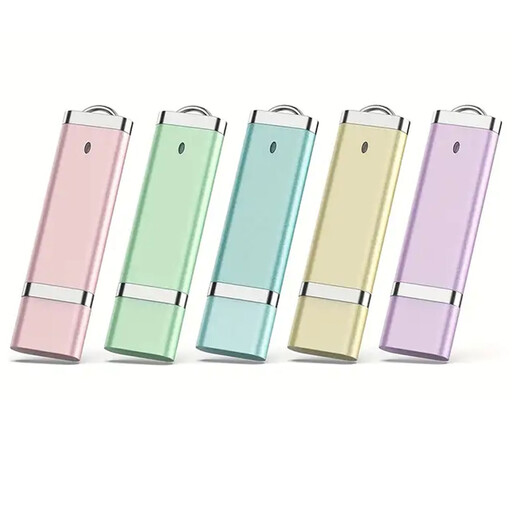
For several local storage locations and organising different folders. According to the product description, each of the five sticks has 16 GB of storage and a colour-coded design.
View at Joybuy
 No image available
Kexin 2-in-1 Type-C USB sticks, pack of 5, 32 GB each
For transferring files locally between devices with USB-A and USB-C ports. The product description lists five USB 2.0 sticks, each with 32 GB of storage.
View at Joybuy
No image available
Kexin 2-in-1 Type-C USB sticks, pack of 5, 64 GB each
For transferring files locally between devices with USB-A and USB-C ports. According to the product description, the pack contains five USB 2.0 sticks, each with 64 GB of storage.
View at Joybuy
Frequently asked questions
Is one USB stick enough as my only long-term archive?
No. Germany’s Federal Office for Information Security points out that the lifespan of storage media cannot be predicted precisely. Keep another local copy separately and check that you can restore files by testing some of your important documents.
How do I set up a stick for Windows and Mac?
First, check the ports and requirements for the specific stick. For a stick larger than 32 GB that you’re formatting on a Mac for use with Windows, Apple lists ExFAT as a format option. Back up any existing files first, as formatting will delete them. If you have an encrypted model, also check how to unlock it.
What ongoing costs and support should I plan for?
Allow for an additional local backup storage device and the effort involved in managing passwords. Check what support is available for the specific model if you have problems with the unlocking software or your password. Kingston lists a five-year warranty and free technical support for the IronKey Locker+ 50 G2; this doesn’t mean that a lost admin password can be recovered.
Can I archive and share theatre scripts as I wish?
There is no universal answer. § 16 UrhG governs the right to reproduce a work. Whether you can copy or share a particular script depends, among other things, on your usage rights and the circumstances. Check your rights before distributing copies.
When should I also consider data protection for script files?
If you process personal data as part of an organisation, for example details about cast and crew in script files, the General Data Protection Regulation is relevant. Choose safeguards that suit the specific situation; this doesn’t mean every personal script stick needs a particular encrypted model.


