Which tablet size is right for you?

Readers who use star charts and PDFs

If you want to view large illustrations and fixed page layouts without constantly moving around the screen, try a real book page on the display. The best way to judge whether small labels and image details are clear enough is to use a file of your own.

Readers with limited space at their seat

If you mainly read continuous text and often hold your tablet, a comfortable size may matter more than having a full-page star chart. Check whether your book format is easy to read on a smaller screen.

Readers with an existing e-book library

If you want to open books you’ve bought without an internet connection, choose a device that works with the right library and app. Download the titles you plan to read before travelling, then check that they’re fully available offline.

What should you look for when buying?

Compact tablet

A good fit if: You mainly read continuous text, have little space to rest your tablet and often hold it in your hand. Samsung lists the Galaxy Tab A11 as having an 8.7-inch screen.

The trade-off: There’s less room for full-page illustrations. Check whether map labels are readable without frequent zooming.

Tablet around 11 inches

A good fit if: You want to read illustrated books or PDFs without interruption and can often rest the device somewhere. The iPad (A16), Galaxy Tab A11+ and REDMI Pad 2 are examples in this size category.

The trade-off: A larger device takes up more space at your seat. Compare a sample page of your own and check that the book app you need is available.

Fire tablet for Kindle books

A good fit if: The Kindle titles you need are available on the Fire tablet you’re considering and can be opened offline before you fly.

The trade-off: Also check that all the other apps you need work on the specific model.

What matters What to check before buying Who is it important to?
Star charts and illustrated pages Open a sample page in the file format you’ll actually use; check that labels and details are clear. If I want to read charts and image plates without constantly zooming in, I test a file of my own. Around 33% of consumers put the readability of charts and illustrated pages first.
Reading until the end of the flight Test the fully charged device with your chosen app and a comfortable brightness setting; don’t assume there’ll be a power socket. If I want to keep reading on a long flight, I make sure the battery has enough charge for the way I use it. Around 27% of consumers say battery life is their top priority.
Comfort at your seat Compare the size and weight of the exact model, taking any case you use into account. If I’ll be holding the tablet for a long time and have little space at my seat, a comfortable size matters more to me than a full-page view. Around 20% of consumers prioritise a device that’s comfortable to hold and easy to stow.
Opening books offline Download the titles you need in advance and open them in flight mode; check maps, attachments and any sign-in steps too. If I rely on my existing library, I want to be able to open my books in the right app without an internet connection. Around 20% of consumers put offline access first.

Which mistakes should you avoid?

  • Assuming advertised battery life means guaranteed reading time

    Your book app and screen brightness may differ from the conditions used for a manufacturer’s battery-life claim. So advertised battery life doesn’t guarantee how long you’ll be able to read your own astronomy PDFs.

    Test the fully charged device with the book you plan to read before travelling, and allow for some extra battery.

  • Confusing books bought in the cloud with books already saved offline

    A title in a cloud library isn’t automatically available on your tablet when you’re offline.

    Download the books you need in advance and open them once in flight mode.

  • Choosing a tablet based on screen size alone

    The same fixed PDF page will appear at different sizes on different screens. Screen size alone won’t tell you whether small labels are readable for you.

    Compare the same sample page on the devices you’re considering, and take the space at your seat into account.

Key brands at a glance

Samsung

The Galaxy Tab A11 is a compact Android option, while the Galaxy Tab A11+ has a larger screen.

  • Samsung lists the Galaxy Tab A11 as 8.7 inches and the Galaxy Tab A11+ as 11 inches.
  • Samsung lists a 7,040-mAh battery and expandable storage for the Galaxy Tab A11+.
  • Battery capacity doesn’t tell you how long you’ll be able to read. Also check that the specific book app you need works.

Apple

The iPad (A16) is an 11-inch option if the titles you need are available in the iPad apps you plan to use.

  • Apple lists the Wi-Fi iPad (A16) as weighing 477 g, with a minimum storage capacity of 128 GB and a resolution of 2360 × 1640 pixels.
  • These details apply to the iPad (A16), not to every iPad model. Offline access and file availability depend on the title and app.

Xiaomi

The REDMI Pad 2 is another Android option, with an 11-inch screen for illustrated pages.

  • Xiaomi lists a resolution of 2560 × 1600 pixels and a reading mode for the REDMI Pad 2.
  • Resolution and reading mode alone don’t tell you how comfortable your files will be to read or how long the battery will last.

Tablets at Joybuy

This selection includes tablets around 10.1 to 11 inches that could be a good starting point for illustrated pages and book files stored on the device. Before you travel, check that your star charts are easy to read, that the right app is available and that you can access your books offline.

GOODTEL G11 Android tablet with an 11-inch screen

GOODTEL G11, Android 15, 11 inches, 256 GB

The 11-inch format is one option for illustrated book pages. Check how easy it is to read small map labels using a file of your own.

Listed in the product title: 2176 × 1600 pixels, 16 GB RAM (8 + 8 virtual), 256 GB storage, 10,000 mAh and an EVA case.

Joybuy
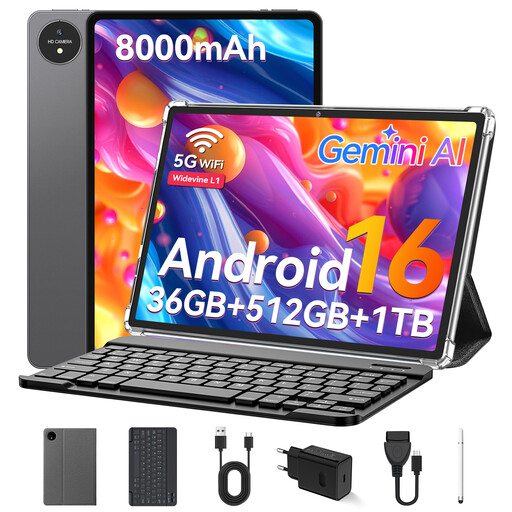
VANWIN YC1095T615M70 tablet with an 11-inch touchscreen and keyboard

VANWIN YC1095T615M70, 11 inches, 512 GB, with keyboard

The 11-inch screen is one option for illustrated pages. Before you travel, check that your star charts are easy to read in the view you prefer.

Listed in the product title: Android, 32 GB RAM, 512 GB ROM, expandable by TF card up to 1 TB, T615 octa-core processor and an 8,000-mAh battery.

A keyboard is included according to the product title; consider whether you want to take it with you on your trip.

Joybuy
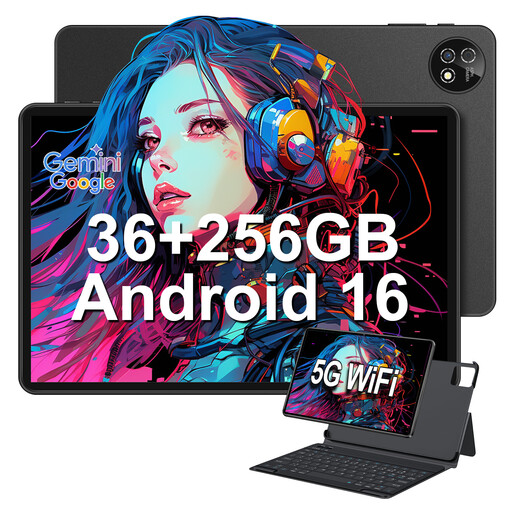
10.1-inch touchscreen tablet with Android 16 and 256 GB storage

10.1-inch touchscreen tablet, Android 16, 256 GB

The 10.1-inch format is one option for illustrated pages. Open a sample page from a file of your own to see how easy it is to read at your seat.

Listed in the product title: 36 GB LPDDR4 RAM, 256 GB storage, expandable up to 1 TB, plus a keyboard and protective case.

Joybuy

TECLAST P50T with an 11-inch screen and 128 GB storage

TECLAST P50T, Android 16, 11 inches, 128 GB

The 11-inch screen may suit illustrated book pages; check how your charts and labels look on the device.

Listed in the product title: 90 Hz, 16 GB RAM (3 GB + 13 GB virtual), 128 GB storage, TF card expansion up to 1 TB and an 8,000-mAh battery.

Joybuy

TECLAST P50 with an 11-inch screen and 128 GB storage

TECLAST P50, Android 15, 11 inches, 128 GB

The 11-inch screen is one option for illustrated pages; compare the display with an astronomy PDF of your own.

Listed in the product title: 90 Hz, 8 GB RAM, 128 GB storage, dual-SIM 4G LTE, 5G Wi-Fi and a 7,000-mAh battery.

Before buying, check which accessories are included and whether they suit the way you plan to use the tablet.

Joybuy

Frequently asked questions

How can I make sure my astronomy book works without onboard Wi-Fi?

Download every title you need to the device you’ll be taking before you fly, then try opening it in flight mode, including any star charts and attachments. Apple Support explains how to download previously purchased books again. For third-party apps and individual files, test offline access using your own copy.

Can I use a tablet during a flight?

According to the European Union Aviation Safety Agency (EASA), tablets can be used on many flights, subject to certain conditions. Airline rules and exceptions, for example during take-off or landing, may apply. Airlines usually require you to use flight mode, so follow the crew’s instructions for your specific flight.

Where should I pack my tablet and power bank when flying?

The EASA recommends carrying devices with lithium batteries in your hand luggage. Spare batteries and power banks should also go in your hand luggage, not checked baggage, according to its guidance. Check your airline’s current limits on watt-hours and quantities. For example, Lufthansa lists a limit of 100 Wh per device for personal tablets; this doesn’t automatically apply to all airlines.

What happens if my tablet develops a fault after I buy it in Germany?

According to consumer information from the European Union, if you buy from a trader in the EU, you’re entitled to a legal guarantee of at least two years from the date you receive the goods. This guarantee applies to the seller and is separate from any additional manufacturer’s warranty.

Do I need a stylus or extra storage for astronomy books?

You don’t need to plan for a stylus just to read. If you want to make notes in the margins, check whether your app supports handwritten notes and which stylus is compatible with the exact tablet model. If you have lots of illustrated books saved on your device, compare file sizes with the available storage before buying.