When a fan is running, microphone placement is the first thing to consider for clear audio description. A lavalier microphone worn close to your body can be positioned near your voice and as far from the fan as possible; RØDE says this approach can help reduce background noise. A handheld recorder is an alternative if you can place it close to the person speaking, but it needs careful positioning. According to Zoom and Tascam, 32-bit float makes it easier to manage recording levels, but it won’t remove fan noise. So check the result with a test recording.
Which option is right for you?
Solo speakers with a fan running
If you can’t switch off the fan, it’s important to position the microphone as close to your voice as possible. RØDE recommends placing the microphone close to the sound source and as far away from unwanted noise as possible.
Speakers recording long takes
For an uninterrupted audio description, features that help manage changing recording levels may be useful. Zoom and Tascam describe 32-bit float as a recording format that makes it easier to manage levels, though a test recording is still a good idea.
Speakers who want simple file handling
If you want to save, listen back to and transfer recordings for editing without any fuss, built-in storage and widely used recording formats may be important. Sony lists these features for the ICD-UX570, while Philips lists them for the VoiceTracer DVT4115.
What should you look for when buying?
When a fan is running, consider microphone placement, longer takes and file handling as separate buying priorities.
| Priority |
What to check before buying |
Who it matters most to |
| Microphone placement |
Check whether a lavalier microphone is included or can be connected, and make a test recording at your recording location with the fan running. |
If the fan has to stay on, I want to position the microphone as close to my voice and as far from the unwanted noise as possible. Around 50% of consumers prioritise clear speech despite fan noise. |
| Levels for long takes |
Compare the recording format, playback options and power supply; test the recording over the intended duration too. |
For a longer description, I want to record changes in speaking volume without level errors making it harder to work with the audio later. Around 30% of consumers prioritise reliable levels in this situation. |
| Saving and sharing files |
Check the file format, available storage and transfer options for the specific model. |
If I want to save, listen back to and share recordings without a complicated microphone setup, straightforward file handling matters to me. Around 20% of consumers have this as their main priority. |
Common misconceptions
-
Confusing 32-bit float with fan-noise reduction
32-bit float affects how recording levels are managed. Microphone placement, on the other hand, affects how the voice is captured in relation to surrounding noise.
First, find a suitable microphone position and listen back to a test recording with the fan running.
If the test recording isn’t clear, you may need to record again or do additional editing.
-
Placing a handheld recorder too far away
When the recorder is further from the speaker, background noise may be more noticeable in relation to the voice. Tascam describes the DR-05XP’s built-in microphones as omnidirectional.
Place the recorder as close to the person speaking as possible, or check whether a compatible external microphone would be suitable. Make your decision based on a test recording, not just the recording format.
-
Assuming Noise Cut guarantees clear speech
The fact that a noise-reduction feature is listed doesn’t show how much it will reduce fan noise at your recording location.
Compare short recordings with the feature switched on and off, and listen for how clearly the speech comes through.
Key brands at a glance
Zoom
The F2 is designed for close-mic recording of a single voice with a lavalier microphone; the H1essential is a handheld alternative.
- Zoom lists 32-bit float for both models. You can connect an external microphone to the H1essential.
- The recording-format specification doesn’t prove that the device will reduce the particular fan noise in your space. With a handheld recorder, capturing the voice depends more on its position or the use of a suitable external microphone.
Tascam
The DR-10L Pro is designed for recording a single voice with the recorder worn on the body; the DR-05XP is a handheld recorder with built-in microphones.
- Tascam lists a lavalier microphone as included with the DR-10L Pro. For the DR-05XP, the manufacturer lists built-in omnidirectional microphones and an external microphone input.
- The 32-bit float specification for either model doesn’t prove that it will reduce fan noise.
Sony
The ICD-UX570 is a compact voice recorder for people who prioritise storage, playback and ease of use.
- Sony Germany lists 4 GB of internal storage and PCM and MP3 recording. The German specification also lists Clear Voice.
- The Clear Voice feature description doesn’t provide measured evidence of how well it reduces the particular fan noise in your space.
Philips VoiceTracer
The DVT4115 combines voice recording with internal storage and PCM or MP3 files.
- Philips Dictation / Speech Processing Solutions lists 8 GB of internal storage and several microphones. The manual describes adjustable microphone sensitivity and Noise Cut.
- The features described don’t show how much they will reduce a particular fan noise in your recording situation.
Joybuy products for voice recording
The following Joybuy products are voice recorders designed for spoken recordings. If a fan is running, check in advance whether you can position the microphone suitably for the speaker and whether the recording is clear at the intended location.
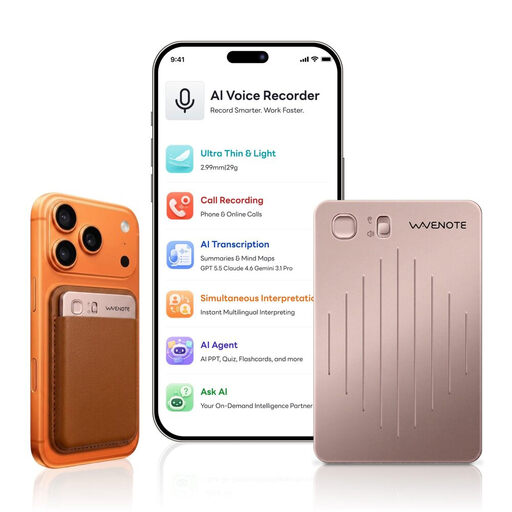 No image available
WaveNote AI Voice Recorder, 64 GB, rose gold
This model is designed for spoken recordings. Make a test recording at your recording location to check how clear it sounds with the fan running.
As stated in the product name: 64 GB of storage.
View at Joybuy
 No image available
AI Voice Recorder, 32 GB, black
This device is described as a voice recorder. If you’re recording audio description with fan noise in the background, check how clear it sounds in the actual recording conditions.
As stated in the product name: 32 GB of storage and 30 hours of recording time.
View at Joybuy
Frequently asked questions
Does 32-bit float remove fan noise?
No. Zoom and Tascam describe 32-bit float as a way to help manage recording levels, not as a fan-noise reduction feature. First, make sure the microphone is positioned appropriately, then check the recording with a test take.
How should I position the microphone before a longer recording?
Position it close to the speaker and as far from the fan as possible. Listen to a test recording made under the same conditions. If you’re using a lavalier microphone, check the clip and cable position too.
What should I check about accessories and warranty details?
Check the specific offer to see whether it includes any memory card, batteries or external microphone you need. Your statutory rights against the seller and a voluntary manufacturer’s guarantee are different things, as Germany’s consumer advice centre explains.
Can I record other people while making an audio description?
Section 201(1) of the German Criminal Code makes it a criminal offence to record another person’s privately spoken words without authorisation. The provision is part of Germany’s Criminal Code. If other people can be heard speaking, check in advance that you’re authorised to record them.


