Who is a lavalier microphone for?

Solo speakers recording in a booth

If you usually speak from the same spot, a consistent microphone position and a test recording that captures the sounds in the room are important. RØDE recommends positioning the microphone close to your mouth. Keeping the cable from pulling can also reduce handling noise.

People recording with a phone or computer they already own

If you want to use your existing device, check whether USB-C, 3.5 mm TRRS or 3.5 mm TRS works with its microphone input and recording app. Sennheiser, Shure and RØDE describe different connection options for their respective models.

Recording while moving or with another person

If you move around while speaking or occasionally record someone else, check the number of transmitters, the receiver or app, and the power supply for the specific set. DJI and Shure offer different wireless recording options and set configurations.

Key things to consider when buying a lavalier microphone

Wired with USB-C

A good fit if: Your recording device supports USB-C audio with the specific microphone and you usually record in the same place.

The trade-off: You don’t need a wireless transmitter, but you are tied to the cable run and your device and app’s compatibility.

Wired with 3.5 mm TRRS

A good fit if: Your mobile device has a compatible microphone input or you’re using a suitable CTIA adapter. Shure describes this connection option for the MVL.

The trade-off: Check the wiring, adapter and recording app rather than choosing based on the connector size alone.

Wired with 3.5 mm TRS

A good fit if: Your recorder or transmitter has a suitable TRS microphone input with plug-in power. RØDE specifies this power supply for the Lavalier GO.

The trade-off: A TRS microphone won’t necessarily work with a smartphone’s TRRS input just because both have a 3.5 mm connector.

Wireless clip-on microphone system

A good fit if: You need freedom to move or want a set with two transmitters for two speakers.

The trade-off: The transmitters, receiver or app, power supply and device support must all suit the recording setup you have in mind.

What matters What to check before buying Who is this important to?
Clear speech Microphone position and clip; make and listen to a test recording in your recording space, wearing typical clothing and with the fan on. If I want to record my voice clearly in a small booth, I pay particular attention to positioning and possible clothing noise. Around 36% of consumers say clear speech is their top priority.
Compatible device connection Check the external microphone input, connector wiring, any CTIA adapter you may need, and the recording app you use. If I want to keep using my existing phone or computer, the connection needs to work with that specific device. Around 29% of consumers put device connectivity first.
Ease of use Check the cable run and attachment. With a wireless system, also check the batteries, receiver and intended recording setup. For regular diary entries, I want my solo setup to be easy to use. Around 21% of consumers say ease of use and repeatability are their main priorities.
Movement or a second voice For two speakers, consider two transmitters and a suitable receiver or compatible app. If I want to move around while speaking or record another person, choosing a set with the right number of transmitters is essential. Around 14% of consumers prioritise freedom of movement or a second voice.

Common buying and usage mistakes

  • Every 3.5 mm plug will fit

    TRRS and TRS refer to different connection types. The Shure MVL uses TRRS, while the RØDE Lavalier GO has a TRS plug and, according to RØDE, needs plug-in power from a compatible input.

    Check the connector wiring, microphone input and any adapter you may need for the specific recording device.

    Depending on your device, you may need a compatible adapter or a different microphone.

  • Noise reduction makes the room echo-free

    If the microphone is poorly positioned, room noise and background sounds may still be audible. Noise-reduction features also vary by model.

    Record with the same clothing and background noise you’ll have for a later entry, then listen to the test before settling on a setting.

  • A one-transmitter set is enough for two people

    A single transmitter won’t let you record two people separately using their own microphones.

    Check the number of transmitters and the intended receiver or recording setup for the specific set. Only record another person’s private conversation if you are authorised to do so.

    You may need a set with two transmitters to use two separate microphones.

Brands to consider

Sennheiser

The XS Lav USB-C is a wired option for mobile devices and computers, provided their USB-C audio recording works with the microphone.

  • Sennheiser lists an omnidirectional pickup pattern, a clip and a 2 m cable for this model.
  • The cable limits how freely you can move. Check support for your device and recording app.

Shure

The MVL is a wired lavalier with a TRRS connection, while the MoveMic One and Two offer a different, wireless recording option.

  • Shure describes the MVL as suitable for compatible mobile devices with a 3.5 mm connection or an appropriate CTIA adapter.
  • Direct smartphone recording with the MoveMic One depends on the MOTIV apps. For other apps, the receiver is relevant.

RØDE

The Lavalier GO is a wired option for suitable TRS microphone inputs, such as those on compatible transmitters or recorders.

  • RØDE lists an omnidirectional capsule and a TRS plug for this model.
  • According to the datasheet, plug-in power is required. A 3.5 mm plug alone doesn’t confirm direct smartphone compatibility.

DJI

The Mic Mini is a wireless option if you’d prefer a portable transmitter to a cable that stays in place.

  • DJI lists omnidirectional recording and two levels of noise reduction.
  • These manufacturer claims don’t guarantee interference-free recording in a booth. The number of transmitters and included accessories depend on the set you choose.

Hollyland

The LARK M2S is another wireless lavalier option, with different receiver configurations available.

  • Hollyland highlights that the bundles on offer come with different receivers.
  • The stated wireless range applies to open, unobstructed conditions and doesn’t demonstrate an advantage in a small booth.

Joybuy products for voice recording

The lavalier microphones below suit different recording devices and include wireless USB-C sets. Before choosing, check your device’s connection and make sure the number of transmitters suits your recording needs.

SYNCO S8 lavalier microphone for smartphones, PCs, laptops and cameras

SYNCO S8 lavalier microphone for smartphones, PCs, laptops and cameras

Designed for recording with a smartphone, PC, laptop or camera. Check the microphone input on your specific device and confirm that your recording app supports it.

Joybuy

Moman M1CXT wireless lavalier microphone, USB-C, 2TX+1RX

Moman M1CXT wireless lavalier microphone, USB-C, 2TX+1RX

The product name specifies two transmitters and a USB-C receiver. Check that your specific recording device supports the receiver.

Joybuy

Moman MC1(C) wireless lavalier microphone for USB-C phones, 2.4 GHz, 1TX&1RX

Moman MC1(C) wireless lavalier microphone, 2.4 GHz, 1TX&1RX

The product name specifies 2.4 GHz and 1TX&1RX for USB-C phones. Check that your specific phone supports the receiver.

Joybuy
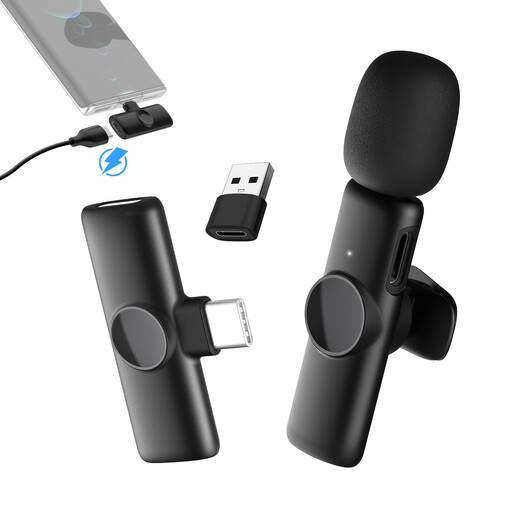
Moman MS1(C) wireless lavalier microphone for USB-C phones, 2.4 GHz, 1TX&1RX

Moman MS1(C) wireless lavalier microphone, 2.4 GHz, 1TX&1RX

The product name specifies one transmitter, one receiver and compatibility with USB-C phones. One transmitter microphone is enough for a solo diary, provided you don’t need to record a second voice separately.

Joybuy

Moman MS1X(C) wireless lavalier microphone for USB-C Android phones, 2.4 GHz, 2TX&1RX

Moman MS1X(C) wireless lavalier microphone, 2.4 GHz, 2TX&1RX

The product name specifies two transmitters, one receiver and compatibility with USB-C Android phones. Check compatibility with your specific device.

Joybuy

Lavalier microphone FAQs

How do I attach a lavalier microphone for an audio diary?

Attach it so the capsule is unobstructed and sits close to your mouth. Shure recommends a distance of 15–25 cm for the MVL; this specific measurement isn’t a guideline for every microphone. Route the cable to minimise rubbing against your clothing, then listen to a test recording.

Do I need noise reduction for every recording?

Not necessarily. First, check the microphone position and the sounds in your booth. DJI lists two levels of noise reduction for the Mic Mini. You can judge how well they work in your space by making a test recording in the actual recording spot.

What extras should I allow for with my lavalier microphone?

Depending on the connection, you may need a suitable adapter. With a wireless system, the receiver and transmitter may also need to be compatible with your recording setup. Check what’s included with the specific version. If a purchase is faulty, statutory rights against the seller are separate from a voluntary guarantee, as the Verbraucherzentrale points out.

Can I simply record someone else’s voice in Germany?

Not without authorisation: Section 201(1) of the German Criminal Code makes it an offence to record another person’s non-publicly spoken words without permission. The German Federal Ministry of Justice lists this provision in the Criminal Code. If someone else’s voice is to be recorded, make sure you have permission before recording. This does not mean you are prohibited from recording your own voice alone.

Can I use any wireless microphone in Germany without checking first?

No. The German Federal Network Agency specifies frequency ranges and technical conditions for wireless microphones. Check whether the specific model is suitable for its intended use in Germany; the Federal Network Agency’s ruling 37/2026 contains the relevant details.