What should you look for when buying?
First, work out how many voices you’ll record at once and how many people need to monitor the recording. Then decide whether you want to record individual tracks to a memory card or directly to a computer.
The comparison below is for consumers choosing an audio interface to record an audio drama in a small booth. Each row covers a key buying priority.
| Priority |
What to check |
Who it matters to |
| Microphone preamps |
Count the microphone preamps you can use at the same time, not all the advertised inputs. The four additional line inputs on the 4th-generation Focusrite Scarlett 18i16, for example, are not additional microphone preamps. |
If I’m recording several parts at once, I need a suitable microphone preamp for each voice. Around 28% of consumers are likely to prioritise this type of connection. |
| Separate tracks |
Check whether you can record individual tracks to a memory card, via USB to your software, or both. Zoom describes individual channels on microSD for the PodTrak P4next; Tascam lists SD and USB recording for the Mixcast 4. |
If I want to edit dialogue separately later, my recording setup needs to capture each voice on its own track. Around 22% of consumers are likely to have this editing requirement. |
| Headphone connections |
Count how many connections you need and check whether you need individual volume controls or different mixes. Zoom and Tascam each list four headphone outputs; the MOTU M4 has one headphone output. |
If everyone involved needs to monitor the recording, I’ll plan the connections and their controls together. Around 22% of consumers are likely to prioritise shared monitoring. |
| Room acoustics |
Record short voice samples from the planned speaking positions and listen for reflections and background noise. Shure notes that a microphone cannot effectively separate direct speech from reflected sound. |
If my booth has noticeable echo, I want to assess the sound where I’ll actually be recording, rather than relying on interface specifications. Around 17% of consumers are likely to prioritise this. |
| Recording without a dedicated computer |
Decide whether you want to record mainly to a memory card or directly to a computer, then check the recording options on the specific model. Zoom lists microSD recording for the PodTrak P4next; Tascam describes SD and USB operation. |
If I want to record in different locations without a computer set up for the job, I need a workflow that suits this. Around 11% of consumers are likely to prioritise this. |
Related products at Joybuy
The Joybuy products below are podcast microphone kits for voice and streaming setups. They aren’t automatically a substitute for a multichannel interface when recording an audio drama with several voices that need to be edited separately. Check the actual recording options and headphone connections.
 Image unavailable
Yinkaer G10-P15-XB podcast microphone kit
The product name suggests a podcast voice setup. If you need to edit audio drama voices separately, check the actual multitrack recording and monitoring options.
The description lists a sound card, an audio mixer, a 3.5 mm condenser microphone and a microphone arm.
View at Joybuy
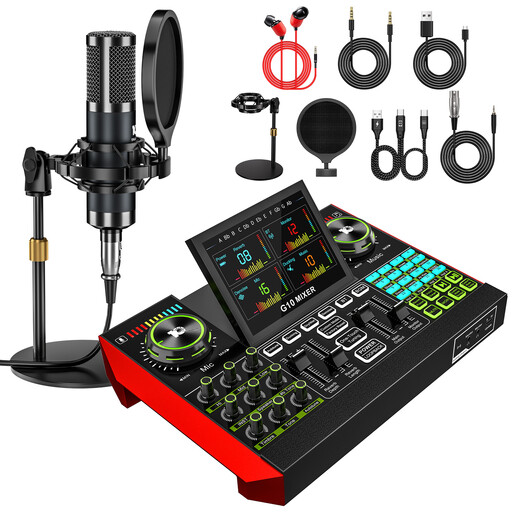 Image unavailable
Yinkaer G10-P15 podcast microphone kit
The product name describes this as a podcast and voice recording kit. If you’re making an audio drama with several separate tracks, check the recording options first.
The description lists a sound card, an audio mixer and a 3.5 mm condenser microphone.
View at Joybuy
 Image unavailable
Yinkaer G10-P17 podcast microphone kit
The product name suggests a voice and streaming setup. For audio drama editing, check whether you can record the voices you need on separate tracks.
The description lists an audio mixer and a 3.5 mm condenser microphone.
View at Joybuy
 Image unavailable
Yinkaer G10-P17-P17 podcast microphone kit
The product name lists two microphones for a voice setup. If you’re recording several parts at once and need separate tracks, the specific recording and monitoring options matter too.
The kit is described as including two 3.5 mm condenser microphones, a sound card and an audio mixer.
View at Joybuy
Frequently asked questions about audio interfaces for audio drama
Do four advertised inputs automatically mean four microphone connections?
No. According to MOTU, two of the M4’s inputs are for microphones and the other two are for line-level signals. On the 4th-generation Focusrite Scarlett 18i16, you should also distinguish the additional line inputs from its four microphone preamps.
What should I set up before the first ensemble recording?
Set up the recording and monitoring route for each microphone you’ll use at the same time, then check that you can reopen the individual tracks you need. Zoom describes memory card recording on the PodTrak P4next, as does Tascam on the Mixcast 4. With the Focusrite Scarlett 18i16, also check the channel routing in your recording software.
Will an audio interface improve echo in a small booth?
Not just by providing connections. Shure explains that a microphone can’t effectively separate direct speech from room reflections, so check the microphone position and room with a voice test recording.
What if a device bought online is faulty?
Your statutory rights against the seller are separate from any voluntary guarantee. If a product is faulty, you may first be entitled to have it repaired or replaced. For a distance purchase as a consumer, you generally also have a right to cancel. Under § 355 BGB, the cancellation period is 14 days, although you should check when it starts and whether any exceptions apply in your particular case.
Can I record other people’s conversations and use music in a published audio drama?
§ 201 StGB concerns the unauthorised recording of another person’s non-public speech. If you’re using copyrighted works, the relevant right under § 19a UrhG may apply when making them publicly available online; make sure you have the necessary rights before publishing. The podcast tariff described by GEMA applies to the specific podcast cases it defines, not automatically to every audio drama.


