For a fixed speaking position, a stand-mounted microphone can avoid contact with clothing. A wired lavalier works well if you need your hands free and the cable route and connection are suitable. If you’ll be moving around, you could use a wireless system or a body-worn recorder, but both involve extra checks for microphones, channels, power and file management. RØDE notes that clothing rubbing against a worn lavalier can be heard in the recording.
Which recording option is right for you?
Performers at a fixed speaking position
If you’ll be speaking from one spot most of the time, you can plan the microphone position and cable route. With a lavalier, make sure your clothes and the cable don’t rub against the capsule. You could also compare it with a stand-mounted microphone as an alternative for the booth.
Ensembles with several people speaking at once
For group dialogue, consider how many people need their own microphone at the same time and whether they need separate recording tracks. Check that the number of microphones, transmitters, inputs and channels matches the specific set-up.
Performers who move around
If you’ll be moving during a scene, cable routing, attachment and power become especially important. A wireless system or a body-worn recorder can offer a different way to record, but remember to plan for the receiver or file management, too.
What should you look for when buying?
Wired lavalier
A good fit if: you’ll be speaking in one place most of the time and the cable won’t get in the way.
Consider: the cable can restrict movement, and the connection and power requirements depend on the specific microphone.
Wireless lavalier system
A good fit if: performers need to move around or a cable would get in the way of the action.
Consider: the number of transmitters, receiver connection, power and local radio conditions all form part of the set-up.
Lavalier with a body-worn recorder
A good fit if: you want to record a moving performer’s voice separately and add it to the edit later.
Consider: starting the recording, checking the memory card and batteries, and transferring the file afterwards.
Microphone on a stand
A good fit if: the speaking position is fixed and you want to avoid clothing touching the microphone.
Consider: the voice needs to suit the microphone position, so try the set-up in the actual booth.
| Consideration |
What to check when buying |
Who is this important to? |
| Minimal contact with clothing |
Test the clip and attachment position with the costume; listen back to a short test recording. |
If I want to avoid rubbing noises, I check the attachment with the clothes that will actually be worn. Around 33% of consumers focus above all on clothing contact and capturing a clear voice. |
| Multiple voices |
Check the number of microphones, transmitters and channels, and whether the specific version records separate tracks. |
For group dialogue scenes, I want to know whether each person can be recorded at the same time. Around 27% of consumers prioritise recording several voices simultaneously. |
| Connecting to existing devices |
Check the input, connector wiring, power requirements and audio source selected in the recording app. |
If I want to keep using my recorder, computer or mobile device, the signal path needs to be compatible. For around 27% of consumers, compatibility with existing equipment comes first. |
| Movement and recording separately |
Test the cable routing and freedom of movement. If you’re using a recorder, also plan for starting it, checking the memory card and batteries, and transferring the file. |
If I move around during a scene or want to save a voice separately, a suitable mobile recording option matters. Around 13% of consumers prioritise freedom of movement or a separate recording. |
Common misconceptions
-
A compatible 3.5 mm plug doesn’t automatically mean it will work
Different lavalier models can have different connection requirements. For example, the RØDE Lavalier GO needs a powered TRS microphone input.
Check the connector wiring, microphone input, power requirements and selected audio source in the recording app together.
-
A microphone for one person won’t automatically record a whole ensemble
A body-worn recorder and a two-channel wireless system offer different ways to record. Check whether the specific equipment can handle the number of simultaneous voices and tracks you need.
Before buying, decide how many people will be speaking at once and whether you want to edit their voices separately.
-
A discreet attachment doesn’t guarantee a noise-free recording
RØDE notes that clothing rubbing against a worn lavalier can be heard in the recording. A microphone worn outside your clothes avoids this contact, but still needs to be positioned correctly.
Make a test recording in costume and while moving as you would during the scene, then compare the lavalier and stand positions in the booth.
Key brands at a glance
RØDE
Lavalier GO for use with a compatible powered TRS microphone input; Wireless GO (Gen 3) as a separate two-channel wireless system for compatible lavalier microphones.
- According to the manufacturer, the Lavalier GO has an omnidirectional capsule, a clip and cable management; it requires plug-in power.
- According to the manufacturer, Wireless GO (Gen 3) offers locking lavalier connectors and local 32-bit float recording.
- For both recording options, check what’s included and test the attachment with the clothes you plan to wear.
Sennheiser
XS Lav USB-C for a wired recording set-up with compatible mobile devices and computers.
- The manufacturer lists an omnidirectional pickup pattern, clip, windshield and 2 m cable for this model.
- USB-C isn’t an analogue 3.5 mm connection, so check that the cable will reach your speaking position.
Shure
MVL for compatible mobile recording set-ups with a 3.5 mm connection.
- Shure lists an omnidirectional pickup pattern and a compatible CTIA adapter as a connection option.
- The sound characteristics described by the manufacturer aren’t a substitute for an independent listening test in an audio drama booth.
Deity
V.Lav, a wired lavalier for compatible 3.5 mm microphone inputs.
- According to Deity, the model’s TRRS connector is configured for many, but not all, microphone inputs; the cable is 5 m long.
- The model uses two LR41 or AG3 batteries, so remember to plan for the cable route and batteries.
Zoom
F2, a lavalier recording option with a body-worn recorder for capturing one voice separately.
- Zoom lists an included lavalier microphone, 32-bit float recording and storage on microSD.
- Each additional person you want to record separately needs their own suitable recording set-up. Managing cards, batteries and files remains part of the process.
Joybuy product selection
This selection includes wired and wireless lavalier options for compatible devices, including models with specified connections for multiple voices. Before recording, check that the connection and device set-up suit your requirements.
 No image available
SYNCO S8 lavalier microphone
For a wired lavalier recording set-up with a compatible device.
3.5 mm connection; the product description lists a clip and an adapter kit. Compatible devices include smartphones, PCs, laptops and cameras.
Test the attachment with the clothes you’ll be wearing to check for friction against the capsule.
View at Joybuy
 No image available
Moman M1CXT, USB-C, 2TX+1RX
A wireless recording option for compatible USB-C devices; the product name specifies two transmitters and one receiver.
2TX+1RX; the product name lists a range of 150 m.
Check the USB-C recording connection on the device you’re using, and test the microphone attachment with your costume.
View at Joybuy
 No image available
Moman MA6 lavalier microphone
For a recording set-up with a compatible smartphone and 3.5 mm connection.
The product details list an omnidirectional pickup pattern, automatic pairing and an operating range of 6 m.
Check the connection on your recording device and test the attachment with the performers’ clothing.
View at Joybuy
 No image available
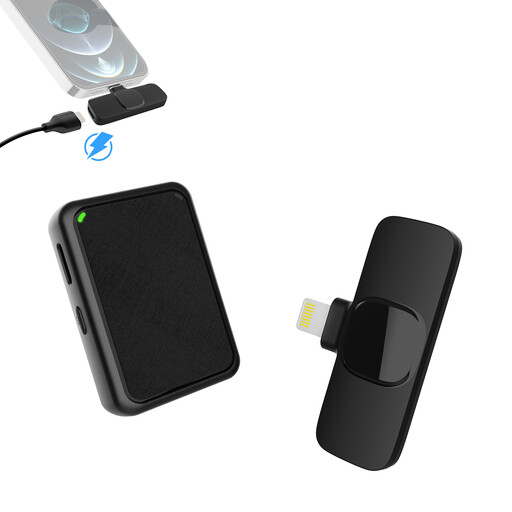
Moman MB1X(A), 2.4 GHz, 2TX+1RX
A wireless recording option for two voices with a compatible iPhone recording device.
2.4 GHz system with two transmitters and one receiver; the Lightning connection is specified for compatible iPhones and iPads.
Check that the Lightning connection suits your specific device, and test the microphone attachment with your costume.
View at Joybuy
 No image available
Verbex K31Pro-Black, dual-microphone system
A wireless recording option with two microphones for compatible iOS or Type-C devices.
Magnetic charging case; the product description states a battery life of 3–6 hours.
Check your recording device’s connection and make sure the battery life suits the length of your recording session.
View at Joybuy
Frequently asked questions
How can I check the microphone attachment before a long audio drama recording?
Attach the microphone to the clothes you’ll actually be wearing, then listen to a short test with quiet, loud and movement-heavy sections. RØDE notes that friction from clothing can be audible. The manufacturer’s suggested distance of around 20–30 cm from the chest is a starting point, not a guarantee for every booth.
What else should I plan for with a body-worn recorder?
With the Zoom F2, you’ll need a suitable memory card and two AAA batteries, and you’ll need to start the recording and transfer the file afterwards. Also plan for a separate suitable recording set-up for every additional person you want to record separately.
Can I record conversations outside the planned audio drama roles without asking?
Section 201 of the German Criminal Code (StGB) makes it a criminal offence to record another person’s words spoken in private without authorisation. Before recording, make sure everyone speaking privately has been properly informed and included. Planning an audio drama recording doesn’t give you permission to capture third parties’ incidental conversations.


