Script revisers
You often incorporate feedback and want to access editing commands easily. Check the keyboard layout and writing software together: comments and Track Changes are software features, as Microsoft Support explains for Word.


For an audio drama script that needs frequent revisions, start by choosing a keyboard whose layout and programmable keys work with your writing software. Programmable features are only useful for workflows that the software supports and that you’ve set up. In a noise-sensitive room or during long sessions, quiet keys or a split design may matter more. Comments and Track Changes are features of the writing software; Microsoft Support explains how they work in Word.
You often incorporate feedback and want to access editing commands easily. Check the keyboard layout and writing software together: comments and Track Changes are software features, as Microsoft Support explains for Word.
You write in a shared or noise-sensitive space and want to prioritise quiet keys over extra customisation features. Information about key noise comes from manufacturers and isn’t a standardised comparison across models.
You want to consider different hand positions and keyboard shapes for longer sessions; a split layout may take some getting used to. F.A.Z. Kaufkompass notes both the typing comfort of the Logitech ERGO K860 and its lack of backlighting and wired mode.
First check which commands your writing software supports. Then weigh up key noise, hand position and desk space to suit your writing environment.
| Priority | What to check before buying | Who is it most important for? |
|---|---|---|
| Revision commands | Commands in your writing software; keyboard layout and operating system | If I use the same commands often when revising, I want to access them easily without confusing macros with comment features. Around 36% of consumers prioritise having the right revision commands. |
| Key noise | Exact switch type; how the keys sound in your own writing environment | If I write in a shared or noise-sensitive room, quiet keys matter more to me than extra customisation features. Around 29% of consumers prioritise quiet keys. |
| Hand position | Split key layout and wrist rest; space needed and time to adjust | During long writing sessions, I want to consider my hand and arm position, as well as split keys, and allow time to get used to the layout. Around 21% of consumers prioritise hand position. |
| Desk space | Layout and position of frequently used keys; connections available at your desk | If my desk is short on space, I want to check whether a more compact layout keeps my usual revision commands within easy reach. For around 14% of consumers, compactness is the top priority. |
A keyboard can’t create tracked revision notes by itself. Your writing software needs to provide the feature you want.
First check how to add comments or track changes in your software, then choose a suitable keyboard layout.
CHERRY describes the keystrokes of the STREAM KEYBOARD as quiet, but this is a manufacturer’s claim, not a standardised measurement for comparing it with other models.
Check the exact switch type and, if possible, try the keys in your own working conditions. A clicky switch option is also available for the PERIBOARD-335.
Layout, switches, keycaps and software support can vary between versions.
Check the full model name, DE-ISO layout, switch type and operating system support for the specific product listing.
According to Logitech, the MX Keys S offers Smart Actions in Logi Options+; the ERGO K860 is a split keyboard with a wrist rest.
The wired STREAM KEYBOARD is a low-profile option with a familiar key layout.
The DE-ISO version of the V1 combines a compact 75% layout with QMK/VIA customisation.
The PERIBOARD-335 combines a split design with a choice of mechanical switches and macro features.
This selection from Joybuy includes keyboards for writing and revising audio drama scripts, with a range of layouts, connection types and stated customisation features.
 No image available
The stated ISO-DE QWERTZ layout is an option for typing in German.
The product description lists a wired keyboard with Akko V3 Pro Cream Yellow switches, hot-swap and RGB.
 No image available
The foldable design may suit a mobile workstation; the product description says it has quiet scissor keys.
Features listed include three connection modes, connections to up to three devices and USB-C charging. The product description lists Windows, Android and iOS as compatible systems.
 No image available
The 75% layout and ISO-DE configuration may suit you if you’re looking for a more compact keyboard with a German key layout.
The product description lists tri-mode connectivity, mechanical switches, hot-swap and VIA compatibility. Check that the specific layout works with your writing software and operating system.
 No image available
The product description lists a German QWERTZ layout and mechanical switches described as quiet and tactile.
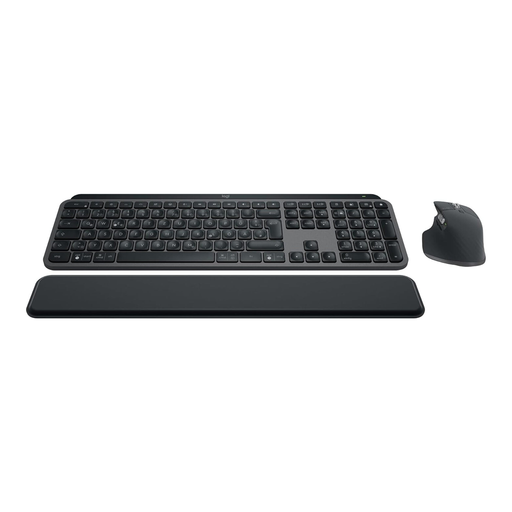
Bluetooth and Logi Bolt connectivity are listed, along with intelligent backlighting.
 No image available
According to the product description, the set includes the MX Keys S and MX Master 3S, and also features Smart Actions. Logitech describes Smart Actions for the MX Keys S as workflows you can set up; how useful they are depends on the actions you choose.
The description lists German QWERTZ, backlighting, Bluetooth and Logi Bolt.
No. Comments and Track Changes are features of your writing software; Microsoft Support explains both for Word. At most, a programmable key can trigger a command available in that software. Check the specific combination of programme, operating system and keyboard.
First decide which command you need in your writing software, then check its keyboard shortcut or customisation options. Only then should you assign a supported key or macro; Microsoft Support explains how to customise keyboard shortcuts in Word.
Check that the connection works with your devices: the CHERRY STREAM KEYBOARD is wired, while Logitech lists Bluetooth or a USB receiver for the ERGO K860. Follow the instructions for cleaning and changing the batteries for the specific version you buy.
For a consumer purchase, the statutory warranty against the seller is separate from a voluntary guarantee. Verbraucherzentrale explains the difference in its article dated 28 September 2026; in the event of a specific fault, the circumstances of the purchase and the fault itself will be relevant.
In Germany, consumers generally have a 14-day right to cancel a contract made online; for goods, the cancellation period starts in connection with receiving them. Verbraucherzentrale explains this rule in its article dated 13 August 2026. Check the terms of your specific purchase; the right to cancel and your rights if an item is faulty are different.