What should you consider when choosing?
First decide whether you’ll record roles one after another or at the same time. This determines how many inputs you need and which connection setup is right for you.
| Consideration |
What to check before buying |
Who should consider this? |
| Room noise and speaking position |
Polar pattern and positioning options; make test recordings of quiet and emphatic lines at your planned recording spot. |
If there’s background noise in my room, I want to assess the distance and microphone placement in a test recording. Around 31% of consumers say room noise and speaking position are their top buying consideration. |
| Separate dialogue tracks |
Number of microphone inputs needed at the same time; XLR compatibility and any phantom power required. |
If several performers are speaking at once, I want to be able to edit their voices separately. Around 25% of consumers put separate dialogue tracks first. |
| Control over vocal nuances |
Headphone monitoring and a suitable polar pattern; listen to test takes with different speaking styles. |
For quiet or expressive passages, I want to hear how my voice and the room sound together before recording. Around 25% of consumers rate control over vocal nuances as their top consideration. |
| Easy start, with room to expand later |
USB connection for your computer; if you plan to use XLR, check the required input and what’s included. |
If I’m initially recording roles individually on my computer, I want to get started without a separate interface while keeping other connection options open. Around 19% of consumers prioritise an easy start. |
Microphones and sets at Joybuy
The Joybuy products below include USB and XLR microphones for voice, a set with two microphones and a wireless set. Compare the connection options, number of voices you need to record and positioning with your planned audio drama setup.
 No image available
Dynamic USB/XLR microphone set
A good option if you want to record on a computer via USB or use an XLR signal path.
The description lists a cardioid pattern, gain, echo and mute controls, a headphone socket, an XLR cable and a desktop stand. A thread is specified for mounting it on a microphone arm.
View at Joybuy
 No image available
Yinkaer G10-P17-P17 podcast kit with two microphones
This set could be a good choice if you’re looking for a voice recording setup with two microphones and an audio mixer.
The product description lists two 3.5 mm condenser microphones and a mixer. It also lists support for PC, Mac and mobile devices; check whether your recording software supports the track editing you need.
View at Joybuy
 No image available
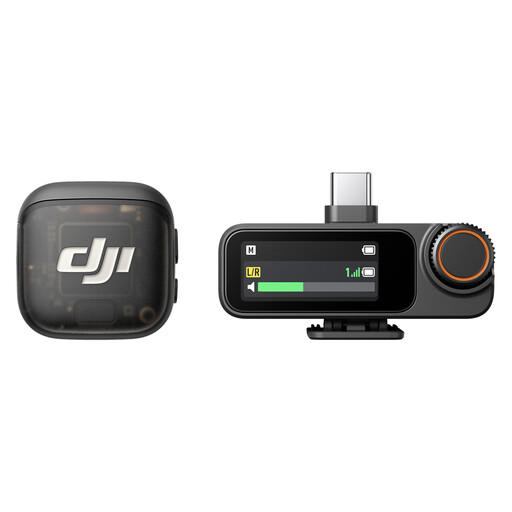
DJI Mic 3, 2 TX + 1 RX with charging case
Could be worth considering for scenes on the move if a wireless microphone system suits your recording plans.
The listed configuration includes two transmitters and one receiver, internal storage in the transmitters and 2.4 GHz wireless transmission. USB-C, Lightning and 3.5 mm TRS connections are listed. Before using the wireless system, check its frequency specifications against the applicable allocation set by Germany’s Federal Network Agency (Bundesnetzagentur), which sets out technical and operational conditions for each band.
View at Joybuy
 No image available
FIFINE K688CTW dynamic USB/XLR microphone with boom arm, white
The USB connection could suit roles recorded one after another on a computer, especially if you want to use the included microphone arm.
The description lists a unidirectional pattern, a headphone socket and a speaking distance of 2 to 6 inches. The XLR cable isn’t included; the microphone controls are inactive when using XLR.
View at Joybuy
 No image available
FIFINE AM8 dynamic USB/XLR microphone with desktop stand
A good option for recording voice on a computer if you’re looking for a dynamic microphone with USB and XLR connections.
It’s specified with a unidirectional pattern, headphone monitoring and a desktop stand. The recommended speaking distance is 2 to 6 inches. The XLR cable isn’t included, and the controls are inactive when using XLR.
View at Joybuy
Frequently asked questions
What do I need to record two people separately at the same time?
You’ll need two compatible microphones and two separate microphone inputs. The Focusrite Vocaster Two is one documented example, with two XLR inputs; whether you need phantom power depends on the microphone you’re using.
How do I set up a recording for an audio drama?
Point the microphone towards the person speaking, check the input level, then listen to a quiet and an emphatic test take. With the AT2020USB-X, the headphone socket and mix control can help you monitor directly from the microphone; controls may differ on other models.
What are my rights when buying online in Germany?
For online consumer purchases covered by the rules, you generally have a 14-day right to cancel from the date of delivery, although exceptions and possible return costs may apply. EU consumer information site Your Europe also explains that faulty goods are covered by a minimum two-year legal guarantee from the seller; this is separate from any manufacturer’s warranty.
Can I use any wireless microphone in Germany?
No. Whether you can use it depends on the frequency band and the conditions of the applicable allocation. In April 2026, Germany’s Federal Network Agency published a general allocation with technical and operational conditions for each band. Check the frequency specifications of the system you’re considering against the allocation currently in force.


