For short voice recordings, a voice recorder that makes individual recordings easy to manage and transfer is a sensible starting point. A handheld recorder may be a better fit if you also need an external microphone or a USB audio workflow. The best way to judge how clearly your voice comes through and how much background noise is picked up is to make a test recording where you plan to use it.
Who is a recorder suitable for?
Students at a shared table
If you’re recording your own flashcards while other people are working nearby, clear speech and a considerate recording setup are especially important. RØDE’s microphone technique guidance points out that greater distance can make your voice sound more distant and bring background noise to the fore.
Anyone creating lots of short flashcards
If you want to record individual sections rather than long sessions, consider how easy it is to find, replay and share files. Sony lists A/B repeat and file division for the ICD-UX570, while Philips lists timestamps for the DVT2075.
Students with a computer-based audio workflow
If you regularly transfer recordings or want to work directly on a computer, file format and connection type are important factors. Philips lists MP3 and PCM/WAV recording for the DVT2075; Zoom also describes the H1essential as a USB microphone.
What should you look for when buying?
Compact voice recorder
A good fit if: You mainly want to record short voice flashcards, replay them and reuse them as files. Sony lists A/B repeat and file division for the ICD-UX570; Philips lists MP3 and PCM/WAV recording for the DVT2075.
Consider: Features vary by model, so check the format and clarity with a test recording at your desk.
Handheld audio recorder
A good fit if: You also need USB audio or an external microphone input. Zoom also describes the H1essential as a USB microphone; Tascam lists an external microphone input and USB-C audio interface for the DR-05XP.
Consider: Extra features aren’t automatically necessary for simple voice flashcards. The DR-05XP’s manual lists a microSD card and batteries among the setup requirements.
For short recordings at a shared desk, the recording environment matters just as much as file management. RØDE explains that greater distance from the microphone can bring background noise to the fore.
| What you need |
What to check before buying |
Who is this important to? |
| Clear speech |
Record a short test flashcard where you plan to use the recorder and listen back through headphones. Check the microphone position and whether other voices are picked up. |
If I’m speaking at a shared desk, I want to hear my own voice clearly without recording other people’s conversations. Around 31% of consumers put speech clarity first. |
| Short individual flashcards |
Check how to start recording, divide files, replay them and find individual files on the specific model. |
If I’m recording lots of short flashcards, I want to find and replay each section quickly. Around 25% of consumers prioritise organising individual flashcards. |
| Reusing recordings |
Make sure the recording format works with your target software and test the transfer process from recording to finished flashcard. |
If I want to add recordings to my flashcard workflow, the file format needs to be compatible. Around 25% of consumers prioritise reusing and transferring files later. |
| Connections and accessories |
Decide whether you really need an external microphone or USB audio. Check the storage medium, power supply and what’s included with the device you choose. |
If I want to use an external microphone or record directly over USB audio, I check the connections and any accessories I’ll need. Around 19% of consumers prioritise additional connection options. |
Common buying mistakes
-
Assuming a recording mode or high resolution guarantees clear speech
Technical recording options don’t prove that conversations at a shared table will be filtered out. Poor microphone placement can bring background noise to the fore.
Make a short recording in the place you’ll actually use the device and listen back through headphones before recording lots of flashcards.
Poor placement can mean extra time spent on test recordings, re-recording or editing.
-
Confusing long recordings with individual flashcards
If you want to replay or correct sections regularly, finding and splitting them in a long recording can take time.
Check how recording, file division, replaying and finding individual sections work on the specific model.
A workflow where sections are difficult to find or split can create extra organisational work.
-
Overlooking the setup required for a handheld recorder
The Tascam DR-05XP manual lists inserting a microSD card and batteries as setup steps.
Before buying, compare what’s included in the specific offer with the parts you need for your recording setup.
Depending on what’s included, you may need to account for storage media or a power supply before using the device.
Brands to consider
Sony
The Sony ICD-UX570 is one option to consider for short voice recordings and playback.
- Sony lists A/B repeat, file division, recording monitoring and a built-in rechargeable battery for this model.
- These features don’t tell you how clear a recording will be at a shared desk, so check with a test file.
Philips
According to Philips, the VoiceTracer DVT2075 combines built-in storage with MP3 and PCM/WAV recording.
- Philips lists timestamps and voice-activated recording for this model.
- The manufacturer’s claims about sound quality aren’t an independent comparison in a shared-desk setting.
Zoom
The H1essential is a handheld recorder to consider if you’re thinking of using a USB microphone as well as recording voice flashcards.
- Zoom lists MP3 recording and USB microphone functionality for this model.
- The advertised 32-bit float recording doesn’t prove that conversations at a shared table will disappear from your recordings.
Tascam
The DR-05XP may be worth considering for a setup with an external microphone or USB-C audio interface.
- Tascam lists these connections and several recording formats.
- Extra features are only useful in a simple workflow if you actually use them. The manual also lists a microSD card and batteries as setup requirements.
Joybuy products
The Joybuy products below are voice recorders for short recordings and digital reuse. Check that each device’s USB, app or cloud workflow is compatible with your flashcard software.
 No image available
PLAUD Note Pro Voice Recorder, 64GB
For short voice recordings that you can then transfer using USB-C.
64 GB storage, built-in microphone and USB-C data cable; product information states that it’s compatible with Android and iOS.
Joybuy
 No image available
Mobvoi TicNote Lite AI Voice Recorder, 4GB
An option if you want to manage recordings through an app and the web.
4 GB storage and Bluetooth; product information also lists recording, transcription and management through the app and web.
Joybuy
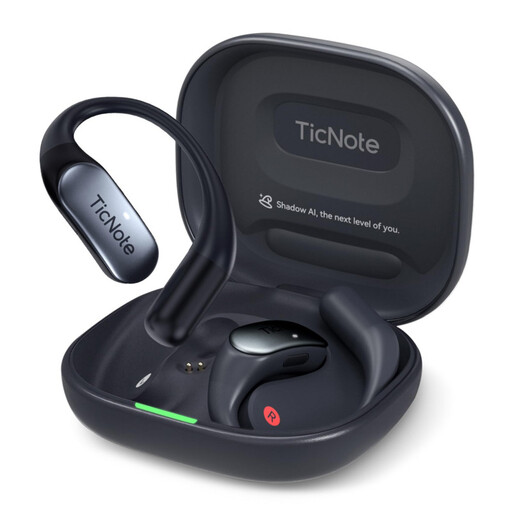 No image available
Mobvoi TicNote Pods 4G AI Voice Recorder, 32GB
For short recordings you want to use online through an app once setup is complete.
32 GB storage and dual-microphone array. Product information states that recording starts at the touch of a button once the app is set up, with files transferred to the cloud over 4G.
Joybuy
 No image available
Mobvoi TicNote Standard AI Voice Recorder, 64GB
For a digital workflow that includes syncing and exporting recordings.
64 GB storage, triple-microphone system, Wi-Fi and Bluetooth; the product name states a recording time of 20H.
Joybuy
 No image available
Rexsun Digital Voice Recorder L15, 64GB
For individual voice flashcards you can listen to directly and transfer over USB.
Product information lists an included 64 GB TF card, headphone playback and USB file transfer. Recording time is stated as up to 22 hours.
Joybuy
Frequently asked questions
Can I record other people’s conversations at a shared desk?
Don’t record other people’s private conversations without their permission. Under § 201 para. 1 of the German Criminal Code (StGB), making such a recording is a criminal offence. The provision is published on the Federal Ministry of Justice’s Laws Online website. Wherever possible, record only your own content for your flashcards, and check the situation if other people might be heard.
How should I position a recorder for a short voice flashcard?
Position the microphone to suit your voice, then make a short test recording in the actual conditions at your desk. RØDE explains that greater distance can make your voice sound more distant and bring background noise to the fore; this doesn’t provide a distance recommendation for any specific device.
Do I need 32-bit float for audio flashcards?
No, it isn’t essential just for making short flashcards. Zoom advertises 32-bit float recording on the H1essential, but if you’re using it at a shared desk, first check that your voice is recorded clearly and that you need the extra recording features.
Which parts should I check before using the recorder for the first time?
Check what’s included in the specific offer and compare it with your planned setup. The Tascam DR-05XP manual lists a microSD card and batteries as setup requirements; don’t assume these are included with every offer.


