Recording solo in a small booth
If you record your flashcards yourself, a clear voice and a suitable microphone position are what matter most. Shure explains that a microphone cannot reliably separate direct speech from reflected sound.


For many short audio flashcards, a simple voice recorder with built-in storage is a practical choice if you mainly speak on your own, listen back to takes and transfer files. A handheld recorder may suit you better if you want extra recording options or an external microphone input; depending on the model, you may need a memory card. In a small booth, microphone placement and a test recording are key: extra recording features won’t eliminate room reflections.
If you record your flashcards yourself, a clear voice and a suitable microphone position are what matter most. Shure explains that a microphone cannot reliably separate direct speech from reflected sound.
When you’re recording lots of individual sentences, it’s important to be able to start recording easily, listen back and manage your files. Sony and OM SYSTEM list features on their respective models for searching, marking or transferring recordings.
If you want to add files to a flashcard app, check the format and playback on your target devices. Anki Docs explains how to add media to notes and highlights differences in format support between its web and mobile versions.
A good fit if: you mostly record on your own and want to record and transfer short files without a separate memory card.
The trade-off: Built-in storage and voice recording features won’t prevent echo. Test the sound and controls where you plan to use it.
A good fit if: you want to use different recording formats or connect a compatible external microphone.
The trade-off: Check the storage medium and what’s included; some models require a memory card.
A good fit if: you regularly want to create transcripts or summaries as well as audio flashcards.
The trade-off: Check how files can be exported through the app and the transcription allowance. These extra features aren’t essential for audio-only flashcards.
| Priority | What to check before buying | Who is it important to? |
|---|---|---|
| Clear speech | Can you position the device securely where you’ll speak and listen back to a test recording from there? | If I want to record a clear solo voice in a small booth, I first consider where to position the recorder and how far away to sit. Around 33% of consumers put speech clarity first, even when recording in a booth. |
| Lots of short takes | Test starting a recording, playback, finding files and, where available, marking or splitting a recording. | If I’m recording lots of individual sentences, I want to record, listen back and find them again quickly. Around 27% of consumers prioritise a smooth workflow for short takes. |
| File export | Test the recording and export formats with a sample card in the app you actually use and on your target device. | If I want to add recordings to my flashcard app, I need files that work in the app and on my devices. Around 27% of consumers put file export first. |
| Accessories and services | Check what storage medium and power supply you need, and whether you’ll actually use transcription. | If I want to keep the extra costs and effort of accessories or digital services to a minimum, I compare what’s included with how I plan to use the recorder. Around 13% of consumers prioritise keeping accessory and service requirements manageable. |
This feature affects how recording levels are handled, not room reflections. Shure explains that a microphone cannot reliably separate direct speech from reflected sound.
Make a test recording from where you plan to speak, then decide whether this feature is useful for your workflow.
Storage media and included accessories vary between recorders. You may need to prepare an extra memory card or power supply.
Before buying, check which memory card and power supply the specific model needs, and what’s included in the offer.
A transcript doesn’t automatically replace the audio file or link it to a flashcard. Plaud lists a monthly transcription allowance for its Starter plan; check the terms of the specific offer before buying.
Test audio export and importing cards separately, and only factor in transcription features if you actually need them.
The features listed relate to the specific models and product ranges. They’re no substitute for testing the recorder where you plan to use it or checking that it exports files in the right format.
The WS series is worth considering for voice recordings and straightforward file transfers; the LS-P5 offers more advanced recording and editing features.
The ICD-UX570 is aimed at users who want built-in storage and search and playback features.
The H1essential is a handheld recorder with built-in X/Y microphones and USB microphone functionality.
The DR-05XP and DR-07XP are handheld options for buyers who want to use memory cards, different recording formats or an external microphone input.
The DVT4115 may suit you if built-in storage, MP3 or PCM files and an optional app fit your workflow.
Note Pro is most relevant if you want to use app-based transcription or summaries as well as audio recording.
The Joybuy products below cover everything from short voice recordings with app-based transcription to recording and export workflows for flashcards.
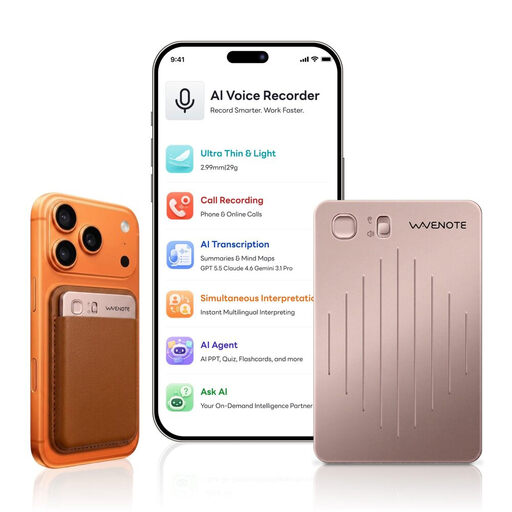 No image available
For audio flashcards if you also want to use app-based transcription or edit files.
64 GB storage; WAV recording. According to the product description, transcription, file editing and syncing require the WaveNote app.
 No image available
For short voice recordings if you also want to use app-based transcription.
64 GB storage; transcription function. The product description also mentions Bluetooth app control.
 No image available
For lots of short recordings if you want one-button operation and A-B playback.
128 GB storage; MP3 and WAV recording; USB-C file transfer. The description also mentions time-based file management.
 No image available
For audio flashcards if you also want real-time transcription and app-based file transfers.
32 GB storage; MP3 and WAV files; one-button recording. The product description lists file transfer via Wi-Fi or Bluetooth. According to the description, cloud syncing and file management are available through the Notta app.
Record a typical set of flashcards from the position where you plan to speak, then listen back. Pay attention to room echo and keep a consistent distance from the microphone. Shure explains that a microphone can’t reliably separate direct speech from reflected speech.
Transfer the files using the USB or app method provided, then test a flashcard in the app you actually use. Anki Docs explains how to add media to notes and points out that not every audio format works across all web and mobile versions.
Back up your recordings after transferring them and check the media files in your flashcard app. Anki has a media check that reports missing and unused files, among other things.
Not for the Starter allowance described by Plaud: it lists 300 free transcription minutes per month, with further allowances available to purchase. Before buying, check the terms of the specific offer in Germany and whether you need transcripts for your flashcards at all.
Section 201 of the German Criminal Code (StGB) concerns the unauthorised recording of another person’s private speech, as well as the use or sharing of such a recording as specified there. Make sure you have permission before recording anyone else; recording your own voice is not the same situation described in Section 201. When processing personal data, you must also comply with data protection law, as explained by the Federal Commissioner for Data Protection and Freedom of Information.