Which lavalier setup is right for you?

A solo speaker with a quiet voice

If you’re recording the audio-guide scripts yourself, attach the microphone close to your mouth and listen back to a test recording wearing the clothes you’ll actually have on. RØDE explains that keeping the mic close to your voice can help improve the balance between your voice and background noise.

A guide team recording outdoors

If you’ll be recording at different locations, plan for both wind protection and freedom of movement. RØDE notes that wind can affect a recording, so test the attachment and wind protection at the intended location.

A team recording interviews

If you’ll be recording people in addition to the guide, check how many microphones or transmitters are included and plan how you’ll manage the files afterwards. The Federal Commissioner for Data Protection and Freedom of Information explains that processing personal data requires a legal basis.

What should you look for when buying?

Buying criterion What to check before buying Who is this particularly important to?
Quiet voices Test the clip and cable position on your clothes; record and listen back to a softly spoken sentence. If I’m recording quiet audio-guide scripts myself, I want to attach the microphone close enough to my mouth and listen back to a test recording. Around 28% of consumers put clear recordings of quiet voices first.
Wind when recording outdoors Check whether a suitable windscreen is included or available for the specific lavalier; test it at the recording location. When recording outdoors, I don’t want to discover wind noise only when I’m editing later. Around 22% of consumers prioritise a suitable windscreen.
Connection to the recording device Check the device model, input, TRS or TRRS wiring, or USB-C audio, as well as the power supply required. If I want to use my existing smartphone, computer or camera, the complete signal path needs to be compatible. Around 22% of consumers check for the right device connection first.
Freedom of movement For a wireless system, check the receiver connection and link; for a recorder, plan for local storage and transferring files later. If I’m walking between village locations or don’t want to carry the recording device directly, I need a suitable recording setup without an awkward cable. Around 17% of consumers prioritise freedom of movement or an independent recording setup.
Multiple voices Check the number of transmitters and the specific set variant; if using separate recorders, consider how you’ll match up the files later. If I want to record someone else as well as the guide, the equipment needs to support the number of people speaking. Around 11% of consumers prioritise recording multiple voices.

Avoid common buying mistakes

  • A 3.5 mm plug doesn’t guarantee smartphone compatibility

    The plug size alone doesn’t tell you whether the wiring and microphone input are compatible. RØDE specifies TRS and Plug-in-Power for the Lavalier GO; Shure describes the MVL as using TRRS or a suitable CTIA adapter.

    Check the signal path from the microphone to the recording app and make a test recording before you start.

    Depending on your device, you may need a suitable adapter or a different microphone.

  • Don’t mistake range or recording format for clear speech

    A stated wireless range isn’t guaranteed at your recording location, and a recording format can’t replace suitable microphone placement or a windscreen.

    Test the connection and make a quiet voice test at the intended location; make sure you have suitable wind protection for outdoor recordings.

  • Choosing a one-transmitter set for two people wearing microphones

    The DJI Mic Mini variants differ in whether they include one or two transmitters.

    Compare the specific set variant and what’s included with the number of people you plan to record at the same time.

A guide to relevant microphone brands

RØDE

Lavalier models for a range of connections and recording setups.

  • The manufacturer describes the Lavalier II as including a clip and a mini furry windscreen.
  • For the Lavalier GO, RØDE specifies TRS and Plug-in-Power, so check that your recording device has a compatible input and power supply.

Shure

According to the manufacturer, the MVL is designed for compatible mobile devices with a 3.5 mm TRRS socket or a suitable CTIA adapter.

  • Shure lists a clip and windscreen as included.
  • The connection type doesn’t automatically confirm compatibility with every specific smartphone.

Sennheiser

The XS Lav USB-C is a wired option for compatible mobile devices and computers with USB-C audio.

  • The manufacturer lists a 2 m cable, a clip and a removable foam windscreen.
  • Check compatibility with your specific device; the foam windscreen isn’t specified as a furry windscreen for stronger outdoor winds.

Zoom

The F2 is a body-worn recorder with a lavalier mic, designed for locally recording your voice.

  • Zoom lists 32-bit float recording for the device, as well as a windscreen and clip for the included lavalier mic.
  • You’ll need to transfer the files afterwards; the recording format doesn’t replace testing the microphone position and windscreen.

DJI

The Mic Mini is a portable wireless system with variants for different numbers of speakers.

  • DJI specifically distinguishes between configurations with one and two transmitters.
  • The manufacturer’s range figures apply under the stated test conditions and aren’t a guarantee for your recording location.

Joybuy products for voice recording

The products below cover wired lavalier and wireless setups for voice recording. Before buying, check that the connection, set variant and number of speakers are right for your recording device and how you plan to use it.

SYNCO S8 lavalier microphone for smartphone, PC, laptop and camera

SYNCO S8 lavalier microphone for smartphone, PC, laptop and camera

Designed as a wired lavalier for voice recording; check the connection on the recording device you plan to use.

The product description lists a 3.5 mm connection, an adapter kit, a clothing clip, omnidirectional recording and a windscreen.

View at Joybuy
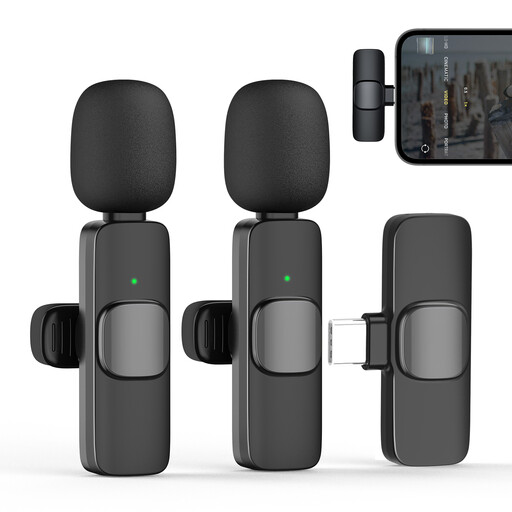
Moman CP1X(C) wireless lavalier microphone for USB-C, 2.4GHz, 1TX and 1RX

Moman CP1X(C) wireless lavalier microphone for USB-C, 2.4GHz (1TX&1RX)

For one speaker who needs to move around, the transmitter-and-receiver setup is a wireless alternative; check that the USB-C receiver works with your device.

The product description lists one transmitter and one receiver, an omnidirectional microphone capsule and a windscreen.

View at Joybuy

Moman MS1X(C) wireless lavalier microphone for USB-C Android phones, 2TX and 1RX

Moman MS1X(C) wireless lavalier microphone for USB-C Android phones (2TX&1RX)

The two-transmitter version is worth considering if you need to mic up two people; the product name indicates that it’s designed for USB-C Android phones.

The product description lists two transmitters, one receiver, an omnidirectional microphone capsule and a pop filter to reduce wind noise.

View at Joybuy
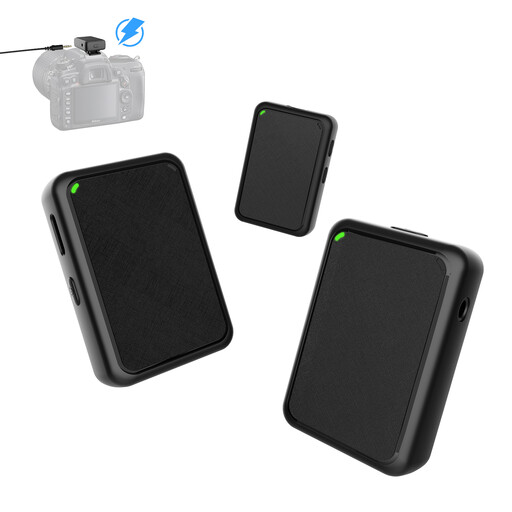
Moman MB1X(M) wireless lavalier microphone for camera, 2TX and 1RX

Moman MB1X(M) wireless lavalier microphone for camera (2TX&1RX)

The two-transmitter setup is designed for recording two people wearing microphones; check that the receiver connects to your camera.

The product description lists two transmitters, one receiver and a 3.5 mm cable for the camera. It also lists furry windscreens for both transmitters and a noise-reduction setting for quiet environments.

View at Joybuy
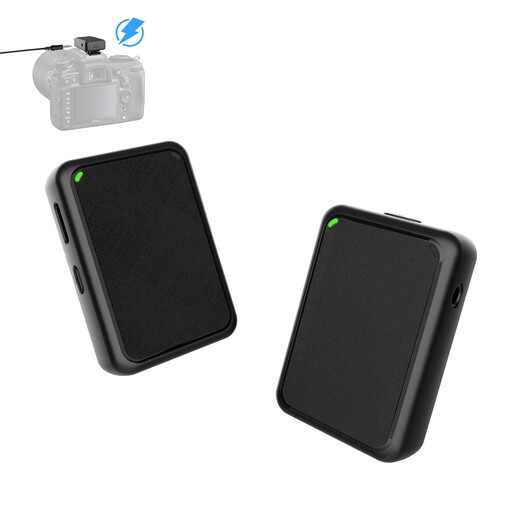
Moman MB1(M) wireless lavalier microphone for camera, 1TX and 1RX

Moman MB1(M) wireless lavalier microphone for camera (1TX&1RX)

The one-transmitter version is designed for a single person wearing a microphone; check your camera’s receiver connection.

The product description lists one transmitter, one receiver and a 3.5 mm cable for the camera. It also lists a furry windscreen and a noise-reduction setting for quiet environments.

View at Joybuy

Frequently asked questions

How should I attach and test the microphone before recording?

Attach it close to your mouth on the clothes you’ll actually be wearing, then listen back to a softly spoken test sentence. RØDE explains that positioning the mic close can help improve the balance between your voice and background noise; the exact position should suit your clothes and voice.

Is the included foam windscreen enough for a windy village location?

There’s no one-size-fits-all answer. Wind can affect a recording by causing rumbling noise, so check which protection is suitable for your model and listen to a test recording at the location. RØDE explicitly lists a mini furry windscreen with the Lavalier II.

Can I simply record other people’s conversations for an audio guide?

Unauthorised recording of another person’s non-public spoken words is covered by Section 201(1) of the German Criminal Code (StGB). Discuss the recording with everyone involved beforehand; recordings that include personal data must also have a legal basis for processing under data protection law. Whether a specific publication is permitted depends on the individual circumstances.

Can I use any wireless microphone in Germany without checking anything else?

You can’t determine that from the term ‘wireless microphone’ alone. The Federal Network Agency publishes general frequency allocations for specific applications and frequency bands; check the details of the particular system against the conditions currently in force.

What should I check about connections and accessories before buying?

Check that the microphone input, plug wiring, required power supply and any necessary adapters are compatible with your recording device. Also check whether the windscreen you need is included and, for a wireless system, whether it has enough transmitters. A quick test using the complete recording setup will show whether the microphone is recognised.