Narrators recording in a fixed location
If you’re recording audio guide scripts quietly and can control the distance, microphone direction and room before each take, you can position the microphone to suit your voice.


For quiet audio guide scripts recorded in a fixed location, a suitably positioned microphone close to the speaker is a good choice. Listen to a short test recording through headphones. If you record in different locations or also want to capture the atmosphere of a place, a portable recorder may be worth considering – but wind and background noise remain important factors. Also make sure the connections, recording device and items included are right for your set-up.
If you’re recording audio guide scripts quietly and can control the distance, microphone direction and room before each take, you can position the microphone to suit your voice.
If you can hear echo or background noise, listen to a test recording made in the room you’ll actually be using. A directional microphone won’t automatically eliminate the sound of the room.
If you want to record voices or the atmosphere of a place while you’re out and about, a portable recording device is one option. For outdoor recordings, remember to factor in wind and ambient sound.
A good fit if: you can record a quiet, solo voice from a short, consistent distance.
Bear in mind: You’ll need to keep to the same speaking position; a cardioid pickup pattern won’t remove echo or all background noise.
A good fit if: you’re recording at a quiet, fixed location, directly to a computer or a compatible device.
Bear in mind: The further away you are, the more room sound and background noise may stand out in the recording.
A good fit if: you’re recording speakers in different locations or want to include the atmosphere of a place in your audio guide.
Bear in mind: Built-in microphones also pick up ambient sound; outdoors, you may need a windscreen and careful positioning.
| Criterion | What to look for when buying | Who is this particularly important to? |
|---|---|---|
| Clarity of quiet voices | Check whether you can position the microphone close to you and at a suitable angle, then listen to a test recording made using your usual quiet speaking voice. | If I’m recording narration calmly and quietly, I want to find a suitable position and check the recording beforehand. Around 36% of consumers put voice clarity first. |
| Echo and background noise | Listen for echo and unwanted noise in the room you plan to use. Also check that the microphone’s main pickup side faces your voice. | In an echoey room, I want to know whether my voice will still be clear against the surroundings. Around 29% of consumers prioritise keeping room sound to a minimum. |
| Recording on the move | Check whether the device can record on its own and what power, storage and monitoring options you’ll need. If it’s windy, make sure the right wind protection is compatible with the device. | If I’m recording in different places, I need a portable solution and have to plan for wind and ambient sound. Around 21% of consumers prioritise recording in different locations. |
| Connections and monitoring | Check the USB or XLR connection and compatibility with your recording device. Confirm that it supports headphone monitoring and check what’s included with the specific version. | If I want to record without extra steps and monitor the sound before longer passages, I check the connections, accessories and headphone socket. Around 14% of consumers prioritise straightforward set-up and monitoring. |
When you’re far from the microphone, your voice can sound more distant and echoey, while background noise becomes more noticeable.
First, plan a microphone position you can comfortably maintain and test the quietest way you expect to speak. Otherwise, you may need to spend extra time recording sections again.
Directional microphones pick up sound differently from certain directions, but they don’t eliminate all room sound. A manufacturer’s claims about processing features don’t prove how they’ll perform with your voice in your room.
Listen to a test recording made in the actual recording location and assess the conditions for yourself, rather than relying on a feature name alone.
Wind and ambient sound can make quiet speech harder to hear. Missing a suitable windscreen or failing to check a connection can also make your planned set-up more difficult.
Check that the windscreen, power supply, storage and monitoring options are suitable for the specific device and recording location.
Depending on the device, outdoor recording may require a suitable windscreen, cables or other recording accessories.
Audio-Technica describes the ATR2100x-USB as a dynamic USB/XLR handheld microphone suitable for uses including voiceover and outdoor recording.
The NT-USB Mini is a compact USB condenser microphone for recordings at a desk, where you can position it as needed.
According to Shure, the MV7+ offers USB-C and XLR connections, as well as app settings for a fixed speaking position.
The H1essential is a standalone handheld recorder for recording in different locations and capturing the atmosphere of a place.
The Profile USB Microphone is a USB-C option for voiceover recording in a fixed location.
This selection includes microphones for fixed USB or USB/XLR speaking positions, as well as devices for mobile and wireless voice recording. Check that the connections, accessories and recording location suit your needs.
 No image available
For quiet scripts recorded in a fixed location, where you can position the microphone close to you and keep it in the same place. Features listed include a cardioid pickup pattern, USB/XLR, headphone monitoring and an adjustable arm; the recommended distance is 2–6 Zoll. An XLR cable isn’t included, and according to the description, the microphone buttons only work in USB mode.
 No image available
For a close, solo voice in a fixed recording position, with the option to monitor your sound while recording via USB. The description lists a unidirectional pickup pattern, USB/XLR, a headphone socket and a recommended distance of 2–6 Zoll. The XLR cable and microphone arm aren’t included.
 No image available
For wireless voice recording on the move, if two transmitters and one receiver suit your set-up. The product description lists clip or magnetic attachment, device compatibility details, a charging case, adaptive gain control and internal 32-bit float recording. Before buying, check that the listed connections are compatible with your recording device.
 No image available
For voice recording on a computer, with a fixed desk or boom-arm position and direct monitoring. Features listed include USB, a cardioid pickup pattern, headphone monitoring, a microphone arm, desk stand, pop filter and USB cable; the product name also mentions a Type-C adapter.
 No image available
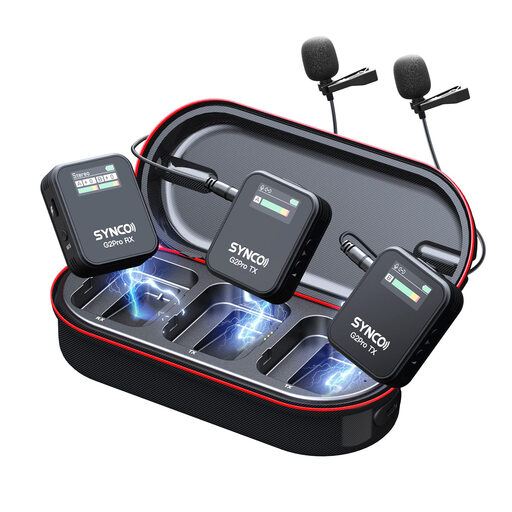
For mobile voice recording with lavalier microphones, if the listed recording modes suit your needs. The description lists stereo, mono and safety channel modes, as well as real-time monitoring and separate volume control on the receiver. Check which connections you’ll need for your recording device.
Record a short passage in the location you plan to use, speaking at the intended volume, then listen to it through headphones. Check the distance, microphone direction, echo, background noise and plosive sounds. A microphone that’s too far away can make your voice sound more distant and the room sound more noticeable.
No. For the USB recording option on the ATR2100x-USB, Audio-Technica describes digital recording to a computer or another compatible device. For the analogue XLR connection, however, you’ll need a suitable microphone input. Before buying, check which connection you actually intend to use.
Compare what’s included with the specific version against your set-up, and check whether you’ll need a stand, compatible cables, headphones or a windscreen for outdoor recording. Zoom sells a compatible furry windscreen for the H1essential as an accessory.
Under § 201 StGB, recording another person’s non-public speech without authorisation is a criminal offence. If identifiable people are recorded or their voices are processed, you must also establish which data protection legal basis applies. Informed consent is one possible legal basis, but it isn’t automatically the only one. Discuss the recording and planned publication with everyone involved beforehand.