What should you look for when buying?
First, count the people who’ll be speaking at the same time and the number of headphone connections you need. Then decide whether you want to record on a computer, without one, or with sound effects played in directly.
| What you need |
What to check |
Who will find this most important? |
| Record several voices separately |
Count the microphone inputs you’ll use at the same time and check that your recording software can capture separate tracks. |
I want to record several roles individually at the same time so I can edit each one separately. For around 31% of consumers, recording multiple voices on separate tracks is the top priority. |
| Individual monitoring at the table |
Check the number of headphone sockets, individual level controls and compatible plugs. |
If everyone needs to monitor at the same time, I need enough individual headphone connections. For around 25% of consumers, individual monitoring comes first. |
| Record without a permanently set-up computer |
Check for standalone recording, storage media, power supply and the number of tracks available via USB. |
If I often change workspaces, recording without a dedicated production computer on hand can be useful. For around 19% of consumers, being able to record anywhere is the main priority. |
| Compact setup for two voices |
Check whether two suitable microphone inputs will be enough and how many people need to connect headphones at the same time. |
For up to two roles speaking at once, I want a straightforward setup rather than extra inputs I won’t use. For around 13% of consumers, keeping things simple for two people matters most. |
| Add sound effects and other audio |
Check for sound pads and playback options; if you’re using music or sound effects from elsewhere, make sure you have the necessary rights. |
If I want to add sound effects or play in other voices while recording, I need a setup that supports this workflow. For around 12% of consumers, this is the main priority. |
Related products from Joybuy
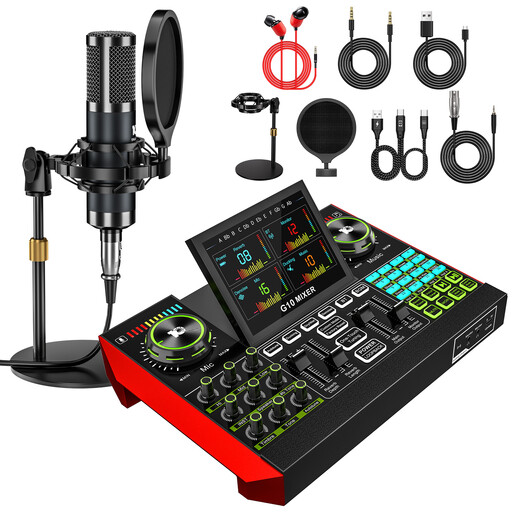
The products below are podcast kits with an audio mixer and 3.5 mm condenser microphones. If you’re recording audio drama with several roles speaking at the same time, check before buying that the connections support separate recordings for the number of voices you need.
 No image available
Yinkaer G10-P17-P17 podcast kit with two microphones
Could suit a voice recording setup with the two supplied microphones. Before recording several voices, check how many inputs can be used at the same time and whether they can be recorded on separate tracks.
The product description lists two 3.5 mm condenser microphones and an audio mixer. It also mentions 16 sound effects, five reverb modes and a built-in battery.
Joybuy
 No image available
Yinkaer G10-P17 podcast microphone kit
A possible option for a voice or podcast setup with the supplied microphone. Check that the connections suit the number of voices you want to record at the same time.
The product description lists an audio mixer, a 3.5 mm condenser microphone, 16 sound effects and five reverb modes.
Joybuy
 No image available
Yinkaer G10-P15 podcast microphone kit
Could suit a voice recording setup with the supplied microphone. If several roles need to speak at the same time, check in advance how many inputs can be used and whether separate recording is supported.
The product description lists a 3.5 mm condenser microphone, an audio mixer and 16 built-in sound effects.
Joybuy
Frequently asked questions
Do four inputs automatically mean four speakers can each use their own headphones?
No. According to Steinberg, the UR44C has four microphone preamps but two headphone outputs. Zoom Europe lists four microphone and four headphone connections for the PodTrak P4next, and Tascam lists the same for the Mixcast 4.
How do I connect microphones and headphones to a Scarlett 2i2 4th Gen?
Focusrite recommends XLR cables for microphones and 48 V phantom power if your microphone needs it. The headphone output uses a 6.35 mm TRS plug; if your headphones have a smaller plug, you’ll need a suitable adaptor.
What else do I need for a mobile recording with several people?
Check which microphones, XLR cables, headphones and storage media you already have. Zoom Europe lists microSD recording for the PodTrak P4next, as well as operation with two AA batteries or a suitable USB power supply. To connect Bluetooth guests, you’ll need the BTA-2 adaptor, sold separately.
Can you record any conversation you can hear at a shared desk?
No, not as a blanket rule: section 201 of the German Criminal Code makes it a criminal offence to record another person’s words spoken in private without authorisation. Before recording, make sure you don’t capture people who aren’t involved without their permission. For telephone conversations, the German Data Protection Conference generally advises obtaining valid consent in advance before making a recording.
Can I use someone else’s music or ready-made sound effects in an audio drama I publish?
Not simply because your device can play the files through sound pads. Copyright law governs the use and making available to the public of protected works. Before publishing, check that you have the rights or relevant permission for your intended use. Whether a particular clip can be used freely depends on its licence.


