If you’re only editing existing voice recordings, your current headphone output may be all you need; an audio interface isn’t essential for this. If you’re recording with an XLR microphone, the main considerations are how many microphone inputs you need to use at once, and whether the headphone and level controls are easy to reach. Direct monitoring is useful when recording vocals, but it isn’t a key selling point for editing alone.
Who might need an audio interface for voice editing?
Editing voice recordings at a shared desk
If you mainly edit existing voice-overs, convenient headphone playback and keeping extra equipment to a minimum at a shared desk are what matter. Bonedo describes audio interfaces as devices that prepare microphone signals for recording on a computer.
Solo speaker with an XLR microphone
If you record your own voice-overs, you’ll need a suitable microphone input, level control and the ability to monitor your audio while recording. Focusrite lists an XLR microphone input and a headphone control for the Scarlett Solo 4th Gen.
Recording with two people
To record two voices at the same time, you’ll need two suitable microphone inputs. Audient lists two microphone preamps for the EVO 4, while MOTU lists two XLR/TRS combo inputs for the M2.
What should you look for when buying?
First, decide whether you’ll only be editing or recording as well. Microphone type and the number of inputs you need to use at once only become key considerations when you’re making your own recordings.
| Consideration |
What to check before buying |
Who should consider this? |
| Headphone playback |
Check whether your existing headphone output is good enough. If you’re choosing an interface, consider the headphone socket and how easy it is to reach the volume control; separate controls for headphones and the main output can be useful. |
If I’m only editing existing voice-overs, I want to work reliably with headphones at a shared desk without having to set up unnecessary extra equipment. That’s why around 33% of consumers prioritise headphone playback and the option to do without an interface. |
| Recording one voice |
Make sure the microphone type matches the connection, and check whether you need 48 V phantom power and how you can control input levels and monitoring. |
If I record my own voice-overs with a microphone, I need a suitable input and want to monitor my voice as I record. Around 27% of consumers prioritise features for solo recording. |
| Switching between computers |
For each computer you use, check the connection, cable and published operating system and driver requirements for the specific model. |
If I switch between computers at a shared desk, I want to be able to connect and use the interface reliably with each one. That’s why around 20% of consumers prioritise computer compatibility and accessible controls. |
| Recording two voices |
Look for two microphone inputs that can be used at the same time, with individual level controls. Consider headphone monitoring separately: two inputs don’t automatically mean two headphone sockets. |
If we’re recording separate voices as a pair, we need suitable inputs for both microphones and a practical monitoring solution. Around 20% of consumers prioritise recording two microphones at the same time. |
Common mistakes when buying an audio interface
-
Automatically buying an interface just for editing
If you’re only editing existing files, you may not use the recording inputs at all. First, try your existing headphone setup and think about which extra features you actually need.
An extra device takes up space at a shared desk and means more cables.
-
Assuming two inputs means two XLR microphone inputs
The total number of inputs doesn’t automatically tell you how many microphones you can connect at the same time. According to PreSonus, the AudioBox GO has one microphone/line input and a separate instrument input; according to Focusrite, the Scarlett Solo 4th Gen has one XLR microphone input. Count the inputs explicitly listed as microphone inputs. If you’re recording with two people, you may need a different interface later.
-
Using direct monitoring and software monitoring at the same time
If you can hear both the direct input signal and the software playback of the same recording track, you may hear an echo while recording. For the MiniFuse 2, Arturia recommends muting software monitoring for the track in question during recording in this situation. Check the routing on your device and in your software.
-
Assuming a USB-C plug guarantees compatibility
A matching plug alone doesn’t prove that the device will work with your operating system and software. MOTU lists model-specific system requirements for the M2; Arturia notes that some unpowered USB hubs may not supply enough power for the MiniFuse 2.
Check each computer you plan to use, the cable you need and the requirements for the specific model. Depending on your setup, you may need a different cable, a suitable hub or another device.
Brands and relevant audio interface models
Focusrite
The Scarlett Solo 4th Gen is designed around one XLR microphone input, while Focusrite says the Vocaster One is aimed more at solo podcast recording.
- Focusrite lists separate controls for the headphone and main outputs on the Scarlett Solo 4th Gen.
- The Scarlett Solo 4th Gen has one XLR microphone input. According to Focusrite, the Vocaster One also has one microphone input; Auto Gain, Mute and Loopback are features listed by the manufacturer.
Audient
The EVO 4 is worth considering if you need two microphone inputs and want automatic level setting.
- Audient lists two microphone preamps, Smartgain, a headphone output, Monitor Mix and Loopback for the EVO 4.
- Smartgain is a device feature; it doesn’t mean that recording quality has been independently verified.
Arturia
The MiniFuse 2 has two inputs and a monitoring mix control for balancing the input signal with computer playback.
- Arturia also lists a dedicated headphone level control and a headphone socket.
- Arturia notes that some unpowered USB hubs may not supply enough power to the MiniFuse 2.
MOTU
The M2 has two individually controlled microphone inputs and level meters on the device.
- MOTU lists two XLR/TRS combo sockets, along with individual gain controls and monitor switches for the inputs.
- Check the operating system requirements published by MOTU for each computer you plan to use.
PreSonus
The AudioBox GO combines a microphone/line input with a separate instrument input.
- According to PreSonus, the Mix control lets you monitor the hardware input signal alongside computer playback.
- The instrument input isn’t a second dedicated XLR microphone input. The software access mentioned on the product page is time-limited.
Related products at Joybuy
The products below range from podcast kits with condenser microphones to a device described as a phono preamp. Before buying, check that the connections and monitoring options suit your existing setup.
 No image available
Douk Audio T4 PRO Mini Valve phono preamp
As an MM phono and headphone amplifier, this model is only relevant if those features suit your existing setup. For XLR voice recording, check that it has the microphone input you need.
The product title mentions a GE5654 valve preamp and a desktop headphone amplifier.
Joybuy
 No image available
Yinkaer G10-P17-P17 podcast kit with two microphones
This set may be useful for making additional podcast recordings. If you want to record two voices separately, check that the mixer supports this workflow.
The listing mentions two 3.5 mm condenser microphones, a mixer, a sound card and effects. If you’re only editing existing files, the microphones and stands are extra equipment you won’t need.
Joybuy
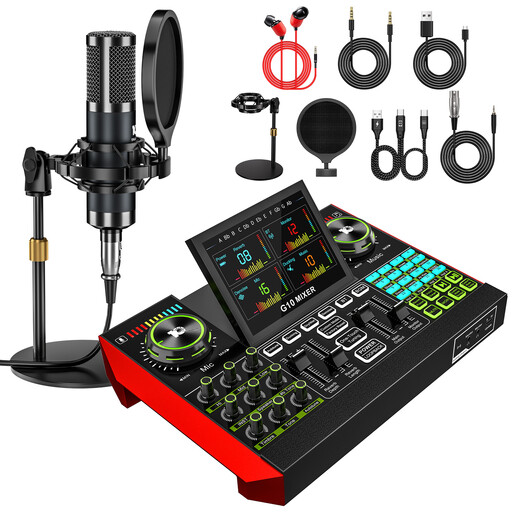 No image available
Yinkaer G10-P15 podcast microphone kit
This kit is designed for making additional voice recordings; you won’t need the microphone or boom arm stand to edit voice-overs you’ve already recorded.
The product title mentions a 3.5 mm condenser microphone, an audio mixer, a sound card and a boom arm stand.
Joybuy
Frequently asked questions about audio interfaces for voice editing
Do I need an audio interface to edit existing voice recordings?
Not just for editing. If you’re only working with existing files, first check whether your current headphone setup is good enough. An interface can provide the right input for an XLR microphone.
Why can I hear an echo when recording?
If direct monitoring and software monitoring of the same recording track are both audible, you may hear your voice twice. For the MiniFuse 2, Arturia recommends muting software monitoring for the track in question during recording in this situation. Check the routing on your device and in your software.
What should I check when connecting to another computer?
For each computer, check the connection, cable and published operating system and driver requirements for the exact model. Arturia also notes that some unpowered USB hubs may not supply enough power for the MiniFuse 2.
Are two audio inputs enough for two XLR microphones?
Not necessarily: both inputs must be suitable for the microphones you need and usable at the same time. According to PreSonus, the AudioBox GO has one microphone/line input and a separate instrument input, so two inputs don’t mean it has two XLR microphone inputs.


